

Overview
In this article, we will see optional URL parameters in AngularJS, with an example. We will be using the same example demo application where we had displayed the list of students. In that, we had displayed the list of students from the database with the help of web services.
For more articles on AngularJS refer these links,
- Overview Of AngularJS
- Modules And Controller In AngularJS
- Controllers in AngularJS
- AngularJS ng src Directive
- AngularJS ng-Repeat Directive
- Handling Events In AngularJS
- How To Use Two-Way Data Binding In AngularJS
- Filters In AngularJS
- Sorting Data In AngularJS
- Sorting Rows By Table Header In AngularJS
- Creating Custom Filters In AngularJS
- ng-Hide And ng-Show In AngularJS
- ng-init Directive In AngularJS
- Search And MultiSearch In AngularJS
- ngInclude Directive In AngularJS
- $http Service In AngularJS
- Consuming ASP.NET WebService In AngularJS
- AnchorScroll Service In AngularJS
- AngularJS Page Refresh Problems
- RouteParams In AngularJS
- Angular AnchorScroll With Database Part
- AngularJS Routing Using WebService
- AngularJS Controller As Syntax
- AngularJS Nested Scopes And Controllers As Syntax
- AngularJS CaseSensitive And Inline Templates
At the moment, we are in studentController displaying the list of students.
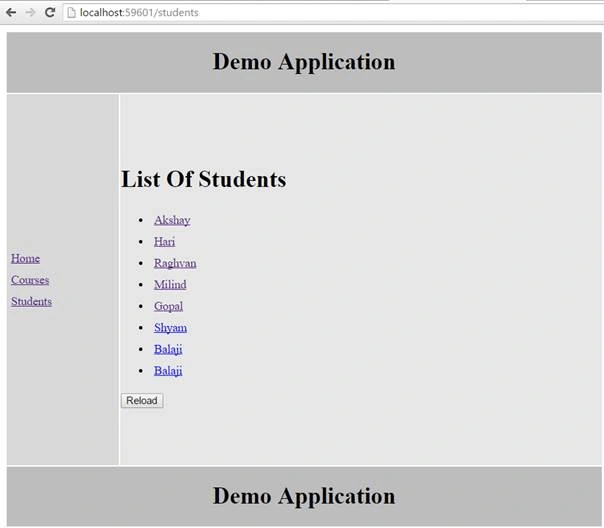
I want to include a search criteria to display the names of the students and their respective details. So, we will modify our code in web services.
We will add another web method which will search the students by name .
So, here is the change.
- [WebMethod]
- public void GetStudentsByName(string name)
- {
- List<Student> listStudents = new List<Student>();
- string cs = ConfigurationManager.ConnectionStrings["Test"].ConnectionString;
- using (SqlConnection con = new SqlConnection(cs))
- {
- SqlCommand cmd = new SqlCommand("select * from students where name like @name", con);
- SqlParameter param = new SqlParameter()
- {
- ParameterName="@name",
- Value=name + "%"
- };
- cmd.Parameters.Add(param);
- con.Open();
- SqlDataReader sdr = cmd.ExecuteReader();
- while (sdr.Read())
- {
- Student student = new Student();
- student.id = Convert.ToInt32(sdr["id"]);
- student.name = sdr["Name"].ToString();
- student.gender = sdr["gender"].ToString();
- student.city = sdr["city"].ToString();
- listStudents.Add(student);
- }
- }
- JavaScriptSerializer js = new JavaScriptSerializer();
- Context.Response.Write(js.Serialize(listStudents));
- }
Let’s save those changes and check our web service.
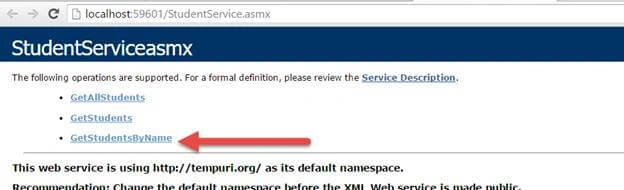
Click on GetStudentsByName and type any name there.
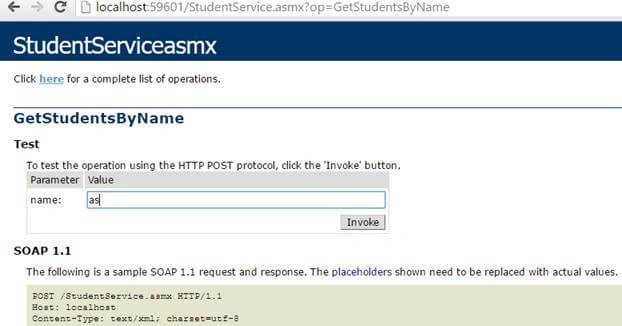
It should display the details i.e. list of students.

So, our web service is working properly here. This was our first change. Now, the next change is our Controller. We want that Controller to search by name. This is our studentsController.
- .controller("studentsController", function ($http, $route) {
- var vm = this;
- vm.reloadData = function () {
- $route.reload();
- }
- $http.get("StudentService.asmx/GetAllStudents")
- .then(function (response) {
- vm.students = response.data;
- })
- })
- .controller("studentsController", function ($http, $route,$location) {
- vm.searchStudents = function () {
- if (vm.name) {
- $location.url("/studentsSearch/" + vm.name);
- }
- else {
- $location.url("/studentsSearch/" );
- }
- }
Now, our final studentsController code is.
- .controller("studentsController", function ($http, $route,$location) {
- vm.searchStudents = function () {
- if (vm.name) {
- $location.url("/studentsSearch/" + vm.name);
- }
- else {
- $location.url("/studentsSearch/" );
- }
- }
- var vm = this;
- vm.reloadData = function () {
- $route.reload();
- }
- $http.get("StudentService.asmx/GetAllStudents")
- .then(function (response) {
- vm.students = response.data;
- })
- })
Name : <input tye="text" ng-model="name" />
The model for this will be same as the name of the student. Since we are using Controller as syntax, let's prefix that.
Name : <input tye="text" ng-model="studentsCtrl.name" />
Now, let’s add a button to this.
- <button ng-click="studentsCtrl.searchStudents">SearchBy</button>
- .controller("studentsSearchController", function ($http, $routeParams) {
- var vm = this;
- if ($routeParams.name) {
- $http({
- url: "StudentService.asmx/GetStudentsByName",
- params: { name: $routeParams.name },
- })
- .then(function (response) {
- vm.students = response.data;
- })
- }
- else {
- $http.get("StudentService.asmx/GetAllStudents")
- .then(function (response) {
- vm.students = response.data;
- })
- }
- });
The next step is to add route in our Controller. So, copy paste the code.
- .when("/studentsSearch/:name?", {
- templateUrl: "Templates/studentsSearch.html",
- controller: "studentsSearchController as studentsSearchCtrl"
- })
controller: "studentsSearchController as studentsSearchCtrl"
So, our final Controller code is.
- /// <reference path="angular.min.js" />
- /// <reference path="angular-route.min.js" />
- var app = angular.module("Demo", ["ngRoute"])
- .config(function ($routeProvider, $locationProvider) {
- $routeProvider.caseInsensitiveMatch = true;
- $routeProvider
- .when("/home", {
- template: "<h1>Hello There !!</h1>",
- controller: "homeController as homeCtrl"
- })
- .when("/courses", {
- templateUrl: "Templates/courses.html",
- controller: "coursesController as coursesCtrl",
- })
- .when("/students", {
- templateUrl: "Templates/students.html",
- controller: "studentsController as studentsCtrl"
- })
- .when("/students/:id", {
- templateUrl: "Templates/StudentDetail.html",
- controller: "StudentDetailController as StudentDetailCtrl"
- })
- .when("/studentsSearch/:name?", {
- templateUrl: "Templates/studentsSearch.html",
- controller: "studentsSearchController as studentsSearchCtrl"
- })
- .otherwise({
- redirectTo: "/home"
- })
- $locationProvider.html5Mode(true);
- })
- .controller("homeController", function () {
- this.message = "Home Page";
- })
- .controller("coursesController", function () {
- this.courses = ["c#", "SQL", "Oracle"];
- })
- .controller("studentsController", function ($http, $route,$location) {
- var vm = this;
- vm.searchStudents = function () {
- if (vm.name) {
- $location.url("/studentsSearch/" + vm.name);
- }
- else {
- $location.url("/studentsSearch/" );
- }
- }
- vm.reloadData = function () {
- $route.reload();
- }
- $http.get("StudentService.asmx/GetAllStudents")
- .then(function (response) {
- vm.students = response.data;
- })
- })
- .controller("StudentDetailController", function ( $http, $routeParams) {
- var vm = this;
- $http({
- url: "StudentService.asmx/GetStudents",
- params: { id: $routeParams.id },
- method:"get"
- })
- .then(function (response) {
- vm.student = response.data;
- })
- })
- .controller("studentsSearchController", function ($http, $routeParams) {
- var vm = this;
- if ($routeParams.name) {
- $http({
- url: "StudentService.asmx/GetStudentsByName",
- params: { name: $routeParams.name },
- })
- .then(function (response) {
- vm.students = response.data;
- })
- }
- else {
- $http.get("StudentService.asmx/GetAllStudents")
- .then(function (response) {
- vm.students = response.data;
- })
- }
- });
- <h1>Students Details</h1>
- <table border="1" style="border-collapse:collapse">
- <thead>
- <tr>
- <th>
- Id
- </th>
- <th>
- Name
- </th>
- <th>
- Gender
- </th>
- <th>
- City
- </th>
- </tr>
- </thead>
- <tr ng-repeat="student in studentsSearchCtrl.students">
- <td>{{student.id}}</td>
- <td>{{student.name}}</td>
- <td>{{student.gender}}</td>
- <td>{{student.city}}</td>
- </tr>
- </table>
Save the Changes and reload the page. You will see the following:
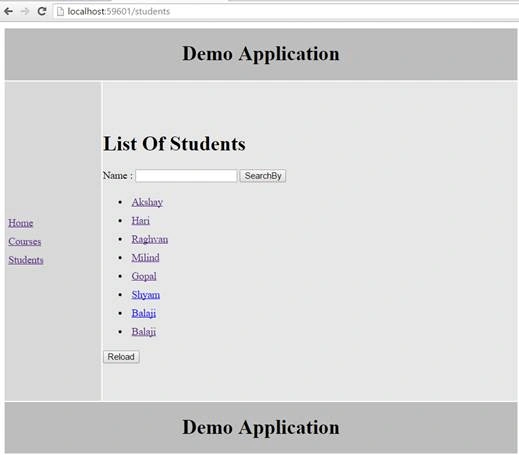
Just type any record there and see the output.
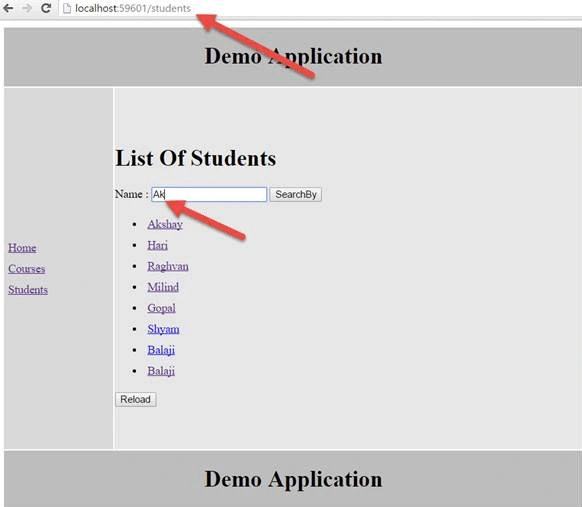
When you click on search, you will see this output.
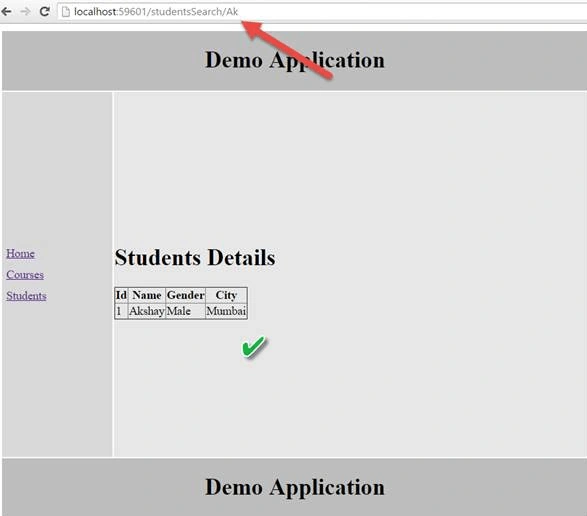
Notice the URL the search which I had typed had appeared in the URL and our partial template has loaded properly with respective details.
Now, let’s click on search button and see what output we do get.
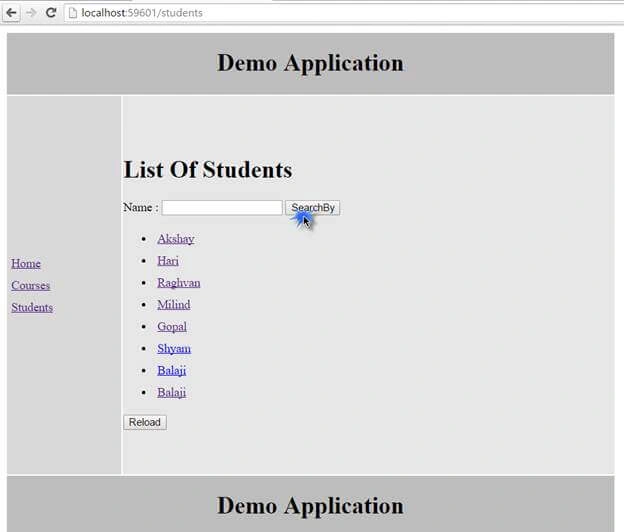
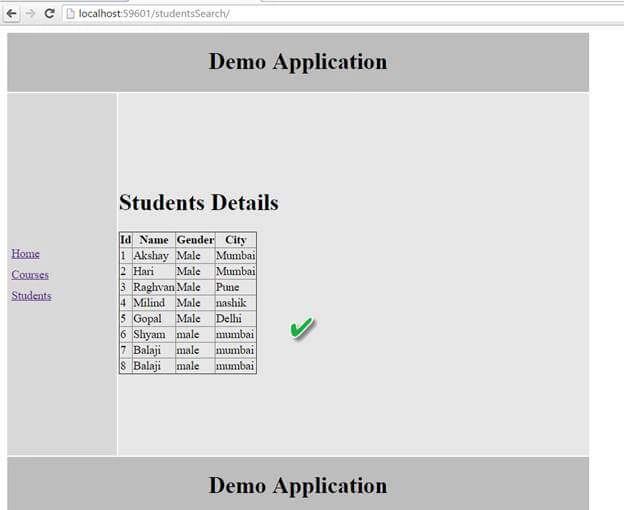
We have got all the details of all students, that means if we don’t enter any name and click on search button, details of all the students are displayed. This means, in our Controller, we have mentioned else condition to display all the details of the students. So, this condition also gets satisfied.
Conclusion
This was all about optional URL Parameters in AngularJS. Hope this article was helpful!!
Comments
Join the conversation! Your thoughts help the community grow.