

Introduction
- Application Level State Management is used to maintain the state of all the users accessing the webforms present within the website.
- The value assigned for an application is considered an object.
- Application object will not have any default expiration period.
- Whenever the webserver has been restarted or stopped then the information maintained by the application object will be lost.
- If any data is stored on the application object then that information will be shared upon all the users accessing the webserver.
- Since the information is shared among all the users, it is advisable to lock and unlock the application object as per requirement.
Global Application Class(Global.asax)
It is a Class that consists of event handlers which executes the code implicitly whenever a relevant task has been performed on the web server.
A Sample Program on Application Level State Management.
Design

Design the form as shown above with two textboxes and one button.
Right-click on the application in Solution Explorer -> Add new item-> select the 'GlobalApplicationClass' file and write the following code in it.
Global.asax code
<%@ Application Language="C#" %>

<script runat="server">

    void Application_Start(object sender, EventArgs e)
    {
        // Code that runs on application startup
        Application.Lock();
        Application["tusers"] = 0;
        Application["ousers"] = 0;
        Application.UnLock();
    }

    void Application_End(object sender, EventArgs e)
    {
        // Code that runs on application shutdown

    }

    void Application_Error(object sender, EventArgs e)
    {
        // Code that runs when an unhandled error occurs
    }

    void Session_Start(object sender, EventArgs e)
    {
        // Code that runs when a new session is started
        int tusers, ousers;
        Application.Lock();
        tusers = int.Parse(Application["tusers"].ToString()) + 1;
        ousers = int.Parse(Application["ousers"].ToString()) + 1;
        Application["tusers"] = tusers;
        Application["ousers"] = ousers;
        Application.UnLock();
    }

    void Session_End(object sender, EventArgs e)
    {
        // Code that runs when a session ends.
        // Note: The Session_End event is raised only when the sessionstate mode
        // is set to InProc in the Web.config file. If session mode is set to StateServer
        // or SQLServer, the event is not raised.
        int ousers;
        Application.Lock();
        ousers = int.Parse(Application["ousers"].ToString()) - 1;
        Application["ousers"] = ousers;
        Application.UnLock();
    }

</script>
Code
using System;

public partial class _Default : System.Web.UI.Page
{
    protected void Page_Load(object sender, EventArgs e)
    {
        string tusers, ousers;
        Application.Lock();
        tusers = Application["tusers"].ToString();
        ousers = Application["ousers"].ToString();
        Application.UnLock();
        TextBox1.Text = tusers;
        TextBox2.Text = ousers;
    }

    protected void BtnLogOut_Click(object sender, EventArgs e)
    {
        Session.Abandon();
    }
}
Output
Execute the application, copy the URL, and open the same URL in other browsers. The result will be as shown below.
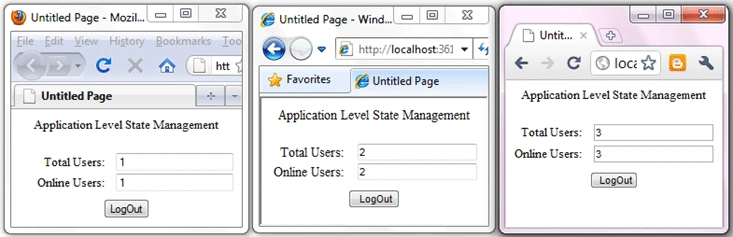
Now, log out close one browser, and refresh the remaining browsers. The result will be as shown below.

Now, log out close another browser, and refresh the remaining browser. The result will be as shown below.

Observation
We can observe that the state of all the users accessing the website i.e., Total Users and Online Users is maintained by this application.
raj jaiswalPosted Mar 17, 2016, 8:25 AM
nice
vinay kumarPosted Jan 27, 2016, 8:07 AM
Nice artical sir
surender bhyanPosted Jun 20, 2011, 1:36 PM
Very helpful:-) Thums up sir:-)
vishal shrivastavPosted Jan 20, 2011, 6:41 AM
thanx prashanth for this useful tutorial