

Introduction
In this article I will tell you how to do sorting using AngularJS.
Angular provides the feature named orderBy that can be used to sort the given data. Here I will create an application where sorting will be applied on multiple columns.
Step 1
First of all you need to add an external Angular.js file to your application, in other words "angular.min.js".
For this you can go to the AngularJS official site or download my source code and then fetch it or you can click on this link and download it: ANGULARJS.
After downloading the external file now you need to add this file to the Head section of your application.
<head runat="server">
<title></title>
<script src="angular.min.js"></script>
</head>
Step 2
Now after adding the external JS file the first thing you need to do is to add ng-app in the <HTML> Tag otherwise your application will not run.
<html ng-app xmlns="http://www.w3.org/1999/xhtml">
Now I will create a simple application that will help you understand this filter.
First I will create a JavaScript function in which some initial values will be passed.
<script>
function x($scope) {
$scope.cars =
[{ name: 'Alto 800', price: '3.5 Lakh', version: 'Manual' },
{ name: 'Eon', price: '4.2 Lakh', version: 'Manual' },
{ name: 'i20', price: '7 Lakh', version: 'Automattic' },
{ name: 'Honda City', price: '11 Lakh', version: 'Automattic' },
{ name: 'i10', price: '5 Lakh', version: 'Manual' }]
$scope.sorting = '-version';
}
</script>
Here I have created an Array of some data, three columns are created in which multiple names, prices and versions of car are defined.
Then reverse sorting is applied on the version of car, this is the initial sorting, later in this article I will show you how to apply sorting on all the columns.
Step 3
Our work on the View is completed and now I will work on the View Model of this application.
<body>
<div ng-app>
<div ng-controller="x">
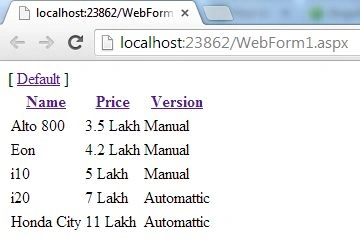
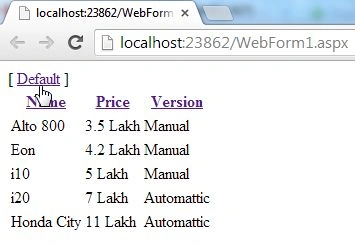
[ <a href="" ng-click="sorting=''">Default</a> ]
<table class="car">
<tr>
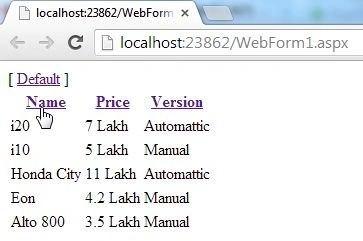
<th><a href="" ng-click="sorting = 'name'; reverse=!reverse">Name</a>
<th><a href="" ng-click="sorting = 'price'; reverse=!reverse">Price</a></th>
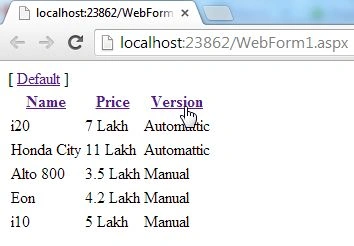
<th><a href="" ng-click="sorting = 'version'; reverse=!reverse">Version</a></th>
</tr>
<tr ng-repeat="car in cars | orderBy:sorting:reverse">
<td>{{car.name}}</td>
<td>{{car.price}}</td>
<td>{{car.version}}</td>
</tr>
</table>
</div>
</div>
</body>
Join the conversation! Your thoughts help the community grow.