
Problem
How to dynamically write HTML using Tag Helper Components in ASP.NET Core 2.0.
Solution
Create an empty project and add a Controller.
- public class HomeController : Controller
- {
- public IActionResult Index()
- {
- return View();
- }
- }
Add a View.
- <!DOCTYPE html>
- <html>
- <head>
- <meta name="viewport" content="width=device-width" />
- <title>ASP.NET Core 2.0 TagHelperComponent</title>
- </head>
- <body>
- </body>
- </html>
Add a Tag Helper Component.
- public class MetaTagHelperComponent : TagHelperComponent
- {
- public override int Order => 1;
- public override void Process(TagHelperContext context, TagHelperOutput output)
- {
- if (string.Equals(context.TagName, "head",
- StringComparison.OrdinalIgnoreCase))
- {
- output.PostContent.AppendHtml(
- $"<meta name=\"description\" content=\"This is a post on
- TagHelperComponent\" /> \r\n");
- output.PostContent.AppendHtml(
- $"<meta name=\"keywords\" content=\"asp.net core, mvc, tag
- helpers\" /> \r\n");
- }
- }
- }
Update the Startup class, inject the component class to Service container.
- public void ConfigureServices(IServiceCollection services)
- {
- services.AddSingleton<ITagHelperComponent, MetaTagHelperComponent>();
- services.AddMvc();
- }
- public void Configure(IApplicationBuilder app, IHostingEnvironment env)
- {
- app.UseMvcWithDefaultRoute();
- }
Run and observe the page generated (view source or developer tools in browser).
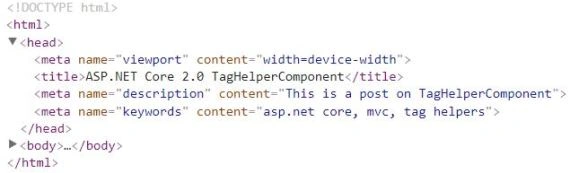
Note that two meta tags were dynamically generated by the Tag Helper Component.
Discussion
ASP.NET Core 2.0 has introduced “Tag Helper Components” that improve and complement Tag Helpers by giving developers the capability to use Dependency Injection with them.
The way this works is that,
- We create a Tag Helper to target existing or new (i.e. custom) HTML elements.
- We then create a class that inherits from TagHelperComponent and override its Process()method to append HTML content to the Tag Helper’s HTML element.
- We then inject this class into the service container which is executed at runtime.
In case you’re wondering if the solution above is missing a Tag Helper for head HTML element, it’s not. ASP.NET Core team has provided us with two built-in Tag Helpers - one targets head and the other targets the body element: HeadTagHelper and BodyTagHelper
In the solution above, our Tag Helper Component is adding a few meta tags to the head element. This could be used, for instance, by a blogging engine to output them for search engine optimisation.
Join the conversation! Your thoughts help the community grow.