

Previous article: Blazor Superpowers - SPA Components Real Time - ASP.NET Core - Master WebApps (Part-22 of 40)
Table of contents
Understanding Frontend-Backend Architecture
Integration Patterns Overview
React + ASP.NET Core Deep Integration
Angular + ASP.NET Core Enterprise Setup
Vue.js + ASP.NET Core Lightweight Fusion
Real-time Communication Strategies
State Management Across Boundaries
Authentication & Authorization Flow
Performance Optimization Techniques
Deployment & DevOps Strategies
Table of Contents
Introduction to Frontend Fusion
Architecture Patterns
Project Setup & Configuration
React Integration Deep Dive
Angular Enterprise Integration
Vue.js Lightweight Integration
Real-World E-Commerce Example
Performance Optimization
Security Considerations
Deployment Strategies
1. Introduction to Frontend Fusion
The Modern Web Development Landscape
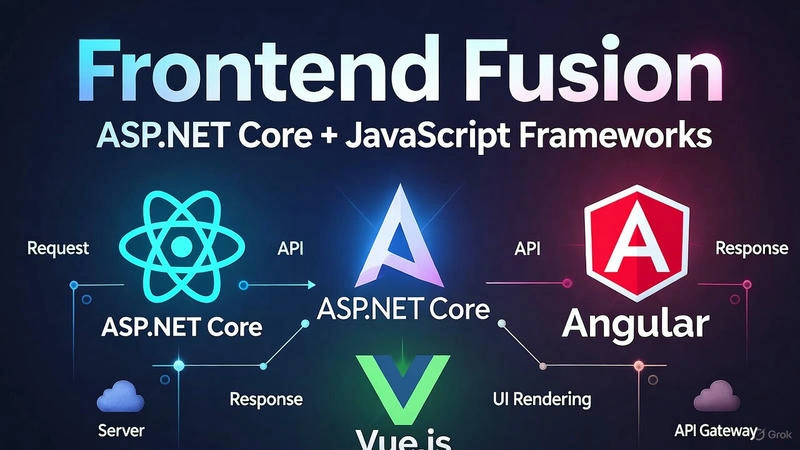
In today's web development ecosystem, the separation of frontend and backend has become a standard practice. However, seamlessly integrating these two worlds remains a challenge that many developers face. Frontend Fusion represents the art and science of blending JavaScript frameworks with ASP.NET Core to create powerful, maintainable, and scalable applications.
Why Frontend Fusion Matters
Traditional Approach Limitations:
Tight coupling between UI and business logic
Limited scalability
Poor developer experience
Difficulty in adopting new frontend technologies
Frontend Fusion Benefits:
Independent development workflows
Technology flexibility
Improved performance
Better team specialization
Enhanced user experience
Real-World Scenario: E-Commerce Platform
Imagine building an e-commerce platform where:
Product catalog uses React for rich interactivity
Admin dashboard uses Angular for enterprise features
Customer portal uses Vue.js for lightweight performance
All seamlessly integrated with ASP.NET Core backend
2. Architecture Patterns
2.1 Separation of Concerns Architecture
    // Backend Architecture
ECommerceSolution/
├── ECommerce.API/           // ASP.NET Core Web API
├── ECommerce.Application/   // Business Logic
├── ECommerce.Domain/        // Domain Models
├── ECommerce.Infrastructure/ // Data Access
└── ECommerce.Shared/        // Shared Utilities

// Frontend Architecture
frontend/
├── react-app/              // React SPA
├── angular-app/            // Angular SPA
├── vue-app/                // Vue.js SPA
└── shared-components/      // Shared UI Components
2.2 Micro-Frontends Architecture
    // ASP.NET Core serving multiple frontends
public class FrontendRoutingMiddleware
{
    private readonly RequestDelegate _next;

    public FrontendRoutingMiddleware(RequestDelegate next)
    {
        _next = next;
    }

    public async Task InvokeAsync(HttpContext context)
    {
        var path = context.Request.Path.Value ?? "";

        if (path.StartsWith("/react"))
        {
            // Serve React app
            await ServeReactApp(context);
        }
        else if (path.StartsWith("/angular"))
        {
            // Serve Angular app
            await ServeAngularApp(context);
        }
        else if (path.StartsWith("/vue"))
        {
            // Serve Vue app
            await ServeVueApp(context);
        }
        else
        {
            await _next(context);
        }
    }
}
2.3 API Gateway Pattern
    // Program.cs - API Gateway configuration
builder.Services.AddReverseProxy()
    .LoadFromConfig(builder.Configuration.GetSection("ReverseProxy"));

// appsettings.json
{
  "ReverseProxy": {
    "Routes": {
      "react-app": {
        "ClusterId": "react-cluster",
        "Match": { "Path": "/react/{**catch-all}" }
      },
      "angular-app": {
        "ClusterId": "angular-cluster",
        "Match": { "Path": "/angular/{**catch-all}" }
      },
      "vue-app": {
        "ClusterId": "vue-cluster",
        "Match": { "Path": "/vue/{**catch-all}" }
      }
    },
    "Clusters": {
      "react-cluster": {
        "Destinations": { "react-server": { "Address": "https://localhost:3000/" } }
      },
      "angular-cluster": {
        "Destinations": { "angular-server": { "Address": "https://localhost:4200/" } }
      },
      "vue-cluster": {
        "Destinations": { "vue-server": { "Address": "https://localhost:8080/" } }
      }
    }
  }
}
3. Project Setup & Configuration
3.1 ASP.NET Core Backend Setup
    // Program.cs - Modern minimal API setup
using Microsoft.AspNetCore.Authentication.JwtBearer;
using Microsoft.EntityFrameworkCore;
using Microsoft.OpenApi.Models;

var builder = WebApplication.CreateBuilder(args);

// Add services
builder.Services.AddControllers();
builder.Services.AddEndpointsApiExplorer();

// Database Context
builder.Services.AddDbContext<ApplicationDbContext>(options =>
    options.UseSqlServer(builder.Configuration.GetConnectionString("DefaultConnection")));

// CORS for multiple frontends
builder.Services.AddCors(options =>
{
    options.AddPolicy("AllowAllFrontends", policy =>
    {
        policy.WithOrigins(
                "http://localhost:3000", // React
                "http://localhost:4200", // Angular
                "http://localhost:8080") // Vue.js
            .AllowAnyHeader()
            .AllowAnyMethod()
            .AllowCredentials();
    });
});

// Authentication
builder.Services.AddAuthentication(JwtBearerDefaults.AuthenticationScheme)
    .AddJwtBearer(options =>
    {
        options.TokenValidationParameters = new TokenValidationParameters
        {
            ValidateIssuer = true,
            ValidateAudience = true,
            ValidateLifetime = true,
            ValidateIssuerSigningKey = true,
            ValidIssuer = builder.Configuration["Jwt:Issuer"],
            ValidAudience = builder.Configuration["Jwt:Audience"],
            IssuerSigningKey = new SymmetricSecurityKey(
                Encoding.UTF8.GetBytes(builder.Configuration["Jwt:Secret"]))
        };
    });

// Swagger/OpenAPI
builder.Services.AddSwaggerGen(c =>
{
    c.SwaggerDoc("v1", new OpenApiInfo { Title = "ECommerce API", Version = "v1" });

    // JWT Support in Swagger
    c.AddSecurityDefinition("Bearer", new OpenApiSecurityScheme
    {
        Description = "JWT Authorization header using the Bearer scheme",
        Type = SecuritySchemeType.Http,
        Scheme = "bearer"
    });
});

var app = builder.Build();

// Configure pipeline
if (app.Environment.IsDevelopment())
{
    app.UseSwagger();
    app.UseSwaggerUI();
}

app.UseCors("AllowAllFrontends");
app.UseAuthentication();
app.UseAuthorization();
app.MapControllers();

app.Run();
3.2 Shared Configuration Management
    // appsettings.json
{
  "ConnectionStrings": {
    "DefaultConnection": "Server=.;Database=ECommerce;Trusted_Connection=true;TrustServerCertificate=true;"
  },
  "Jwt": {
    "Secret": "your-super-secret-key-at-least-32-characters-long",
    "Issuer": "ecommerce-api",
    "Audience": "ecommerce-apps",
    "ExpiryMinutes": 60
  },
  "Frontend": {
    "ReactAppUrl": "http://localhost:3000",
    "AngularAppUrl": "http://localhost:4200",
    "VueAppUrl": "http://localhost:8080"
  },
  "Logging": {
    "LogLevel": {
      "Default": "Information",
      "Microsoft.AspNetCore": "Warning"
    }
  },
  "AllowedHosts": "*"
}

// Frontend configuration service
public class FrontendConfigService
{
    private readonly IConfiguration _configuration;

    public FrontendConfigService(IConfiguration configuration)
    {
        _configuration = configuration;
    }

    public FrontendConfig GetConfig(string frontendType)
    {
        return frontendType.ToLower() switch
        {
            "react" => new FrontendConfig
            {
                ApiUrl = _configuration["ApiBaseUrl"],
                AppUrl = _configuration["Frontend:ReactAppUrl"],
                Features = new List<string> { "SSR", "PWA", "RealTime" }
            },
            "angular" => new FrontendConfig
            {
                ApiUrl = _configuration["ApiBaseUrl"],
                AppUrl = _configuration["Frontend:AngularAppUrl"],
                Features = new List<string> { "LazyLoading", "AOT", "Universal" }
            },
            "vue" => new FrontendConfig
            {
                ApiUrl = _configuration["ApiBaseUrl"],
                AppUrl = _configuration["Frontend:VueAppUrl"],
                Features = new List<string> { "CompositionAPI", "Vite", "Pinia" }
            },
            _ => throw new ArgumentException($"Unknown frontend type: {frontendType}")
        };
    }
}

public class FrontendConfig
{
    public string ApiUrl { get; set; } = string.Empty;
    public string AppUrl { get; set; } = string.Empty;
    public List<string> Features { get; set; } = new();
}
4. React Integration Deep Dive
4.1 React Project Setup with TypeScript
    // package.json for React + ASP.NET Core integration
{
  "name": "ecommerce-react-app",
  "version": "1.0.0",
  "type": "module",
  "scripts": {
    "dev": "vite",
    "build": "tsc && vite build",
    "preview": "vite preview",
    "serve": "npm run build && aspnetcore-https && dotnet run"
  },
  "dependencies": {
    "react": "^18.2.0",
    "react-dom": "^18.2.0",
    "react-query": "^3.39.3",
    "axios": "^1.4.0",
    "react-router-dom": "^6.14.1",
    "zustand": "^4.3.9",
    "react-hook-form": "^7.45.1"
  },
  "devDependencies": {
    "@types/react": "^18.2.15",
    "@types/react-dom": "^18.2.7",
    "@vitejs/plugin-react": "^4.0.3",
    "typescript": "^5.0.2",
    "vite": "^4.4.5"
  }
}
4.2 API Service Layer
    // src/services/apiClient.ts
import axios, { AxiosInstance, AxiosResponse, InternalAxiosRequestConfig } from 'axios';

class ApiClient {
  private client: AxiosInstance;

  constructor(baseURL: string) {
    this.client = axios.create({
      baseURL,
      timeout: 10000,
      headers: {
        'Content-Type': 'application/json',
      },
    });

    this.setupInterceptors();
  }

  private setupInterceptors(): void {
    // Request interceptor
    this.client.interceptors.request.use(
      (config: InternalAxiosRequestConfig) => {
        const token = localStorage.getItem('authToken');
        if (token && config.headers) {
          config.headers.Authorization = `Bearer ${token}`;
        }
        return config;
      },
      (error) => Promise.reject(error)
    );

    // Response interceptor
    this.client.interceptors.response.use(
      (response: AxiosResponse) => response,
      (error) => {
        if (error.response?.status === 401) {
          localStorage.removeItem('authToken');
          window.location.href = '/login';
        }
        return Promise.reject(error);
      }
    );
  }

  public async get<T>(url: string, params?: any): Promise<T> {
    const response = await this.client.get<T>(url, { params });
    return response.data;
  }

  public async post<T>(url: string, data?: any): Promise<T> {
    const response = await this.client.post<T>(url, data);
    return response.data;
  }

  public async put<T>(url: string, data?: any): Promise<T> {
    const response = await this.client.put<T>(url, data);
    return response.data;
  }

  public async delete<T>(url: string): Promise<T> {
    const response = await this.client.delete<T>(url);
    return response.data;
  }
}

// Create API client instance
export const apiClient = new ApiClient(import.meta.env.VITE_API_BASE_URL);
4.3 React Hooks for API Integration
    // src/hooks/useApi.ts
import { useQuery, useMutation, useQueryClient } from '@tanstack/react-query';
import { apiClient } from '../services/apiClient';

// Product types
export interface Product {
  id: number;
  name: string;
  description: string;
  price: number;
  category: string;
  imageUrl: string;
  stock: number;
  createdAt: string;
}

export interface CreateProductRequest {
  name: string;
  description: string;
  price: number;
  category: string;
  imageUrl: string;
  stock: number;
}

// Product API hooks
export const useProducts = (category?: string) => {
  return useQuery({
    queryKey: ['products', category],
    queryFn: () =>
      apiClient.get<Product[]>('/api/products', { category }),
    staleTime: 5 * 60 * 1000, // 5 minutes
  });
};

export const useProduct = (id: number) => {
  return useQuery({
    queryKey: ['products', id],
    queryFn: () => apiClient.get<Product>(`/api/products/${id}`),
    enabled: !!id,
  });
};

export const useCreateProduct = () => {
  const queryClient = useQueryClient();

  return useMutation({
    mutationFn: (product: CreateProductRequest) =>
      apiClient.post<Product>('/api/products', product),
    onSuccess: () => {
      // Invalidate and refetch products query
      queryClient.invalidateQueries({ queryKey: ['products'] });
    },
  });
};

export const useUpdateProduct = () => {
  const queryClient = useQueryClient();

  return useMutation({
    mutationFn: ({ id, ...product }: Partial<Product> & { id: number }) =>
      apiClient.put<Product>(`/api/products/${id}`, product),
    onSuccess: (_, variables) => {
      queryClient.invalidateQueries({ queryKey: ['products'] });
      queryClient.invalidateQueries({ queryKey: ['products', variables.id] });
    },
  });
};

export const useDeleteProduct = () => {
  const queryClient = useQueryClient();

  return useMutation({
    mutationFn: (id: number) =>
      apiClient.delete(`/api/products/${id}`),
    onSuccess: () => {
      queryClient.invalidateQueries({ queryKey: ['products'] });
    },
  });
};
4.4 React Components with ASP.NET Core Integration
    // src/components/ProductList.tsx
import React from 'react';
import { useProducts, useDeleteProduct } from '../hooks/useApi';
import { ProductCard } from './ProductCard';
import { LoadingSpinner } from './LoadingSpinner';
import { ErrorMessage } from './ErrorMessage';

interface ProductListProps {
  category?: string;
  onProductSelect?: (product: Product) => void;
}

export const ProductList: React.FC<ProductListProps> = ({
  category,
  onProductSelect
}) => {
  const { data: products, isLoading, error } = useProducts(category);
  const deleteProductMutation = useDeleteProduct();

  const handleDelete = async (productId: number) => {
    if (window.confirm('Are you sure you want to delete this product?')) {
      try {
        await deleteProductMutation.mutateAsync(productId);
      } catch (error) {
        console.error('Failed to delete product:', error);
      }
    }
  };

  if (isLoading) return <LoadingSpinner />;
  if (error) return <ErrorMessage message="Failed to load products" />;

  return (
    <div className="product-grid">
      {products?.map((product) => (
        <ProductCard
          key={product.id}
          product={product}
          onSelect={onProductSelect}
          onDelete={handleDelete}
          canDelete={true}
        />
      ))}
    </div>
  );
};
4.5 Real-time Features with SignalR
    // src/services/signalRService.ts
import { HubConnection, HubConnectionBuilder, LogLevel } from '@microsoft/signalr';

class SignalRService {
  private connection: HubConnection | null = null;
  private reconnectAttempts = 0;
  private maxReconnectAttempts = 5;

  async connect(hubUrl: string): Promise<void> {
    try {
      this.connection = new HubConnectionBuilder()
        .withUrl(hubUrl)
        .withAutomaticReconnect([0, 2000, 5000, 10000, 30000])
        .configureLogging(LogLevel.Information)
        .build();

      this.setupEventHandlers();

      await this.connection.start();
      console.log('SignalR Connected');
      this.reconnectAttempts = 0;
    } catch (error) {
      console.error('SignalR Connection Failed:', error);
      this.handleReconnection();
    }
  }

  private setupEventHandlers(): void {
    if (!this.connection) return;

    this.connection.onclose(() => {
      console.log('SignalR Connection Closed');
      this.handleReconnection();
    });

    this.connection.onreconnecting(() => {
      console.log('SignalR Reconnecting...');
    });

    this.connection.onreconnected(() => {
      console.log('SignalR Reconnected');
      this.reconnectAttempts = 0;
    });
  }

  private handleReconnection(): void {
    if (this.reconnectAttempts < this.maxReconnectAttempts) {
      this.reconnectAttempts++;
      setTimeout(() => {
        this.connect(this.connection?.connection.baseUrl || '');
      }, Math.min(1000 * this.reconnectAttempts, 30000));
    }
  }

  on<T>(methodName: string, callback: (data: T) => void): void {
    this.connection?.on(methodName, callback);
  }

  async invoke<T>(methodName: string, ...args: any[]): Promise<T> {
    if (!this.connection) {
      throw new Error('SignalR connection not established');
    }
    return await this.connection.invoke<T>(methodName, ...args);
  }

  async disconnect(): Promise<void> {
    if (this.connection) {
      await this.connection.stop();
      this.connection = null;
    }
  }
}

export const signalRService = new SignalRService();
5. Angular Enterprise Integration
5.1 Angular Project Structure
    // angular.json - Enterprise configuration
{
  "$schema": "./node_modules/@angular/cli/lib/config/schema.json",
  "version": 1,
  "newProjectRoot": "projects",
  "projects": {
    "ecommerce-angular": {
      "projectType": "application",
      "schematics": {},
      "root": "",
      "sourceRoot": "src",
      "prefix": "app",
      "architect": {
        "build": {
          "builder": "@angular-devkit/build-angular:browser",
          "options": {
            "outputPath": "dist/ecommerce-angular",
            "index": "src/index.html",
            "main": "src/main.ts",
            "polyfills": ["zone.js"],
            "tsConfig": "tsconfig.app.json",
            "inlineStyleLanguage": "scss",
            "assets": [
              "src/favicon.ico",
              "src/assets",
              "src/web.config"
            ],
            "styles": [
              "src/styles.scss",
              "node_modules/@angular/material/prebuilt-themes/indigo-pink.css"
            ],
            "scripts": [],
            "serviceWorker": true,
            "ngswConfigPath": "ngsw-config.json"
          },
          "configurations": {
            "production": {
              "budgets": [
                {
                  "type": "initial",
                  "maximumWarning": "500kb",
                  "maximumError": "1mb"
                },
                {
                  "type": "anyComponentStyle",
                  "maximumWarning": "2kb",
                  "maximumError": "4kb"
                }
              ],
              "outputHashing": "all",
              "optimization": true,
              "sourceMap": false
            }
          }
        },
        "serve": {
          "builder": "@angular-devkit/build-angular:dev-server",
          "configurations": {
            "production": {
              "browserTarget": "ecommerce-angular:build:production"
            }
          }
        }
      }
    }
  }
}
5.2 Angular Services for ASP.NET Core Integration
    // src/app/core/services/api.service.ts
import { Injectable } from '@angular/core';
import { HttpClient, HttpParams, HttpHeaders } from '@angular/common/http';
import { Observable, throwError } from 'rxjs';
import { catchError, map } from 'rxjs/operators';
import { environment } from '../../../environments/environment';

export interface ApiResponse<T> {
  data: T;
  success: boolean;
  message?: string;
  totalCount?: number;
}

@Injectable({
  providedIn: 'root'
})
export class ApiService {
  private baseUrl = environment.apiUrl;

  constructor(private http: HttpClient) { }

  get<T>(endpoint: string, params?: any): Observable<T> {
    let httpParams = new HttpParams();
    if (params) {
      Object.keys(params).forEach(key => {
        if (params[key] !== null && params[key] !== undefined) {
          httpParams = httpParams.set(key, params[key].toString());
        }
      });
    }

    return this.http.get<ApiResponse<T>>(`${this.baseUrl}${endpoint}`, { params: httpParams })
      .pipe(
        map(response => response.data),
        catchError(this.handleError)
      );
  }

  post<T>(endpoint: string, data: any): Observable<T> {
    return this.http.post<ApiResponse<T>>(`${this.baseUrl}${endpoint}`, data)
      .pipe(
        map(response => response.data),
        catchError(this.handleError)
      );
  }

  put<T>(endpoint: string, data: any): Observable<T> {
    return this.http.put<ApiResponse<T>>(`${this.baseUrl}${endpoint}`, data)
      .pipe(
        map(response => response.data),
        catchError(this.handleError)
      );
  }

  delete<T>(endpoint: string): Observable<T> {
    return this.http.delete<ApiResponse<T>>(`${this.baseUrl}${endpoint}`)
      .pipe(
        map(response => response.data),
        catchError(this.handleError)
      );
  }

  private handleError(error: any) {
    let errorMessage = 'An unknown error occurred';

    if (error.error instanceof ErrorEvent) {
      // Client-side error
      errorMessage = `Error: ${error.error.message}`;
    } else {
      // Server-side error
      errorMessage = `Error Code: ${error.status}\nMessage: ${error.message}`;
    }

    console.error(errorMessage);
    return throwError(() => new Error(errorMessage));
  }
}
5.3 Angular State Management with NgRx
    // src/app/store/product/product.actions.ts
import { createAction, props } from '@ngrx/store';
import { Product } from '../../core/models/product.model';

export const loadProducts = createAction(
  '[Product] Load Products',
  props<{ category?: string }>()
);

export const loadProductsSuccess = createAction(
  '[Product] Load Products Success',
  props<{ products: Product[] }>()
);

export const loadProductsFailure = createAction(
  '[Product] Load Products Failure',
  props<{ error: string }>()
);

export const createProduct = createAction(
  '[Product] Create Product',
  props<{ product: Omit<Product, 'id'> }>()
);

export const createProductSuccess = createAction(
  '[Product] Create Product Success',
  props<{ product: Product }>()
);

export const createProductFailure = createAction(
  '[Product] Create Product Failure',
  props<{ error: string }>()
);

// src/app/store/product/product.effects.ts
import { Injectable } from '@angular/core';
import { Actions, createEffect, ofType } from '@ngrx/effects';
import { of } from 'rxjs';
import { map, mergeMap, catchError } from 'rxjs/operators';
import { ProductService } from '../../core/services/product.service';
import * as ProductActions from './product.actions';

@Injectable()
export class ProductEffects {
  loadProducts$ = createEffect(() =>
    this.actions$.pipe(
      ofType(ProductActions.loadProducts),
      mergeMap((action) =>
        this.productService.getProducts(action.category).pipe(
          map(products => ProductActions.loadProductsSuccess({ products })),
          catchError(error => of(ProductActions.loadProductsFailure({ error: error.message })))
        )
      )
    )
  );

  createProduct$ = createEffect(() =>
    this.actions$.pipe(
      ofType(ProductActions.createProduct),
      mergeMap((action) =>
        this.productService.createProduct(action.product).pipe(
          map(product => ProductActions.createProductSuccess({ product })),
          catchError(error => of(ProductActions.createProductFailure({ error: error.message })))
        )
      )
    )
  );

  constructor(
    private actions$: Actions,
    private productService: ProductService
  ) {}
}
5.4 Angular Authentication Interceptor
    // src/app/core/interceptors/auth.interceptor.ts
import { Injectable } from '@angular/core';
import {
  HttpRequest,
  HttpHandler,
  HttpEvent,
  HttpInterceptor,
  HttpErrorResponse
} from '@angular/common/http';
import { Observable, throwError, BehaviorSubject } from 'rxjs';
import { catchError, filter, take, switchMap } from 'rxjs/operators';
import { AuthService } from '../services/auth.service';

@Injectable()
export class AuthInterceptor implements HttpInterceptor {
  private isRefreshing = false;
  private refreshTokenSubject: BehaviorSubject<any> = new BehaviorSubject<any>(null);

  constructor(private authService: AuthService) {}

  intercept(request: HttpRequest<any>, next: HttpHandler): Observable<HttpEvent<any>> {
    const token = this.authService.getAccessToken();

    if (token) {
      request = this.addToken(request, token);
    }

    return next.handle(request).pipe(
      catchError(error => {
        if (error instanceof HttpErrorResponse && error.status === 401) {
          return this.handle401Error(request, next);
        } else {
          return throwError(() => error);
        }
      })
    );
  }

  private addToken(request: HttpRequest<any>, token: string) {
    return request.clone({
      setHeaders: {
        Authorization: `Bearer ${token}`
      }
    });
  }

  private handle401Error(request: HttpRequest<any>, next: HttpHandler) {
    if (!this.isRefreshing) {
      this.isRefreshing = true;
      this.refreshTokenSubject.next(null);

      return this.authService.refreshToken().pipe(
        switchMap((token: any) => {
          this.isRefreshing = false;
          this.refreshTokenSubject.next(token.accessToken);
          return next.handle(this.addToken(request, token.accessToken));
        }),
        catchError((error) => {
          this.isRefreshing = false;
          this.authService.logout();
          return throwError(() => error);
        })
      );
    } else {
      return this.refreshTokenSubject.pipe(
        filter(token => token != null),
        take(1),
        switchMap(token => {
          return next.handle(this.addToken(request, token));
        })
      );
    }
  }
}
6. Vue.js Lightweight Integration
6.1 Vue 3 Composition API Integration
    // src/composables/useApi.ts
import { ref, reactive } from 'vue';
import type { Ref } from 'vue';
import { apiClient } from '../services/apiClient';

interface ApiState<T> {
  data: T | null;
  loading: boolean;
  error: string | null;
}

export function useApi<T>() {
  const state = reactive<ApiState<T>>({
    data: null,
    loading: false,
    error: null
  });

  const execute = async (apiCall: () => Promise<T>) => {
    state.loading = true;
    state.error = null;

    try {
      state.data = await apiCall();
    } catch (error) {
      state.error = error instanceof Error ? error.message : 'An error occurred';
      console.error('API Error:', error);
    } finally {
      state.loading = false;
    }
  };

  return {
    state,
    execute
  };
}

// Product-specific composable
export function useProducts() {
  const { state, execute } = useApi<Product[]>();

  const fetchProducts = async (category?: string) => {
    await execute(() =>
      apiClient.get<Product[]>('/api/products', { category })
    );
  };

  const createProduct = async (product: CreateProductRequest) => {
    await execute(() =>
      apiClient.post<Product>('/api/products', product)
    );
  };

  return {
    products: state,
    fetchProducts,
    createProduct
  };
}
6.2 Vuex/Pinia Store Integration
    // stores/products.ts - Pinia Store
import { defineStore } from 'pinia';
import { ref, computed } from 'vue';
import { apiClient } from '../services/apiClient';
import type { Product, CreateProductRequest } from '../types';

export const useProductStore = defineStore('products', () => {
  // State
  const products = ref<Product[]>([]);
  const loading = ref(false);
  const error = ref<string | null>(null);
  const selectedCategory = ref<string>('');

  // Getters
  const featuredProducts = computed(() =>
    products.value.filter(product => product.price > 100)
  );

  const productsByCategory = computed(() =>
    selectedCategory.value
      ? products.value.filter(product => product.category === selectedCategory.value)
      : products.value
  );

  const totalValue = computed(() =>
    products.value.reduce((total, product) => total + product.price, 0)
  );

  // Actions
  const fetchProducts = async (category?: string) => {
    loading.value = true;
    error.value = null;

    try {
      const response = await apiClient.get<Product[]>('/api/products', { category });
      products.value = response;
      selectedCategory.value = category || '';
    } catch (err) {
      error.value = err instanceof Error ? err.message : 'Failed to fetch products';
      console.error('Failed to fetch products:', err);
    } finally {
      loading.value = false;
    }
  };

  const createProduct = async (productData: CreateProductRequest) => {
    try {
      const newProduct = await apiClient.post<Product>('/api/products', productData);
      products.value.push(newProduct);
      return newProduct;
    } catch (err) {
      error.value = err instanceof Error ? err.message : 'Failed to create product';
      throw err;
    }
  };

  const updateProduct = async (productId: number, updates: Partial<Product>) => {
    try {
      const updatedProduct = await apiClient.put<Product>(
        `/api/products/${productId}`,
        updates
      );

      const index = products.value.findIndex(p => p.id === productId);
      if (index !== -1) {
        products.value[index] = updatedProduct;
      }

      return updatedProduct;
    } catch (err) {
      error.value = err instanceof Error ? err.message : 'Failed to update product';
      throw err;
    }
  };

  const deleteProduct = async (productId: number) => {
    try {
      await apiClient.delete(`/api/products/${productId}`);
      products.value = products.value.filter(p => p.id !== productId);
    } catch (err) {
      error.value = err instanceof Error ? err.message : 'Failed to delete product';
      throw err;
    }
  };

  return {
    // State
    products,
    loading,
    error,
    selectedCategory,

    // Getters
    featuredProducts,
    productsByCategory,
    totalValue,

    // Actions
    fetchProducts,
    createProduct,
    updateProduct,
    deleteProduct
  };
});
6.3 Vue Components with ASP.NET Core Backend
    <!-- src/components/ProductManagement.vue -->
<template>
  <div class="product-management">
    <div class="header">
      <h2>Product Management</h2>
      <button @click="showCreateForm = true" class="btn-primary">
        Add New Product
      </button>
    </div>

    <!-- Filters -->
    <div class="filters">
      <select v-model="selectedCategory" @change="handleCategoryChange">
        <option value="">All Categories</option>
        <option v-for="category in categories" :key="category" :value="category">
          {{ category }}
        </option>
      </select>

      <input
        v-model="searchQuery"
        type="text"
        placeholder="Search products..."
        @input="handleSearch"
      />
    </div>

    <!-- Loading State -->
    <div v-if="productStore.loading" class="loading">
      <LoadingSpinner />
    </div>

    <!-- Error State -->
    <div v-else-if="productStore.error" class="error">
      {{ productStore.error }}
      <button @click="loadProducts" class="btn-secondary">Retry</button>
    </div>

    <!-- Products Grid -->
    <div v-else class="products-grid">
      <ProductCard
        v-for="product in filteredProducts"
        :key="product.id"
        :product="product"
        @edit="handleEdit"
        @delete="handleDelete"
      />
    </div>

    <!-- Empty State -->
    <div v-if="!productStore.loading && filteredProducts.length === 0" class="empty-state">
      <p>No products found.</p>
    </div>

    <!-- Create/Edit Modal -->
    <ProductFormModal
      v-if="showCreateForm || editingProduct"
      :product="editingProduct"
      @save="handleSave"
      @cancel="handleCancel"
    />
  </div>
</template>

<script setup lang="ts">
import { ref, computed, onMounted } from 'vue';
import { useProductStore } from '../stores/products';
import ProductCard from './ProductCard.vue';
import ProductFormModal from './ProductFormModal.vue';
import LoadingSpinner from './LoadingSpinner.vue';
import type { Product, CreateProductRequest } from '../types';

const productStore = useProductStore();
const selectedCategory = ref('');
const searchQuery = ref('');
const showCreateForm = ref(false);
const editingProduct = ref<Product | null>(null);

// Computed properties
const categories = computed(() =>
  Array.from(new Set(productStore.products.map(p => p.category)))
);

const filteredProducts = computed(() => {
  let products = productStore.productsByCategory;

  if (searchQuery.value) {
    const query = searchQuery.value.toLowerCase();
    products = products.filter(product =>
      product.name.toLowerCase().includes(query) ||
      product.description.toLowerCase().includes(query)
    );
  }

  return products;
});

// Lifecycle
onMounted(() => {
  loadProducts();
});

// Methods
const loadProducts = () => {
  productStore.fetchProducts(selectedCategory.value);
};

const handleCategoryChange = () => {
  loadProducts();
};

const handleSearch = () => {
  // Search is handled by computed property
};

const handleEdit = (product: Product) => {
  editingProduct.value = { ...product };
};

const handleDelete = async (productId: number) => {
  if (confirm('Are you sure you want to delete this product?')) {
    try {
      await productStore.deleteProduct(productId);
    } catch (error) {
      console.error('Failed to delete product:', error);
    }
  }
};

const handleSave = async (productData: CreateProductRequest | Product) => {
  try {
    if (editingProduct.value) {
      // Update existing product
      await productStore.updateProduct(
        (productData as Product).id,
        productData
      );
    } else {
      // Create new product
      await productStore.createProduct(productData as CreateProductRequest);
    }

    // Reset form state
    showCreateForm.value = false;
    editingProduct.value = null;
  } catch (error) {
    console.error('Failed to save product:', error);
  }
};

const handleCancel = () => {
  showCreateForm.value = false;
  editingProduct.value = null;
};
</script>

<style scoped>
.product-management {
  max-width: 1200px;
  margin: 0 auto;
  padding: 20px;
}

.header {
  display: flex;
  justify-content: space-between;
  align-items: center;
  margin-bottom: 30px;
}

.filters {
  display: flex;
  gap: 15px;
  margin-bottom: 20px;
}

.filters select,
.filters input {
  padding: 8px 12px;
  border: 1px solid #ddd;
  border-radius: 4px;
}

.products-grid {
  display: grid;
  grid-template-columns: repeat(auto-fill, minmax(300px, 1fr));
  gap: 20px;
}

.empty-state {
  text-align: center;
  padding: 40px;
  color: #666;
}

.loading, .error {
  text-align: center;
  padding: 40px;
}

.error {
  color: #d32f2f;
}
</style>
Join the conversation! Your thoughts help the community grow.