

Introduction
This article walks you through the steps to create a Web Application, using AngularJS, which uses WebAPI to communicate between client and Server side.
Step 1
Check the link given below to see all the steps to create a Web API wtih an Entity Framework code first implementation.
http://social.technet.microsoft.com/wiki/contents/articles/26795.asp-net-webapi-entity-framework-code-first.aspx
Step 2
Now, in order to use an Entity Framework, we need to install a NuGet package.
In Visual Studio 2013, select the menu option given below.
Tools-> Library Package manager -> Manage NuGet Packages for the solution.
Search for AngularJS and select the option Install.
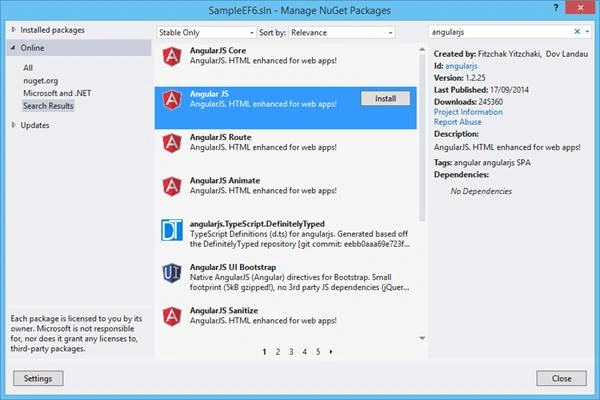
This option will automatically install the NuGet package.
Step 3
Now, add a new JavaScript file (contactController.js) in scripts directory and add Angular functions.
JavaScript
- function contactController($scope, $http) {
- $scope.loading = true;
- $scope.addMode = false;
- //Used to display the data
- $http.get('/api/Contact/').success(function (data) {
- $scope.Contacts = data;
- $scope.loading = false;
- })
- .error(function () {
- $scope.error = "An Error has occured while loading posts!";
- $scope.loading = false;
- });
- $scope.toggleEdit = function () {
- this.Contact.editMode = !this.Contact.editMode;
- };
- $scope.toggleAdd = function () {
- $scope.addMode = !$scope.addMode;
- };
- //Used to save a record after edit
- $scope.save = function () {
- alert("Edit");
- $scope.loading = true;
- var frien = this.Contact;
- alert(emp);
- $http.put('/api/Contact/', frien).success(function (data) {
- alert("Saved Successfully!!");
- emp.editMode = false;
- $scope.loading = false;
- }).error(function (data) {
- $scope.error = "An Error has occured while Saving Contact! " + data;
- $scope.loading = false;
- });
- };
- //Used to add a new record
- $scope.add = function () {
- $scope.loading = true;
- $http.post('/api/Contact/', this.newContact).success(function (data) {
- alert("Added Successfully!!");
- $scope.addMode = false;
- $scope.Contacts.push(data);
- $scope.loading = false;
- }).error(function (data) {
- $scope.error = "An Error has occured while Adding Contact! " + data;
- $scope.loading = false;
- });
- };
- //Used to edit a record
- $scope.deleteContact = function () {
- $scope.loading = true;
- var Contactid = this.Contact.ContactId;
- $http.delete('/api/Contact/' + Contactid).success(function (data) {
- alert("Deleted Successfully!!");
- $.each($scope.Contacts, function (i) {
- if ($scope.Contacts[i].ContactId === Contactid) {
- $scope.Contacts.splice(i, 1);
- return false;
- }
- });
- $scope.loading = false;
- }).error(function (data) {
- $scope.error = "An Error has occured while Saving Contact! " + data;
- $scope.loading = false;
- });
- };
- }
Thiruppathi RPosted May 12, 2017, 7:53 AM
Nice Article.Thanks to sharing..
Rajesh KadamPosted May 9, 2017, 1:16 AM
Good article. but, you forgot to add code for add, edit and delete.
Manav PandyaPosted May 9, 2017, 12:30 AM
Nice share .........................
Rafnas T PPosted May 9, 2017, 12:26 AM
Nice share. keep sharing..