

Introduction
Today I will demonstrate the implementation of jQuery server side Datatable in MVC appplication with server side filter, sorting and Pagination.
Datatable is a jQuery plugin to display data in tabular format with sorting, filter and pagination written in javascript. Datatable is a flexible tool which allows the customization of the plugin as per our requirement.
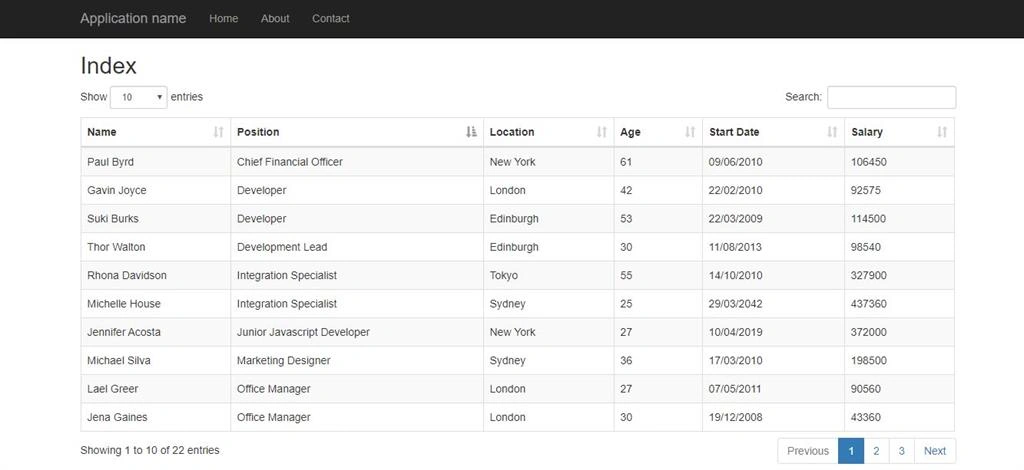
Today we will create an MVC application which will be using Datatable plugin with searching, sorting, pagination functionality.
Prerequisites
Basic knowledge of MVC application (Controller, Action and Views) jQuery and Ajax.
Step 1
Create a basic Web Application with MVC framework, build it and launch the application once to check whether everything is configured properly or not.
Step 2
We will create a simple table to display employee detail in datatable. First of all create a new controller (EmployeeController) in your Application.
and create a view for Action Index named as Index.cshtml.
Step 3
Import the CDN (Content Delivery Network) or download the required css and js file. Here I am using CDN for required js and css.
Imported css
Import below css in your view Index.cshtml,
<link href="https://maxcdn.bootstrapcdn.com/bootstrap/3.3.7/css/bootstrap.min.css" rel="stylesheet" />
<link href="https://cdn.datatables.net/1.10.20/css/dataTables.bootstrap.min.css" rel="stylesheet" />
Imported javascript
Import below js in your view Index.cshtml
<script src="https://cdn.datatables.net/1.10.20/js/jquery.dataTables.min.js"></script>
<script src="https://cdn.datatables.net/1.10.20/js/dataTables.bootstrap.min.js"></script>
Step 4
Create Model to bind the request data. Create a class file named as JqueryDatatableParam and paste the code as below.
public class JqueryDatatableParam
{
    public string sEcho { get; set; }
    public string sSearch { get; set; }
    public int iDisplayLength { get; set; }
    public int iDisplayStart { get; set; }
    public int iColumns { get; set; }
    public int iSortCol_0 { get; set; }
    public string sSortDir_0 { get; set; }
    public int iSortingCols { get; set; }
    public string sColumns { get; set; }
}
Step 5
Create Model to bind the request data. Create a class file named as Employee and paste the code as below.
public class Employee
{
    public string Name { get; set; }
    public string Position { get; set; }
    public string Location { get; set; }
    public int Age { get; set; }
    public DateTime StartDate { get; set; }
    public string StartDateString { get; set; }
    public int  Salary { get; set; }
}
Step 6
We will create an action method to in our EmployeeController to return the data which we will display in view.
Create a method named GetData in EmployeeController as below.
public ActionResult GetData(JqueryDatatableParam param)
{
    var employees = GetEmployees(); //This method is returning the IEnumerable employee from database
}
Filter
Add the following code in GetData method to apply server side filter.
if (!string.IsNullOrEmpty(param.sSearch))
{
    employeesemployees = employees.Where(x => x.Name.ToLower().Contains(param.sSearch.ToLower())
                                  || x.Position.ToLower().Contains(param.sSearch.ToLower())
                                  || x.Location.ToLower().Contains(param.sSearch.ToLower())
                                  || x.Salary.ToString().Contains(param.sSearch.ToLower())
                                  || x.Age.ToString().Contains(param.sSearch.ToLower())
                                  || x.StartDate.ToString("dd'/'MM'/'yyyy").ToLower().Contains(param.sSearch.ToLower())).ToList();
}
From html page whatever keyword we are typing in search textbox is sent to request in querystring as `sSearch` name. In the above code snippet we are checking if the same parameter `sSearch` is not null then we are checking the same keyword in our list to apply filter.
Note
To ignore case sensitive search before comparing we are converting the string to lower case.
Sorting
To apply Sorting add the following code in same GetData method.
var sortColumnIndex = Convert.ToInt32(HttpContext.Request.QueryString["iSortCol_0"]);
var sortDirection = HttpContext.Request.QueryString["sSortDir_0"];
if (sortColumnIndex == 3) {
    employees = sortDirection == "asc" ? employees.OrderBy(c => c.Age) : employees.OrderByDescending(c => c.Age);
} else if (sortColumnIndex == 4) {
    employees = sortDirection == "asc" ? employees.OrderBy(c => c.StartDate) : employees.OrderByDescending(c => c.StartDate);
} else if (sortColumnIndex == 5) {
    employees = sortDirection == "asc" ? employees.OrderBy(c => c.Salary) : employees.OrderByDescending(c => c.Salary);
} else {
    Func < Employee, string > orderingFunction = e => sortColumnIndex == 0 ? e.Name : sortColumnIndex == 1 ? e.Position : e.Location;
    employees = sortDirection == "asc" ? employees.OrderBy(orderingFunction) : employees.OrderByDescending(orderingFunction);
}
To apply sorting we required two parameters, Sorting direction (Ascendening or descding) and SortColumnName. We are storing the sortdirection value in variable `sortDirection` and sortcolumn no in variable `sortColumnIndex`. And based on sortColumnIndex we are sorting the list.
Pagination
To apply the pagination add the below code in GetData() method.
var displayResult = employees.Skip(param.iDisplayStart)
               .Take(param.iDisplayLength).ToList();
var totalRecords = employees.Count();
For pagination also we require two value page numbers and count to display in per page. PageNumber is bound in `iDisplayStart` parameter and per page count is bound in `iDisplayLength` request parameter. And we are using the Take() and Skip() method of linq to perform the pagination based on value of both parameters.
Now add the below code snippet to send filtered and sorted data as response of ajax call in json format.
return Json(new
{
    param.sEcho,
    iTotalRecords = totalRecords,
    iTotalDisplayRecords = totalRecords,
    aaData = displayResult
}, JsonRequestBehavior.AllowGet);
Step 6
We have completed our method to perform all operations. Now we have to call this method from view and we have to bind all column values in table. Add the below code snippet in Index.cshtml page.
Tasneem NomaniPosted Feb 16, 2024, 9:22 PM
Idisplaylength, idisplastart, where are these set?
Tasneem NomaniPosted Feb 16, 2024, 9:21 PM
I tried to implement your code, but there are parts of code missing
karthik lalPosted Aug 26, 2022, 5:31 PM
How to pass column filter parameter in ajax call
Nikhil KurkurePosted Mar 27, 2022, 7:20 AM
Can you please share source code?
Nurana ZeynalliPosted Nov 28, 2021, 3:21 AM
Hi,Can you share source code with me Really i need it
Brice HilarionPosted Apr 22, 2021, 12:33 PM
Very interesting !
Darwin UMPosted Jan 28, 2021, 9:28 PM
How to pass different url ajax to JQuery Datatable to send multiple queries to the same table. for example listAll, listbyrange, listname, etc, and call the table to load the data from those queries.
Harish PenugondaPosted Nov 1, 2020, 1:59 PM
One doubt GetEmployee() pulls all the records from database so there will be a performance impact right
Srivatshan BrPosted Jul 20, 2020, 1:55 AM
Nice article..its working..
Tony WolfPosted Jul 16, 2020, 2:52 AM
There are something still bugging me, the part of GetEmployee() method in controller it say that the method does not exist in current context
Dan ColganPosted Jul 13, 2020, 3:15 PM
How do I pass a parameter to limit the data initially
nomi aliPosted Jul 6, 2020, 5:38 PM
There is an error: DataTables warning (table id = 'tblStudent'): Requested unknown parameter '0' from the data source for row 0