

Introduction
I created a class using mciSendString functions to play audio files then compile it to a dll file. To use my dll file, please add MediaControl.dll to your project reference then declare an instance as
follows:
private MediaControl.AudioPlayer MyPlayer = new MediaControl.AudioPlayer();
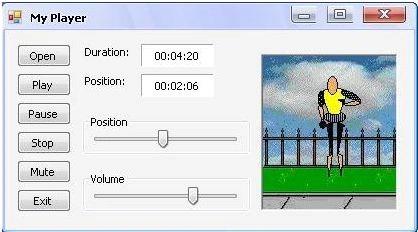
In the following table you can read about some commands of the player as examples.
Command |
Explanation |
Example |
|
Open |
Open music file. (*.mp3, *.ram, *.wav, ...) |
MyPlayer.Open(FileName); |
|
Play |
Play music file. |
MyPlayer.Play(); |
|
Pause |
Stop the song temporary. |
MyPlayer.Pause = true; |
|
Close |
Stop playing. |
MyPlayer.Close(); |
|
Volume |
Set and get volume. |
MyPlayer.Volume = Value; |
|
Position |
Set and get position. |
MyPlayer.position = Value; |
|
Duration |
Get the duration. |
label1.Text = MyPlayer.Duration(); |
|
SetAudioOff |
Set voice off. |
MyPlayer.SetAudioOff(); |
|
SetAudioOn |
Set voice on. |
MyPlayer.SetAudioOn(); |
After extracting the file MyPlayerC.zip You can find MediaControl.dll file in the (..\..\MyClass) folder. You can read about the commands: Play, Pause, Stop, ... etc. and read the code in my project for using my AudioPlayer class. You can test my project with the file ..\..\Music\M1.mp3 or any audio file and see how to use MyPlayer.PositionChanged to make motion without a new Timer.
Peacy IndhoPosted Jul 18, 2020, 9:32 AM
Hi, i am new to programming, i wonder if it is possible getting the MediaControl.dll source code intead of just having the dll file? This way i can see what is happening with every commands that you are senidng back and forward. Thank you for sharing.
Ahmed AsfhPosted Jun 4, 2013, 4:11 AM
I love your musics in that music folder..
Samuel OmotosoPosted Feb 15, 2013, 11:55 AM
This is really wonderful.....Kudos!!
HEESUN YUPosted Jan 11, 2013, 1:43 PM
thanks! :D
ethmane MohamedPosted Oct 20, 2012, 4:42 PM
thanks brother
Devillom DonPosted Aug 26, 2012, 3:05 PM
thanks for class!
Devillom DonPosted Aug 26, 2012, 3:05 PM
thanks for class!