

Suppose we are building a contact group application in ASP.NET MVC3 using razor view engine.
Here one contact group can hold multiple contact information. That means it is a 1 to many relationship.
Now we have 2 model classes.
- Group
- Contact
Under the controller folder we have one controller class named "groupcontroller.cs".
Now under the "view" folder we have a different view.
Now we have to deal with "create.cshtml".
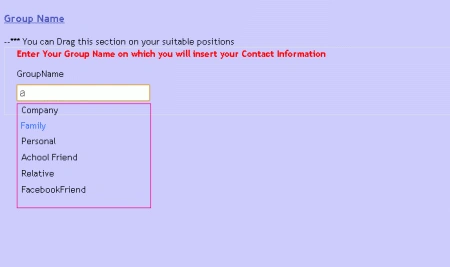
Here while typing your group name it will automatically show a possible group name like {friend,family,twiter friend,company e.t.c}.
So for that first we have to include the Jquery in our "create.cshtml" file like in the following code:
<link href="@Url.Content("~/Content/Site.css")" rel="stylesheet" type="text/css" />
<link href="../../Content/themes/base/jquery.ui.autocomplete.css" rel="stylesheet"
type="text/css" />
<script src="../../Scripts/jquery-ui-1.8.11.js" type="text/javascript"></script>
<script src="../../Scripts/jquery-ui-1.8.11.min.js" type="text/javascript"></script>
Now in the razor view engine we are displaying and taking the group name value like in the following code segment:
<fieldset>
<b><font color="red">Enter Your Group Name on which you will insert your Contact Information</font></b>
<div class="editor-label" >
@Html.LabelFor(model => model.Group.GroupName)
</div>
<div class="editor-field">
@Html.EditorFor(model => model.Group.GroupName)
@Html.ValidationMessageFor(model => model.Group.GroupName)
</div>
</fieldset>
farooq smdPosted Jun 21, 2016, 12:27 PM
nice one
ravi jotungiyaPosted Sep 18, 2012, 5:33 AM
Thank you for sharing
Steven ChalkPosted Mar 11, 2012, 4:38 AM
This needs to be improved. What you are showing here is no more than the simple examples on the jquery website. This needs to show an ajax call to a controller action and returning json to the browser. This example is just a simple, local script.
Adora KrausePosted Jan 31, 2012, 11:08 PM
Its a very good and useful article.
Sonakshi SinghPosted Jan 31, 2012, 10:53 PM
Thank you for sharing