
For those who don't know, NAnt is a .NET build scripting tool. It is a lot like the Java build tool Ant, so everything in this article is probably also applicable for Ant. This article assumes a intermediate knowledge of the NAnt tool.
Though the purists will probably disagree, NAnt is essentially a high-level programming language, optimized for automating common build tasks, such as source control operations, compiling, moving files and deleting files. Because of the automation it allows, NAnt has become very popular for use in continuous integration. But what else might NAnt be good for?
The rest of this article will work through a difficult backup problem that I solved with Nant. I will demonstrate how to use NAnt to create a customizable, heterogeneous and effective backup system. This article assumes basic familiarity with NAnt. If you would like to learn more about this tool, lots of information is available on the NAnt site (http://nant.sourceforge.net).
The server being backed up in this article runs Windows 2003, .NET, SQL, MySQL, MSDE, PHP, and a mail server. There are ninety-five clients hosted on the server and they have a variety of backup requirements. Some clients have never considered backups, some prefer to manage it themselves, while some are paranoid that they will lose everything and require a formal, reliable backup process. Due to the variety of different requirements, combined with a limited budget, commercial tools are not a viable solution to this backup problem.
I categorized the various backup types that I needed as follows: IIS metadata backup, MySQL data backup, MS SQL data backup, and backup of each of the sites files. Looking at this least it seemed that perhaps NAnt might be capable of fulfilling my needs. There was also the question of what to do with the backups. The options that I could see were: zip the files and store them on the server, zip the files and store them on a network backup drive, zip the files and send them with email. Once again, different clients needed different solutions.
Other design goals for my new backup system were that it should be scheduled, and adding new clients to the server should not result in an excessive amount of work configuring my backup process.
Backup Challenge 1: Backup the IIS Metabase
The IIS metabase stores the configuration of IIS. This combined with the site data is enough to restore a web server in the event of some dramatic failure. One way to backup the IIS metabase is to right-click the computer to backup in the IIS snap-in and select 'Backup/Restore Configuration...' from the 'All Tasks' menu item. Fortunately, this functionality is also available with scripting.
In Windows 2000 or Windows XP a backup can be made with the following command line call:
cscript metaback.vbs
For Windows 2003, use this command line call:
cscript iisback.vbs /backup /b <backup name>
Executing these commands creates an IIS backup that can later be used to restore the IIS configuration. Because they are simple command line calls it is simple to include them in a NAnt script, such as this one:
(NB: In my NAnt scripts, the values listed in the <!-- Parameters --> section at the start of the script are values that the script expects to have been set as properties by the calling script.)
<?xml version="1.0"?>
<project name="IIS" default="CreateIISBackup">
<!-- Parameters
backupName
scriptDirectory
-->
<target name="CreateIISBackup" >
<exec basedir="${ scriptDirectory }" program="cscript" commandline="iisback.vbs /backup /b ${backupName}" />
</target>
</project>
Save this script as IIS.build. Because this script requires a property to be set before it is called, it cannot be run directly from the command line. A script to run the IIS script looks like this:
<?xml version="1.0"?>
<project name="BackupIIS" default="Backup">
<property name="backupName" value="IISBackup" />
<!-- For this script to work, this must be set to the location of the script (metaback.vbs or IISback.vbs) -->
<property name=" scriptDirectory" value="IISBackup" />
<target name="Backup" >
<nant buildfile="IIS.build" inheritall="true" />
</target>
</project>
Save this script as BackupIIS.build. Now when this backup is run it should create an IIS backup called 'IISBackup'. To run the backup make sure the two scripts are in the same directory and that nant.exe is in the system path. Open a command prompt and change to the directory that the scripts are in, then type:
nant -buildfile:BackupIIS.build
and press enter.
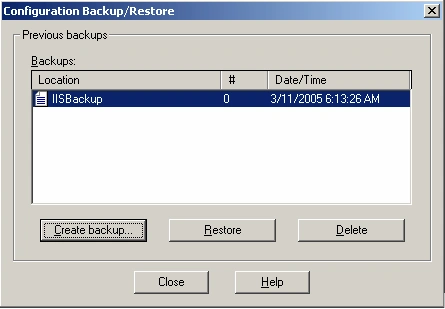
To check that the backup worked open the IIS snap-in, right click on your computer node, and select 'Backup/Restore Configuration...' from the 'All Tasks' menu. You should see a backup called 'IISBackup' in the Backups grid.
Backup Challenge 2: Backup the Site Files
The requirement is as follows; backup all files in some sites. For each site that requires backup, zip the files and email the archive to a secure storage location.
I started by writing a NAnt script with two targets. The first target compresses a directory, the second target compresses a directory and then sends the archive via email.
<?xml version="1.0"?>
<project name="FileBackup" >
<!--parameters
baseDirectory This is the parent of the directory to be compressed
targetDirectory This is the directory to be compressed
backupDirectory This is the location to store the archives
-->
<target name="CompressDirectory">
<zip zipfile="${backupDirectory}${directoryName}.zip" >
<fileset basedir="${baseDirectory}">
<include name="${ targetDirectory}/*" />
<include name="${targetDirectory }/**/*" />
</fileset>
</zip>
</target>
<target name="CompressDirectoryAndEmail" depends="CompressDirectory">
<mail from[email protected]
tolist[email protected]
subject="${ targetDirectory} backup"
mailhost="localhost">
<files>
<include name="${backupDirectory}${ targetDirectory}.zip" />
</files>
<attachments>
<include name="${backupDirectory}${ targetDirectory}.zip" />
</attachments>
</mail>
<!-- The backup has be mailed so the file is no longer required. -->
<delete file="${backupDirectory}${targetDirectory}.zip" />
</target>
</project>
Save this file as FileBackup.build. As with the IIS backup before, this script can not be run directly because it requires parameters to be set. Another script is required to set the parameters and specify backup policies for each site that requires backup. For this example, assume that I have all of my websites stored in a directory called C:\inetpub. There is also another directory called C:\backup. I currently have three websites: web1, web2 and web3. They are stored in C:\inetpub\web1, C:\inetpub\web2 and C:\inetpub\web3 respectively. The owner of web1 requires that the site be backed up nightly, and the archive be stored on the server in C:\backup. The owners of web2 and web3 require that their sites be backed up nightly and emailed to a secure location, but they do not require that a copy be stored on the server. These requirements are implemented with the following script:
(NB: This script sends email using the localhost SMTP server. Your local SMTP server must be configured to allow this.)
<?xml version="1.0"?>
<project name="BackupWebsites" default="Backup">
<!-- These two properties can be declared globally, because they are the same for all sites. -->
<property name="baseDirectory" value="C:\inetpub\" />
<property name="backupDirectory" value="C:\backup\" />
<!-- This target exists only to specify which sites are to be backed up, and in what order. -->
<target name="Backup" depends="BackupWeb1,BackupWeb2,BackupWeb3" />
<target name="BackupWeb1">
<property name="targetDirectory" value="web1" />
<nant buildfile="FileBackup.build" inheritall="true" target="CompressDirectory" />
</target>
<target name="BackupWeb1">
<property name="targetDirectory" value="web2" />
<nant buildfile="FileBackup.build" inheritall="true" target="CompressDirectoryAndEmail" />
</target>
<target name="BackupWeb1">
<property name="targetDirectory" value="web3" />
<nant buildfile="FileBackup.build" inheritall="true" target="CompressDirectoryAndEmail" />
</target>
</project>
Join the conversation! Your thoughts help the community grow.