

Introduction
In this article, you will learn how to create an image slideshow automatically. This can be done by using “Carousel View”.
What is Carousel View
- Carousel View has the ability to show items in 3D or linear arrangements.
- On-demand loading for efficient data utilization -- no need to pre-populate a large number of items at the same time.
- UI Virtualization helps reduce loading time and app’s live memory.
Steps for Creating Image Slider
- We will have to install a NuGet package which will help us to create “Image Slider” in Xamarin. Forms. The name of the NuGet package is given below.
“Forms.CarouselView”.
- After installing the NuGet package, add the following library in your library files which will help you to work with Carousel View.
xmlns:forms1="clr-namespace:Xamarin.Forms;assembly=Xamarin.Forms.CarouselView"
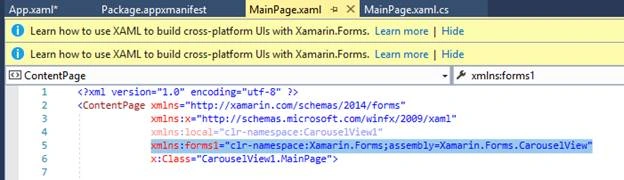
- Now, it’s time to type some lines of code.
Type the following code in the XAML file, which is defined below.
- <StackLayout>
- <Label Text="Carousel View" HorizontalOptions="Center" VerticalOptions="CenterAndExpand" />
- <forms1:CarouselView x:Name="MainCarouselView">
- <forms1:CarouselView.ItemTemplate>
- <DataTemplate>
- <Image Source="{Binding .}"></Image>
- </DataTemplate>
- </forms1:CarouselView.ItemTemplate>
- </forms1:CarouselView
- lt;/StackLayout>


Mohanad ObaidPosted Jul 17, 2020, 2:53 PM
And you should use the following code in XAML : <controls:CarouselViewControl x:Name="mmlist" Orientation="Horizontal" InterPageSpacing="10" VerticalOptions="FillAndExpand" HorizontalOptions="FillAndExpand"> <controls:CarouselViewControl.ItemTemplate> <DataTemplate> <Image Source="{Binding imgPath}" WidthRequest="300" HeightRequest="300"/> </DataTemplate> </controls:CarouselViewControl.ItemTemplate> </controls:CarouselViewControl>
Mohanad ObaidPosted Jul 17, 2020, 2:52 PM
Hi the plugin has been updated , so you need to install the following plugin ( CarouselView.FormsPlugin )
Mohammad AssafPosted Feb 18, 2020, 10:29 AM
Hello, I cant found "Forms.CarouselView" library. Please help. Thank you for your article