

Reference: Keycloak as a Unified IAM Broker
Introduction
As organizations scale their Identity and Access Management (IAM) systems, managing multiple tenants, identity providers, clients, and configurations becomes increasingly complex.
Manual configuration through the Keycloak UI or procedural scripting via APIs leads to:
Configuration drift
Environment inconsistencies
High operational overhead
Increased risk of human error
To solve this, automation becomes essential.
In this article, we explore:
What is Keycloak Admin API
What is KeycloakConfigCLI
How to use a template-driven approach for tenant onboarding
Comparison between both approaches
Best practices for scalable IAM automation
1. What is Keycloak Admin API?
The Keycloak Admin REST API is an interface provided by Keycloak to programmatically manage:
Realms
Clients
Users
Roles
Identity Providers
Authentication flows
Example: Create a Realm
POST /admin/realms
Authorization: Bearer <token>
Content-Type: application/json

{
  "realm": "demo-realm",
  "enabled": true
}
How Admin API Works
You make REST calls in sequence
You handle dependencies manually
You manage tokens and authentication
You build orchestration logic

Challenges with Admin API
❌ Imperative (step-by-step execution)
❌ Requires orchestration (ordering matters)
❌ Not idempotent (duplicate runs may fail)
❌ Hard to maintain at scale
❌ Complex error handling
2. What is KeycloakConfigCLI?
KeycloakConfigCLI is a declarative tool that allows you to configure Keycloak using:
JSON
YAML
Instead of writing API calls, you define the desired final state, and the CLI applies it.
How It Works
Bash:
keycloak-config-cli --import
Reads configuration files
Compares with current Keycloak state
Applies only necessary changes
Ensures idempotency

Example: Realm Configuration
{
  "realm": "demo-realm",
  "enabled": true,
  "clients": [
    {
      "clientId": "demo-client",
      "protocol": "openid-connect"
    }
  ]
}
3. Template-Driven Tenant Provisioning
Problem
Onboarding multiple tenants manually leads to:
Repeated configurations
Inconsistent setups
Time-consuming deployments
Solution: Template-Driven Approach
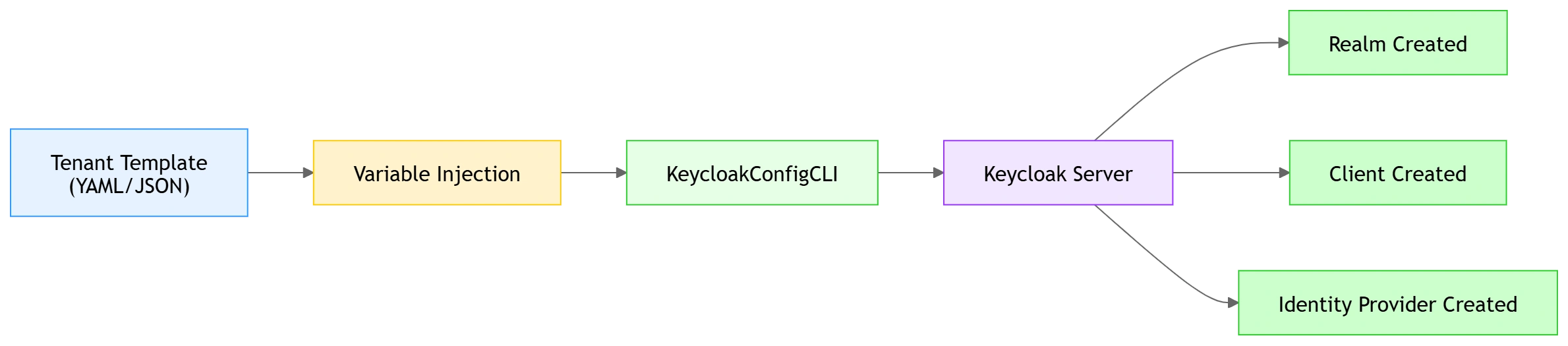
Instead of creating tenants manually, define a reusable template:
Template Example
realm: ${REALM_NAME}
enabled: true

clients:
  - clientId: ${CLIENT_ID}
    protocol: openid-connect
    redirectUris:
      - ${REDIRECT_URI}

identityProviders:
  - alias: ${IDP_ALIAS}
    providerId: saml
    config:
      entityId: ${ENTITY_ID}
Dynamic Variables
| Variable | Description |
|---|---|
${REALM_NAME} | Tenant-specific realm |
${CLIENT_ID} | Client identifier |
${IDP_ALIAS} | Identity provider name |
${ENTITY_ID} | SAML entity |
Tenant Onboarding Workflow
Template → Replace variables → Apply CLI → Tenant createdExample Execution
export REALM_NAME=tenant1
export CLIENT_ID=tenant1-client

keycloak-config-cli --import
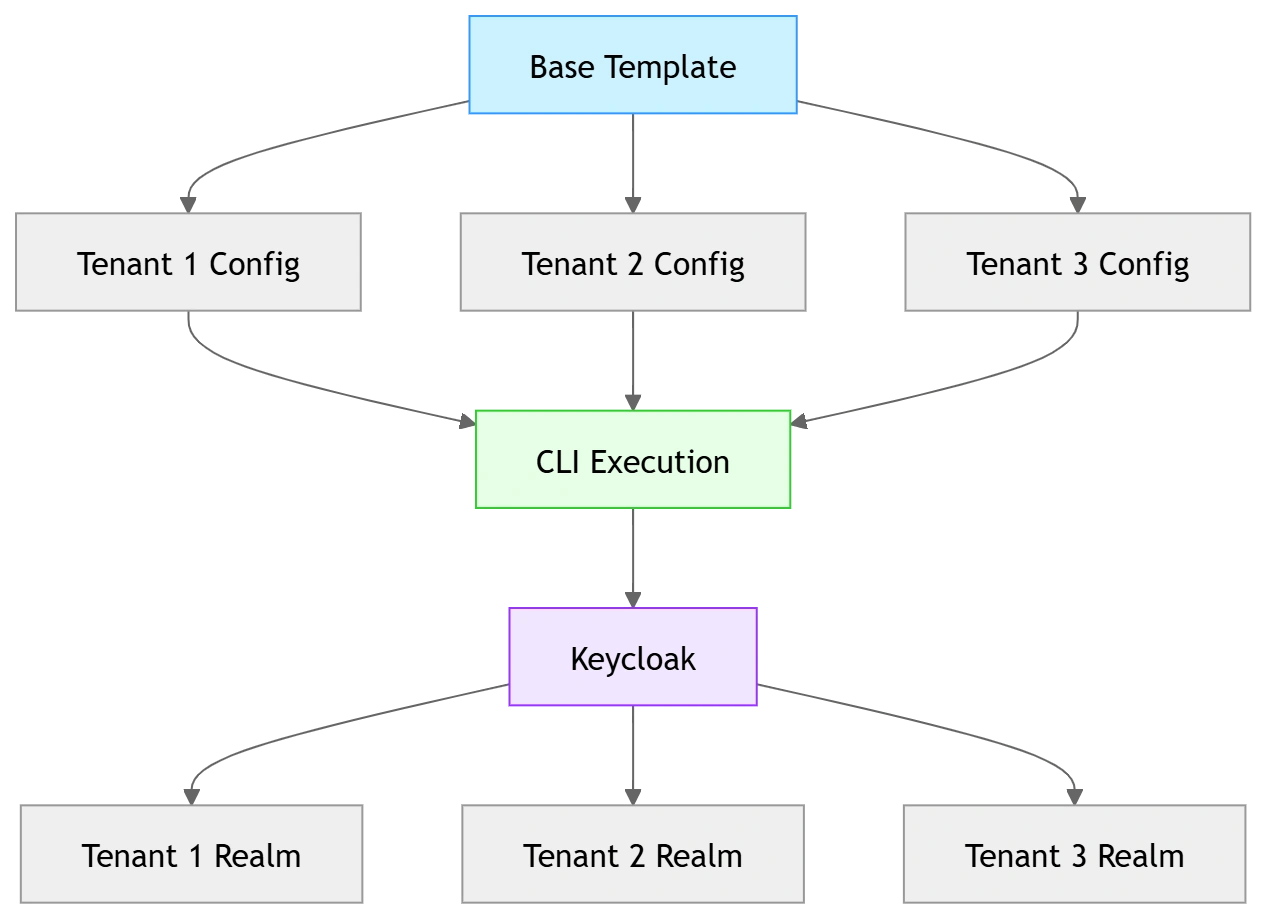
4. Multi-Tenant Provisioning Using Templates
Folder Structure
keycloak-config/
├── base-template.yaml
├── tenants/
│   ├── tenant1.env
│   ├── tenant2.env
Execution Script
for tenant in tenants/*.env
do
  source $tenant
  keycloak-config-cli --import
done
Result
✔ Multiple tenants created automatically
✔ Consistent configuration
✔ Zero manual UI work
5. KeycloakConfigCLI vs Admin API
| Feature | Admin API | KeycloakConfigCLI |
|---|---|---|
| Approach | Imperative | Declarative |
| Idempotency | ❌ No | ✔ Yes |
| Complexity | High | Low |
| CI/CD Friendly | Limited | Excellent |
| Maintenance | Hard | Easy |
| Scaling Tenants | Difficult | Simple |
| Error Handling | Manual | Built-in |

6. When to Use Each Approach
Use Admin API when:
Dynamic runtime changes are needed
User-level operations
Real-time updates
Use KeycloakConfigCLI when:
Infrastructure setup
Tenant onboarding
Environment provisioning
CI/CD pipelines
7. CI/CD Integration Example
- script: |
    docker run --rm \
      -e KEYCLOAK_URL=$(keycloakUrl) \
      -e KEYCLOAK_USER=$(username) \
      -e KEYCLOAK_PASSWORD=$(password) \
      -v $(System.DefaultWorkingDirectory)/config:/config \
      adorsys/keycloak-config-cli:latest
8. Benefits of Template-Driven Keycloak Automation
✔ Consistent environments (Dev / QA / Prod)
✔ Faster onboarding of new tenants
✔ Reduced manual effort
✔ Easy rollback using Git
✔ Improved auditability
9. Best Practices
Store configurations in Git
Use environment variables for secrets
Separate base template from tenant-specific values
Enable remote state management
Use versioning for config files
10. Conclusion
Managing IAM configurations manually or through APIs becomes increasingly difficult as systems scale.
By using:
KeycloakConfigCLI
Template-driven configuration
GitOps principles
We can achieve:
Automated tenant onboarding
Consistent IAM environments
Reduced operational overhead
KeycloakConfigCLI provides a powerful, scalable, and maintainable approach to managing identity infrastructure in modern applications.
KeycloakConfigCLI enables GitOps-style IAM configuration, allowing identity infrastructure to be treated as code, ensuring consistency, repeatability, and scalability across environments.
Join the conversation! Your thoughts help the community grow.