

Introduction
When working in Azure, especially during development or testing cycles, it’s common to spin up multiple services such as App Services, Storage Accounts, Databases, Virtual Networks, and other workloads. These resources are often used temporarily in dev/test, and if they are not removed afterward, they continue to generate unnecessary costs.
To avoid this, Azure provides a powerful service called Azure Automation, which helps you automate operational tasks across Azure and external systems. Azure Automation supports PowerShell and Python runbooks, allowing you to automate…
• Resource cleanup
• Scheduled maintenance
• Credential and certificate rotation
• Configuration management and more
In this article, we will set up an Azure Automation Runbook to remove all resources within a Resource Group (for example, blazorapp-dev01_group) that contain workloads created for development and testing purposes. The solution will automatically clean up the Resource Group according to a schedule daily, weekly, monthly, or any other frequency you choose.
This approach is ideal for:
Short-lived development environments
Testing and lab environments
Demo setups
Environments created by CI/CD pipelines for temporary testing
Architecture Overview
Azure Automation Account → Runbook (PowerShell) → Managed Identity → Azure Resource Group
When triggered manually or by schedule, the Runbook connects using the system-assigned managed identity and cleans up all resources inside the target Resource Group.
Prerequisites
Before getting started, make sure you have:
An Azure subscription
Owner/Contributor access to create resources
A resource group with dev/test resources (optional, but recommended for demo)
Implementation
Step 1: Create Azure Automation Account
1. Go to Azure Portal
2. Search for Automation Account
3. Click Create
4. Select the subscription and resource group
5. Enter a name (example: Maintenance-Job)
6. Enable System-Assigned Managed Identity
7. Click Review + Create
Step 2: Assign Permissions
Go to the Automation Account → Identity
Ensure System-assigned identity is enabled
Click Azure role assignments
Assigning the Contributor role at the resource group
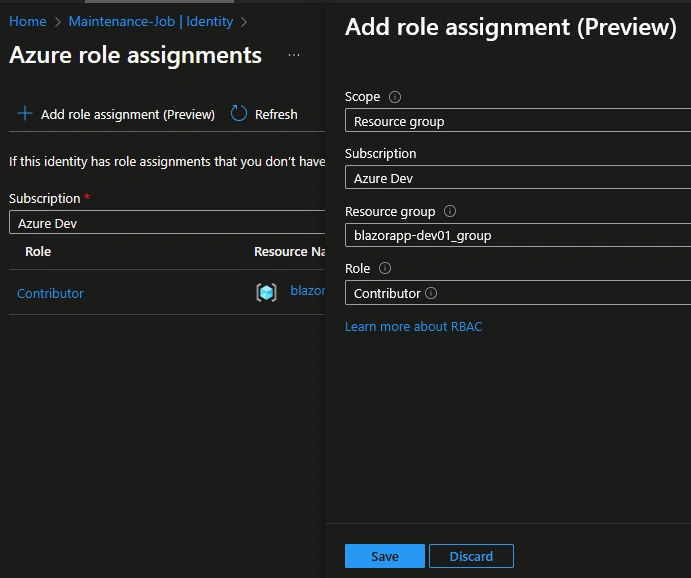
This allows the Runbook to delete resources without storing credentials.
Step 3: Create a Runbook
1. In the Automation Account, Maintenance-Job
2. Create a runbook with runbook types such as PowerShell and version 7.2. In my case, I named it remove_workload
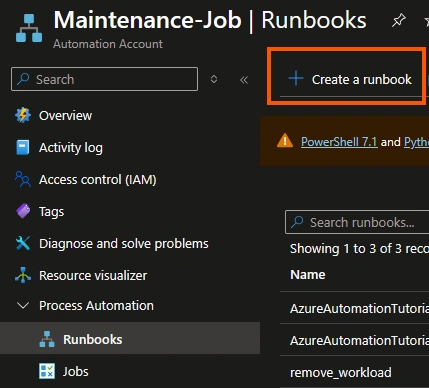
3. Add the below script and publish the runbook
$ResourceGroupName = "blazorapp-dev01_group"

Write-Output "Connecting to Azure using Managed Identity..."
Connect-AzAccount -Identity

$rg = Get-AzResourceGroup -Name $ResourceGroupName -ErrorAction SilentlyContinue

if (!$rg) {
    Write-Error "Resource group '$ResourceGroupName' not found."
    exit 1
}

$resources = Get-AzResource -ResourceGroupName $ResourceGroupName

if ($resources.Count -eq 0) {
    Write-Output "No resources to delete. Resource group is empty."
    exit 0
}

Write-Output "Deleting $($resources.Count) resources from resource group $ResourceGroupName..."

foreach ($resource in $resources) {
    try {
        Write-Output "Removing resource: $($resource.Name) ($($resource.ResourceType))..."
        Remove-AzResource -ResourceId $resource.ResourceId -Force -ErrorAction Stop
        Write-Output "Successfully deleted: $($resource.Name)"
    }
    catch {
        Write-Error "Failed to delete resource $($resource.Name). Error: $_"
    }
}

Write-Output "Resource cleanup completed successfully."
The above script will remove all the workload under the blazorapp-dev01_group resource group. Make sure you replace it with your resource group.
Step 3: Create a Schedule
1. Go to the newly created Runbook, under resources -> Schedules, and add a schedule
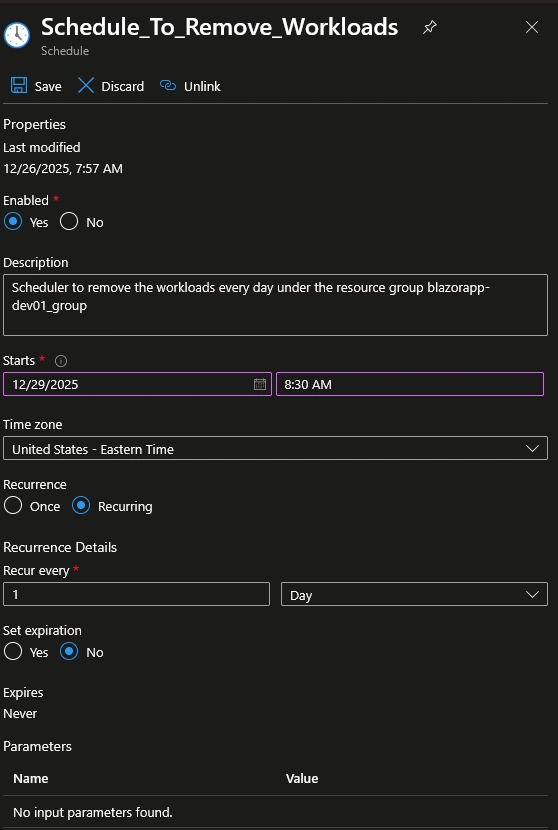
2. Based on the above setting, the job will be run every day at 8:30 AM
Summary
Azure Automation provides a seamless way to perform operational tasks without manual effort. By automating resource cleanup for development and testing environments, you not only reduce cloud waste and costs but also improve governance and maintain a clean subscription. With just a few steps, you can create a system that operates automatically and consistently, allowing you to focus on development rather than maintenance.
Join the conversation! Your thoughts help the community grow.