

What is Azure Agent Factory
Azure Agent Factory is a set of tools and services in Azure AI Foundry that helps you build AI agents that can actually do work, not just chat. These agents can read data, call APIs, trigger workflows, and safely act inside your business systems to deliver real outcomes.
Why Agent Factory is useful
Many teams struggle to move from a demo chatbot to a real production agent that is secure, reliable, and connected to internal systems. Agent Factory solves this by giving you a standard way to design, test, secure, and monitor agents, so you can go from idea to production faster.
Core building blocks
AI agents
An AI agent is a smart assistant that can understand natural language, reason through steps, and decide which tools to call to complete a task. Instead of just generating text, it uses tools to search data, update records, send messages, or start workflows.
Image source: ai.azure.com
Tools
Tools are how an agent “takes action” in the real world. Examples include:
Searching a document index
Calling a REST API
Running a script or function
Creating a ticket in a CRM or IT system
Agent Factory makes it easy to plug tools into agents and control how and when they can be used.
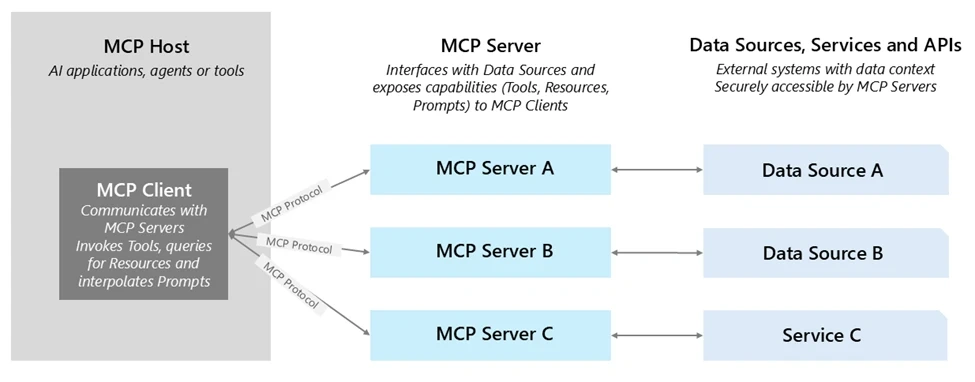
Image source: Microsoft.com
Connectors
Through Azure Logic Apps and other integration services, Agent Factory can connect agents to more than 1,400 SaaS and on‑premises systems such as Salesforce, ServiceNow, SAP, and more. This means you can orchestrate complete business workflows without building every integration from scratch.
Built-in tools vs custom tools
Built-in tools
Azure AI Foundry provides many ready-made tools so you can see value quickly. Common examples include:
Enterprise search over internal content
Web and knowledge retrieval
Data and code execution tools for analysis
These are ideal for first use cases like internal copilots, FAQ assistants, and data Q&A agents.
Image source: Microsoft.com
Custom tools for your business
Every organization has unique systems. Agent Factory lets you expose those systems as custom tools using standards like OpenAPI or Model Context Protocol (MCP). You can wrap internal microservices, databases, RPA flows, or partner APIs and reuse them across many agents.
Because tools run inside Azure’s identity, logging, and policy framework, you keep control over who can trigger what and under which conditions.
Governance, security, and control
Enterprise-grade security
Agents in a company must respect access control, least privilege, and compliance rules. Agent Factory integrates with Microsoft Entra ID so agents and tools run under managed identities and follow your existing security model.
You can
Limit which tools an agent can use
Restrict which users or apps can call an agent
Keep data and execution inside your chosen regions and boundaries
Observability and auditing
Every tool call made by an agent can be logged with inputs, outputs, duration, and status. This gives you an audit trail to investigate issues, prove compliance, and understand how agents behave in production.
These logs also help developers improve agent prompts, tool configurations, and fallback behaviors over time.
From prototype to production
Simple build flow
A typical journey with Agent Factory looks like this:
Define the business goal (for example, “triage support tickets” or “prepare sales briefs”).
Choose or build the tools and connectors the agent will need.
Design the agent’s instructions and behavior in Azure AI Foundry.
Test the agent against sample scenarios and trace its tool calls.
Add security policies, logging, and evaluation.
Deploy and monitor in production, then iterate.
Example impact
Customers highlighted in Microsoft materials report faster delivery of AI agents and shorter time‑to‑value by reusing Agent Factory tools, connectors, and governance instead of building everything from scratch. They turn pilots into stable, enterprise‑ready agents more quickly and with less risk.
Why Agent Factory matters now
Enterprises are moving from simple copilots to “agentic” applications that can handle complex, multi‑step work across systems. Azure Agent Factory gives teams a safe, repeatable way to build these agents using the same cloud platform, security, and DevOps practices they already know.
Join the conversation! Your thoughts help the community grow.