

Overview of Elastic Jobs
Azure SQL Database Elastic Jobs enables users to automate and schedule administrative tasks across multiple Azure SQL Databases. Tasks such as schema updates and user management can be efficiently handled. Elastic Jobs provides a centralized mechanism for workload management, ensuring consistency and reducing manual effort.
Elastic Jobs are very beneficial in environments with many databases, where individual management can become overwhelming.
Elastic Jobs have been there in Azure for many years in Preview. Fortunately, they went to GA recently which means you can now leverage Elastic Jobs for your production workloads.
Real-world Use Case: Automating User Creation Across SQL Databases.
Automate the process of creating/managing database scope users, custom roles, and assigning roles to users across multiple databases.
Below is a conceptual diagram that shows you the SQL DB setup for one environment, which is DEV.
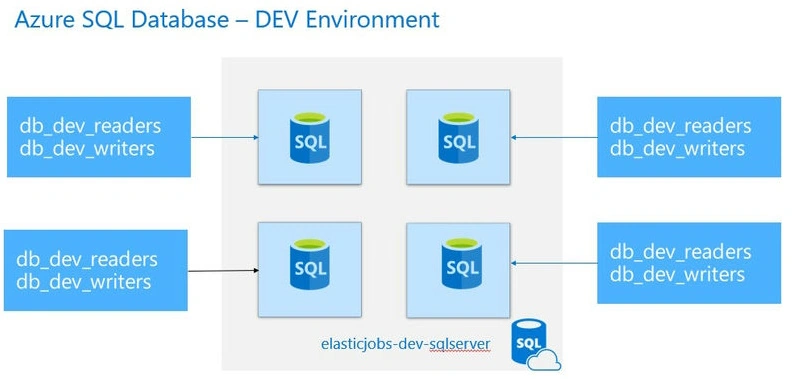
User Creation Across SQL Databases: Challenges
- Managing Multiple Databases: Keeping track of all SQL databases and ensuring the user creation process is consistent across them can be difficult.
- Role Assignments: Assigning the correct roles to users in each database can be prone to errors if done manually.
- Scalability: As the number of databases increases, managing user creation becomes more complex and time-consuming.
- Azure Entra Integration: Ensuring proper synchronization between Microsoft Entra groups and SQL databases may involve technical complexities.
- Operational Overhead: Without automation, the repetitive task of user creation across multiple databases can take up significant time and effort.
- Auditing and Monitoring: Tracking user creation and ensuring compliance with organizational policies across databases can be challenging.
Automating User Creation Across SQL Databases: Solution
- Centralized User Management: Use Azure Entra Groups to manage user access and roles centrally, reducing manual intervention.
- Automation Scripts: Develop scripts T-SQL to automate user creation and role assignments across all databases.
- Scheduled Execution: Use a scheduling tool that can connect to all the SQL Databases and run the T-SQL Scripts at a scheduled frequency.
Fortunately, Microsoft Azure has a native solution that assists in automating/scheduling the Jobs seamlessly across.
- Single Azure SQL Database
- Multiple Databases in different Subscriptions
- Multiple Databases in different Elastic Pools.
Before we start learning about Elastic Jobs, let’s first set up the elements to simulate the real-world infrastructure in the below pre-requisites section.
Pre-requisites
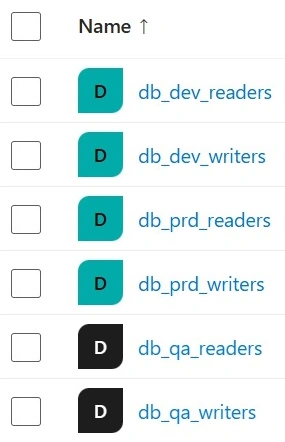
- Create Microsoft Entra Security Groups.
- Create Microsoft Entra – Security Groups db_<env>_readers and db_<env>_writers.
Below is what your Security Groups Should look like,
Job Database
Create an SQL Server named (az-elastic pool-common-SQL server) with an Empty Database named az-elasticpool-sqldb with Standard S1 or above. This SQL Database will be used while creating the Elastic Pool – Agent. You can create this in a Resource Group named az-elasticpool-common-rg, which is common for all Environments.
Assigning API Permissions to Managed Identity using PowerShell
- Create A user-assigned Managed Identity named az-elastic pool-use in the az-elasticpool-common-rg resource group. This Managed Identity will be assigned to Elastic Job Agent in the later stages.
- Provide Permissions to User Assigned Managed Identity.
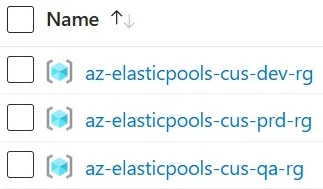
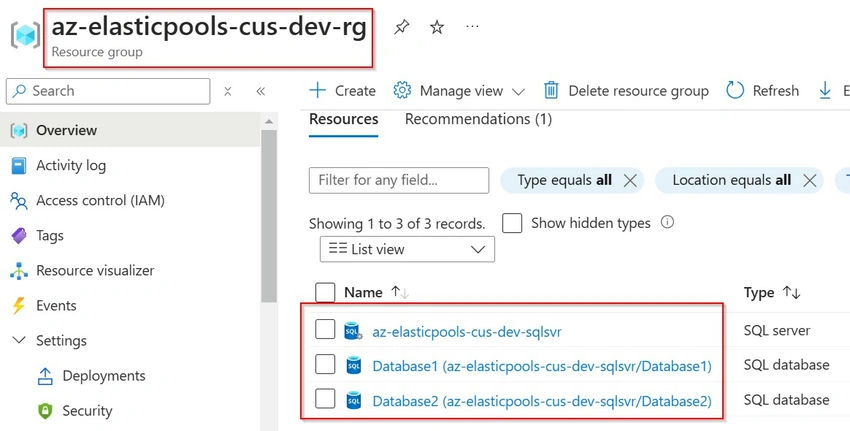
Set up three Environments in three different Resource Groups. In each resource group, create one SQL Server and two Databases. Below is what the DEV RG looks like.
Below is how resources are provisioned in each resource group. Below is a reference to DEV Environment.
Create Database-Scoped Users for Microsoft Entra Security Groups.
Create a User and Assign appropriate permissions in each Database using T-SQL.
Ref: Create Database-Scoped Users for Microsoft Entra Security Groups
Note. The above Database-Scoped User creation is a one-time thing that is required to provide permissions for the Elastic Job to execute the T-SQL Scripts in all the SQL Databases associated with the Target Group. Don’t confuse the above users with the users in the User Management Use Case that we are handing out in this article. In the Article reference, I have shown how to provide db_datareader and db_datawriters roles. However, you need to provide the appropriate permissions based on what the T-SQL does.
We have now completed setting up the prerequisites. It’s now time to implement the solution of automating the users in all the databases by exploring the components of Elastic Jobs and implementing them.
Elastic Jobs - Components - It’s now time to understand the components of Elastic Jobs.
Below is the Architecture Diagram from Microsoft.
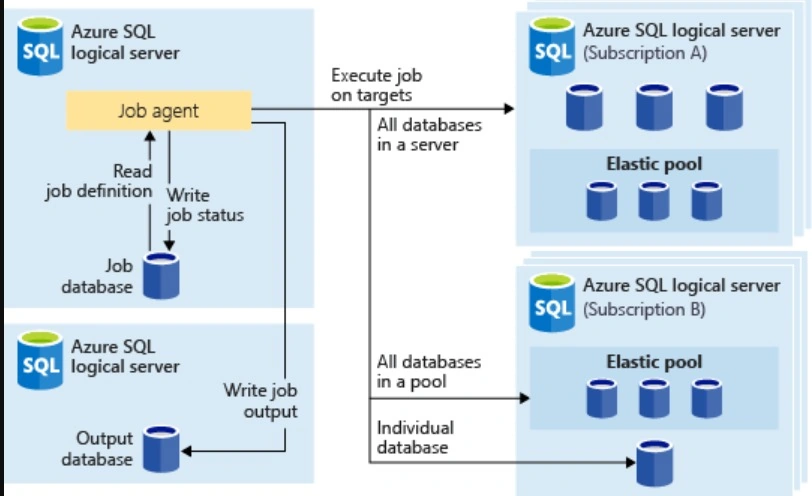
Components for elastic jobs
Below are the components for elastic jobs.
| Component | Description |
| Elastic Job Database | A database in Azure SQL Database that the job agent uses to store job-related data, job definitions, etc. You need to create an Empty Azure SQL Database and choose the same while creating the Elastic Job Agent next. |
| Elastic Job Agent |
The Azure resource you create to run and manage Jobs. While Creating the Agent. Choose the SQL Database, which acts as the Job Database that contains all the metadata about Jobs, Job Steps, and the information about the schedule in which the Jobs would run. Managed Identity – Select the appropriate MI that is used to run the Queries in the Target SQL Databases, which are part of the Target Group explained later. |
| Job & Steps | A job is a unit of work that is composed of one or more job steps. Job steps specify the T-SQL script to run, as well as other details required to execute the script. |
| Target Group |
The set of servers, pools, and databases to run a job against. All the Scripts configured in the Job Steps will be executed in the SQL Databases selected in the Target Group. You can also specify which databases to include and exclude. |
Steps for Creating Elastic Jobs and all its components
Let’s now head over to Azure Portal, create all the Elastic Jobs components, and implement a solution for our scenario discussed earlier.
Create Elastic Job Agent
Search for Elastic Job Agents and create a new Job Agent by providing the information below.
| Field | Value |
| Subscription | Select any subscription |
| Resource Group | az-elastic pool-common-rg |
| Elastic Job Agent Name | az-elastic pool-user mgmt-job agent |
| SQL Server | az-elastic pool-common-sql server |
| Job Database | az-elastic pool-sqldb |
| Service Tier | JA 100 |
| Identity | Click on the Add User assigned Managed Identity button and select the az-elasticpool-usmi |
In the final step, review all the provided values and create the Elastic Job Agent resource.
Target Group
Click on the Target Group menu and click on the Create button by providing the Target Group as SQLDB-UserManagement-TargetGroup. Once the Target Group is created, we need to select the Members. Click on the Create button and then provide the information below.
Join the conversation! Your thoughts help the community grow.