

Question 1: Variables and its Declaration
Answer
A variable is an entity whose value can keep changing. For example, the age of a student, the address of a faculty member and the salary of an employee are all examples of variables.
In C# a variable is a location in the computer's memory that is identified by a unique name and is used to store a value. The name of the variable is used to access and read the value stored in it. Various types of data such as a character, an integer or a string can be stored in variables. Based on the type of data that needs to be stored in a variable, variables can be assigned various data types.
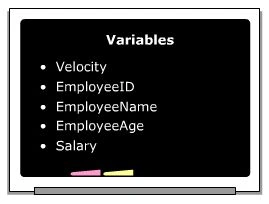
In C#, memory is allocated to a variable at the time of its creation. When you are referring to a variable, you are actually referring to the value stored in that variable.
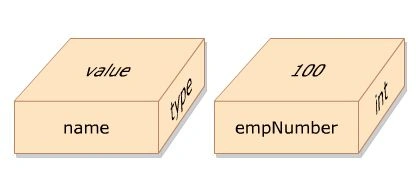
Syntax The following syntax is used to declare variables in C#:
<Data type> <variable Name>;
Where:
Datatype: Is a valid data type in C#.
VariableName: Is a valid variable name.
The following syntax is used to initialize variables in C#:
<VariableName> = <value>;
=: Is the assignment operator used to assign values.
Value: Is the data that is stored in the variable.
Snippet and Example
The following snippet declares two variables, namely empNumber and empName.
int empNumber;
String empName;
The preceding lines declare an integer variable, empName, and a string variable, empName.
Memory is allocated to hold data in each variable.
Values can be assigned to variables using the assignment operator (=) as shown below.
empNumber=100;
empName="David Blake";
You can also assign a value to a variable upon creation, as shown below.
Int empNumber=100;
Variable Naming Rules
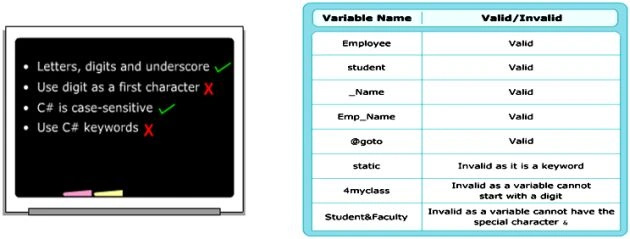
A variable needs to be declared before it can be referenced. You need to follow certain rules when declaring a variable:
- A variable name can begin with an upper case or a lower case letter. The name can contain letters, digits and the underscore character (_).
- The first character of the variable name must be a letter and not a digit. The underscore is also a legal first character, but it is not recommended at the beginning of a name.
- C# is a case-sensitive language; hence the variable names "count" and "Count" refer to two separate variables.
- C# keywords cannot be used as variable names. If you still need to use a C# keyword then prefix it with the '@' symbol.
Declaration
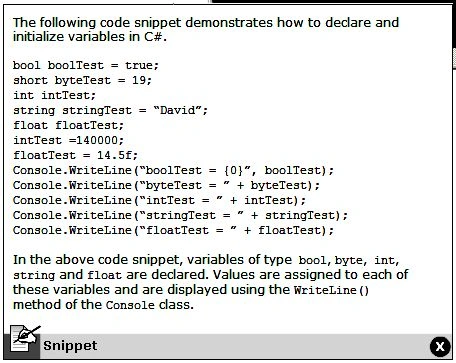
In C#, you can declare multiple variables at the same time in the same way you declare a single variable. After declaring variables, you need to assign values to them. Assigning a value to a variable is called initialization. You can assign a value to a variable while declaring it or at a later time. The following code snippet demonstrates how to declare and initialize variables in C#.
Question 2: Constant and its Declaration.
Answer
A constant value cannot be changed at compile time and runtime.
Need For Constant
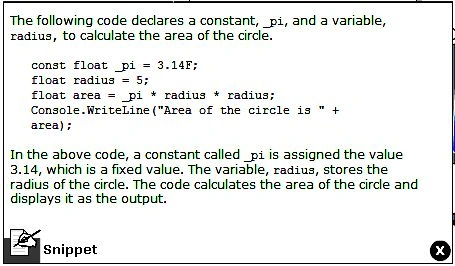
Consider code that calculates the area of a circle. To calculate the area of the circle, the value of PI, ARC, and RADIUS must be provided in the formula. The value of PI is a constant value. This value will remain unchanged irrespective of the value of the radius provided.
Similarly, constants in C# are fixed values assigned to identifiers that are not modified throughout the execution of the code. They are defined when you want to preserve values to reuse them later or to prevent any modification to the values.
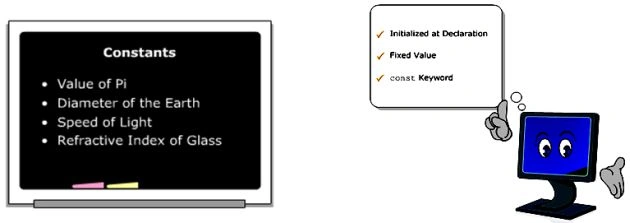
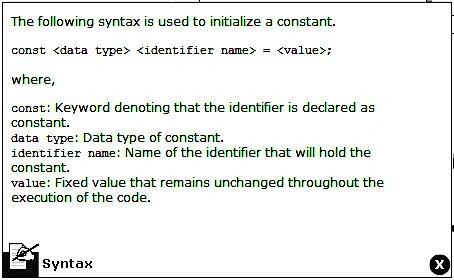
In C#, you can declare constants for all data types. You need to initialize a constant at the time of its declaration. Constants are declared for value types rather than for reference types. To declare an identifier as a constant, the const keyword is used in the identifier declaration. The compiler can identify constants at the time of compilation because of the const keyword.
Question 3: Data Types
Answer
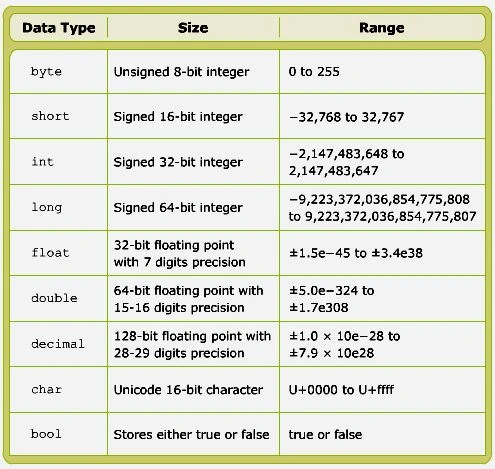
You can store various types of values, such as numbers, characters or strings in different variables. But the compiler must know what kind of data a specific variable is expected to store. To identify the type of data that can be stored in a variable, C# provides many data types. When a variable is declared, a data type is assigned to the variable. This allows the variable to store values of the assigned data type. In the C# programming language, data types are divided into two categories. These are:
1. Value Types
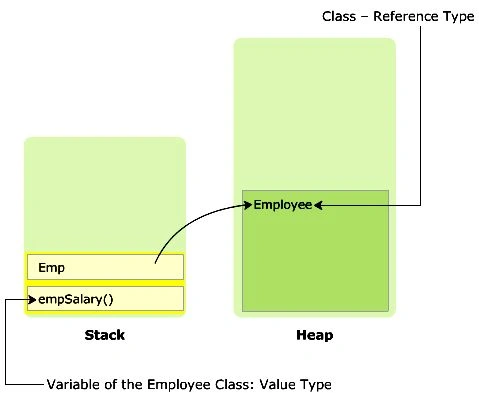
Variables of value types store actual values. These values are stored in a stack. The values can be either of a built-in data type or a user-defined data type. Most of the built-in data types are value types. The value type built-in data types are int, float, double, char and bool. Stack storage results in faster memory allocation to variables of value types.
2. Reference Types
Variables of reference type store the memory address of other variables in a heap. These values can either belong to a built-in data type that is a reference type. Most of the user-defined data types such as class are reference types.
Classification
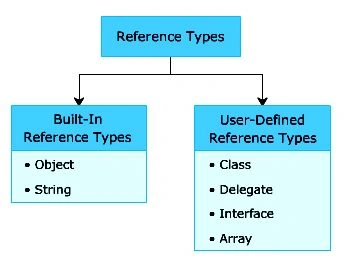
Reference data types store the memory reference of other variables. These other variables hold the actual values. Reference types can be classified as:
- Object
- String
- Class
- Delegate
- Interface
- Array
Object
Object is a built-in reference data type. It is a base class for all predefined and user-defined data types. A class is a logical structure that represents a real world entity. This means that the predefined and user-defined data types are created based on the Object class.
String
String is a built-in reference type. A String type signifies Unicode character string values. Once strings are created, they cannot be modified.
Class
A class is a user-defined structure that contains variables and methods. For example, the Employee class can be a user-defined structure that can contain variables such as empSalary, empName, and CalculateSalary (), that return the net salary of an employee.
Delegate
A delegate is a user-defined reference type that stores the reference of one or more methods.
Interface
An interface is a type of user-defined class for multiple inheritances.
Array
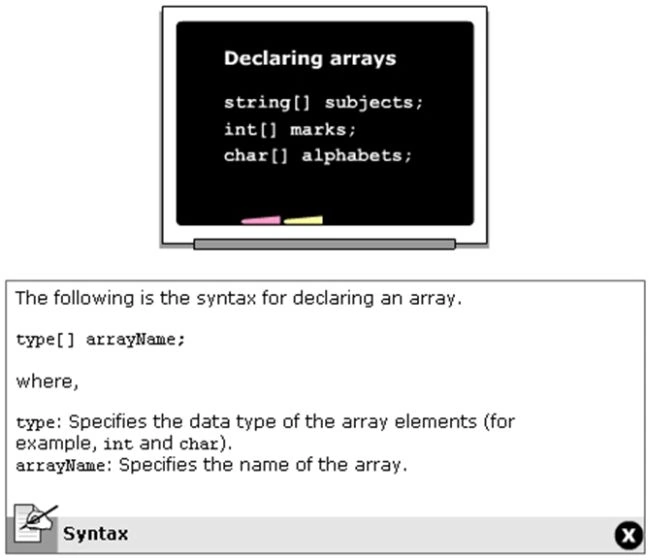
An array is a user-defined data structure that contains values of the same data type, such as marks as marks of students.
Question 4: Using Literals
Answer
A literal is a static value assigned to variables and constants. You can define literals for any data type of C #. Numeric literals might be suffixed with a letter to indicate the data type of the literal. This letter can be either in upper or lower case. For example, in the following declaration, string bookName = "Csharp", Csharp is a literal assigned to the variable bookName of type string.
In C#, there are six types of literals. These are:
- Boolean Literal
- Integer Literal
- Real Literal
- Character Literal
- String Literal
- Null Literal
1. Boolean Literal
Boolean literals two values, true or false. For example:
bool val=true;
Where, true: Is a Boolean assigned to the variable val.
2. Integer Literal
An integer literal can be assigned to an int, unit, long or ulong data types. A suffix for integer literals includes U, L, UL, or LU. U denotes unit or ulong, L denotes long. UL and LU denote ulong. For Example:
long val = 53L;
Where, 53L: Is an integer literal assigned to the variable val.
3. Real Literal
A real literal is assigned to float, double (default), and decimal data types.This is indicated by the suffix letter appearing after the assigned value. A real literal can be suffixed by F, D, or M. F denotes float, D denotes double and M denotes decimal. For example:
float val = 1.66F;
Where, 1.66F: Is a real literal assigned to the variable val.
4. Character Literal
A character literal is assigned to a char data type. A character literal is always enclosed in single quotes. For example:
Char val = 'A';
Where, A: Is a character literal assigned to the variable val.
5. String Literal
There are two types of string literals in C#, regular and verbatim. A regular string literal is a standard string. A verbatim string literal is similar to a regular string literal but is prefixed by the @ character. A string literal is always enclosed in double quotes. For example:
String mailDomain = "@gmail.com";
Where, @gmail.com: Is a verbatim string literal.
6. Null Literal
The null literal has only one value, null. For example:
String email = null;
Where, null: Specifies that email does not refer to any objects (reference)
Question 5: Keywords
Answer
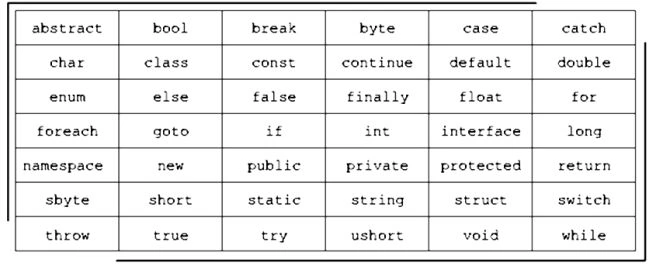
Keywords are reversed words and are separately compiled by the compiler. They convey a predefined meaning to the compiler and hence cannot be created or modified. For example, int is a keyword that specifies that the variable is of data type integer. You cannot use keywords as variable names, method names or class names unless you prefix the keywords with the "@" character. The graphic lists the keywords used in C#:
Question 6: Escape Sequence
Answer
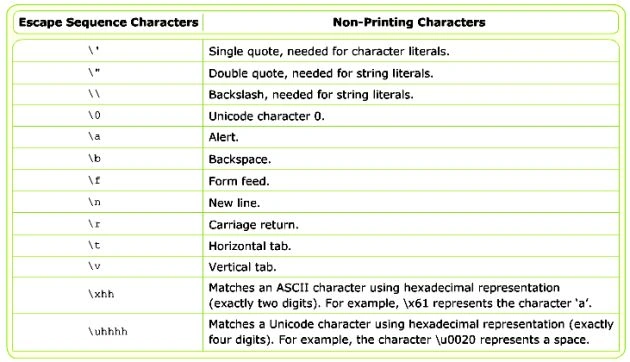
An escape sequence character is a special character that is prefixed by a backslash (\). Escape sequence characters are used to implement special non-printing character such as a new line, a single space or a backspace. This non-printing character is used while displaying formatted output to the user to maximize readability. The backslash character tells the compiler that the following character denotes a non-printing character. For example, \n is used to insert a new line similar to the Enter key of the keyboard. There are multiple escape sequence characters in C# that are used for various kinds of formatting. The table shown below displays the escape sequence characters and their corresponding non-printing characters in C#.
Question 7: Console Operation
Answer
Console operations are tasks performed on the command line interface using executable commands. The console operations are used in software applications because these operations are easily controlled by the operating system. This is because console operations are dependent on the input and output devices of the computer system.
A console application is one that performs operations at the command prompt. All console applications consist of three streams, that are a series of bytes. These streams are attached to the input and output devices of the computer system and they handle the input and output operations. The three streams are:
1. Standard Output method
- The standard out stream displays the output on the monitor.
- In C#, all console operations are handled by the console class of the system namespace. A namespace is a collection of classes having similar functionalities.
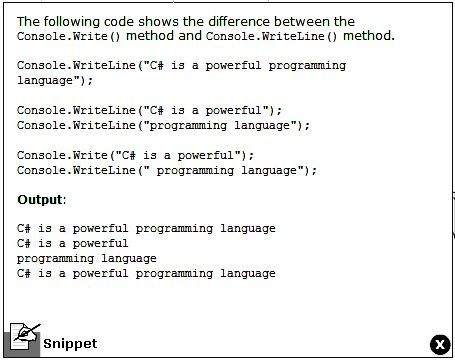
- To write data on the console, you need the standard output stream. This stream is provided by the output methods of console class. There are two output methods that write to the standard stream. They are:
Console.Write (): Writes any type of data.
Console.WriteLine (): Writes any type of data this data ends with a new line character in the standard output stream. This means any data after this line will appear on the new line.
2. Standard input method
- The standard in stream takes the input and passes it to the console application for processing.
- In C#, to read data, you need the standard input stream. This stream is provided by the input methods of the console class. These are two input methods that enable the software to take in the input from the standard input stream. These methods are:
Console.Read (): Reads a single character.
Console.ReadLine (): Read a line of strings.
DEMO For ReadMethod
namespace ReadMethod
{
    class Program
    {
        static void Main(string[] args)
        {
            string Name;
            Console.Write("Enter your Name:-");
            Name = Console.ReadLine();
            Console.WriteLine("Your Name is:-" + Name);
            Console.WriteLine("Yoyr Name is:- {0}", Name);
            Console.ReadLine();
        }
    }
}
3. Standard err method
The standard err stream display messages on the monitor.
4. Placeholders
The WriteLine ( ) and Write ( ) methods accept a list of parameters to format text before displaying the output. The first parameter is a string containing markers in braces to indicate the potion where the values of the variables will be substituted. Each marker indicates a zero-based index based on the number of variables in the list. For example, to indicate the first parameter position, you write {0}, second you write {1} and so on. The numbers in the curly brackets are called placeholders.
DEMO For Placeholder
namespace Placeholder
{
    class Program
    {
        static void Main(string[] args)
        {
            int Result, Number;
            Number = 5;
            Result = 100 * Number;
            Console.WriteLine("The result is " + Result + " when 100 is multiply by" + Number);
            Console.Write("The result is " + Result);
            Console.WriteLine(" when 100 is multiply by " + Number);
            Console.WriteLine("The result is {0} when 100 is multiply by {1}", Result, Number);
            Console.ReadLine();
        }
    }
}
5. Convert Methods
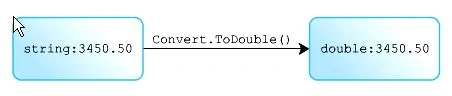
The ReadLine () method can be used to accept integer values from the user. The data is accepted as a string and then converted into the int data type. C# provides a convert class base data type.
DEMO For ConvertMethod
namespace ConvrtMethod
{
    class Program
    {
        static void Main(string[] args)
        {
            string Name;
            int Age;
            double Salary;
            Console.Write("Enter Your Name:-");
            Name = Console.ReadLine();
            Console.Write("Enter your Age:-");
            Age = Convert.ToInt32(Console.ReadLine());
            Console.Write("Enter your Salary:-");
            Salary = Convert.ToDouble(Console.ReadLine());
            Console.WriteLine("\nName is :-" + Name);
            Console.WriteLine("Age is :-" + Age);
            Console.WriteLine("Salary is :-" + Salary);
            Console.ReadLine();
        }
    }
}
Question 8: Programming Constructs or Control-Flow Statement
Answer
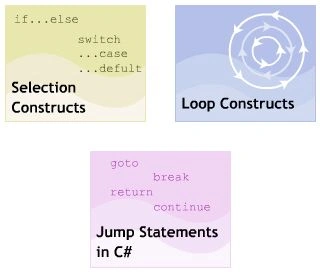
Welcome to the module C# Programming Constructs. Construct help in building the flow of a program. They are used for performing specific actions depending on whether certain is satisfied repeatedly or can transfer the control to another block.
In this module, you will learn about:
- Selection or conditional Statements
- Loop Statements
- Jump Statements in C#
Question 9: Selection or Conditional Statements
Answer
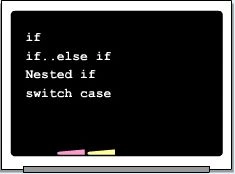
A selection construct is a programming construct supported by C# that controls the flow of a program. It executes a specific block of statements based on a Boolean condition, that is an expression returning true or false. The selection constructs are referred to as decision-making constructs. Therefore, selection constructs allow you to take logical decisions about executing different blocks of a program to achieve the required logical output. C# supports the following decision-making constructs:
- If construct
- If..else construct
- If..else if construct
- Nested if construct
- Switch.. case construct
1. If construct or statements
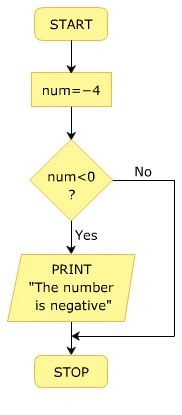
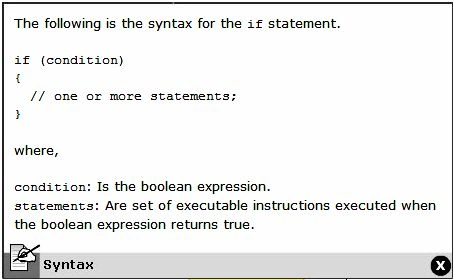
- The if statement allows you to execute a block of statements after evaluating the specified logical condition. The if statement starts with the if keyword and is followed by the condition. If the condition evaluates to true then the block of statements following the if statement is executed. If the condition evaluates to false then the block of statements following the if statements is ignored and the statement after the block is executed.
- If a statement is followed by only one statement then it is not required to include the statement in curly braces.
Syntax
Demo Program
namespace IF_Ststement
{
    class Program
    {
        static void Main(string[] args)
        {
            int No1, No2;
            Console.WriteLine("Enter Value one:-");
            No1 = Convert.ToInt32(Console.ReadLine());
            Console.WriteLine("Enter Value second:-");
            No2 = Convert.ToInt32(Console.ReadLine());
            if (No1 > No2)
            {
                Console.WriteLine("First Value is Big");
            }
            if (No1 < No2)
            {
                Console.WriteLine("Second Value is Big");
            }
            Console.ReadLine();
        }
    }
}
2. IF..Else Construct or Statements
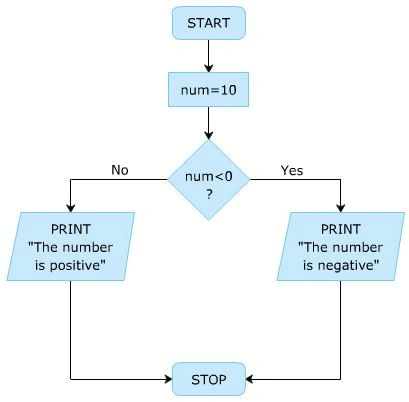
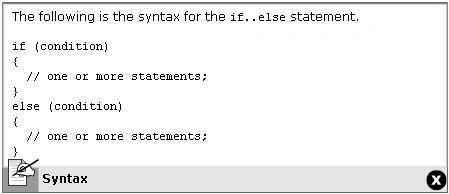
The if statements executes a block of statements only if the specified condition is true. However, in some situations, it is required to define an action for a false condition. This is done using the if..else construct.
The if..else construct starts with the if block followed by an else block. The else block starts with the else keyword followed by a block of statements. If the condition specified in the if statement evaluates to false then the statements in the else block are executed.
Syntax
Demo Program
namespace IF._._.Else_Statements
{
    class Program
    {
        static void Main(string[] args)
        {
            int No;
            Console.WriteLine("Enter Any Number:-");
            No = Convert.ToInt32(Console.ReadLine());
            if (No > 0)
            {
                Console.WriteLine("Number is Positive");
            }
            else
            {
                Console.WriteLine("Number is Negative");
            }
            Console.ReadLine();
        }
    }
}
3. If..Else If Construct or Statements
The if..else if construct allows you to check multiple conditions and it executes a different block of code for each condition. This construct is also referred to as if..else if ladder. The construct starts with the if block followed by one or more else if blocks followed by an optional else block. The conditions specified in the if..else if construct are evaluated sequentially. The execution starts from the if statement. If a condition evaluates to false then the condition specified in the following else if statement is evaluated.
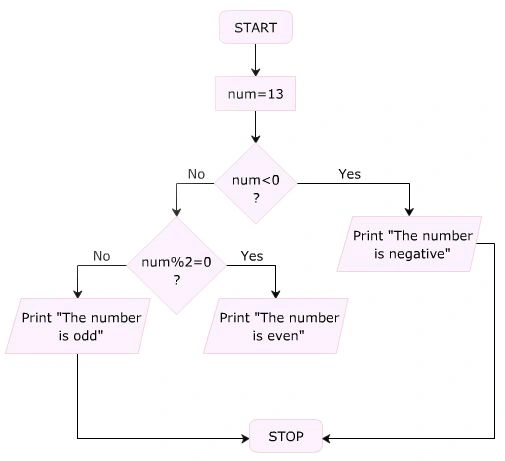
Syntax
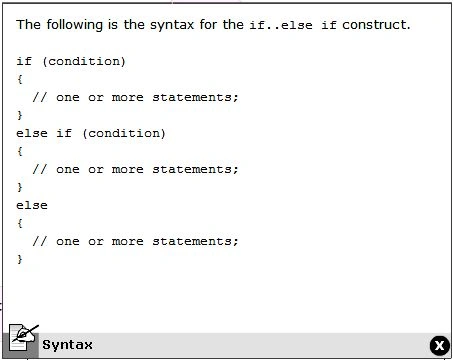
Demo Program
namespace IF._._ElseIF_Statement
{
    class Program
    {
        static void Main(string[] args)
        {
            int Num;
            Console.WriteLine("Enter Any Number:-");
            Num = Convert.ToInt32(Console.ReadLine());
            if (Num < 0)
            {
                Console.WriteLine("The Number is Negative");
            }
            else if (Num % 2 == 0)
            {
                Console.WriteLine("The Number is odd");
            }
            else
            {
                Console.WriteLine("The Number is even");
            }
            Console.ReadLine();
        }
    }
}
4. Nested If Construct or Statements
- The nested if construct consists of multiple if statements. The nested if construct starts with the if statement, that is called the outer if statements, and contains multiple if statements, that are called inner if statements.
- In the nested if construct, the outer if condition controls the execution of the inner if statements. The compiler executes the inner if statements only if the condition in the outer if statements is true. In addition, each inner if statement is executed only if the condition in its previous inner if statement is true.
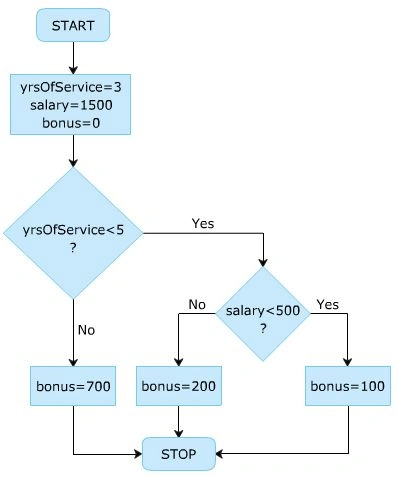
Syntax
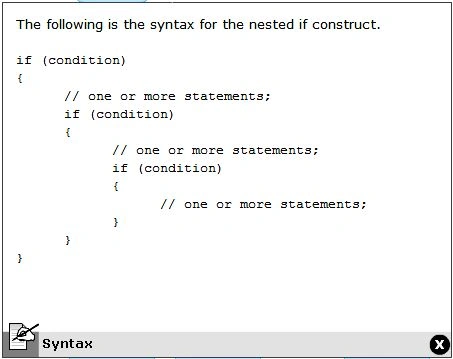
Demo Program
namespace Nested_IF_Statement
{
    class Program
    {
        static void Main(string[] args)
        {
            int Salary, Service;
            Console.Write("Enter Yrs Of Service:-");
            Service = Convert.ToInt32(Console.ReadLine());
            Console.Write("Enter Salary:-");
            Salary = Convert.ToInt32(Console.ReadLine());
            if (Service < 5)
            {
                if (Salary < 500)
                {
                    Console.WriteLine("Provided Bonus:-> 100");
                }
                else
                {
                    Console.WriteLine("Provided Bonus:-> 200");
                }
            }
            else
            {
                Console.WriteLine("Provided Bonus:-> 700");
            }
            Console.ReadLine();
        }
    }
}
5. Switch .. Case Construct or Statements
A program is difficult to comprehend when there are too many if statements representing multiple selection constructs. To avoid using multiple if statements, in certain cases the switch .. case statement can be used as an alternative.
The switch .. case statement is used when a variable needs to be compared against different values.
- Switch: The switch keyword is followed by an integer expression enclosed in parentheses. The expression must be of type int, char, byte, or short. The switch statement executes the case corresponding to the expression.
- Case: The case keyword is followed by a unique integer constant and a colon. Thus, the case statement cannot contain a variable. The lock following a specific case value match. each case block must end with the break keyword that passes the control out of the switch construct.
- Break: The break statement is optional and is used inside the switch .. case statement to terminate the execution of the statement sequence. The control is transferred to the statement after the end of switch. If there is no break then execution flows sequentially into the next case statement. Sometimes, multiple cases can be present without break statements between them.
- Default: if no case value matches the switch expression value then the program control is transferred to the default block. This is the equivalent of the "else" of the if..else if construct.
Syntax
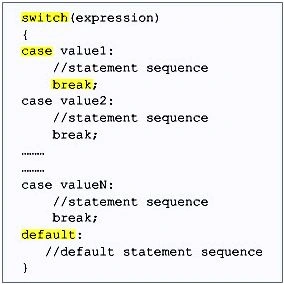
Demo Program
namespace Switch_Case
{
    class Program
    {
        static void Main(string[] args)
        {
            int Day;
            Console.WriteLine("Enter Your Choice:-");
            Day = Convert.ToInt32(Console.ReadLine());
            switch (Day)
            {
                case 1:
                    Console.WriteLine("Sunday");
                    break;
                case 2:
                    Console.WriteLine("Monday");
                    break;
                case 3:
                    Console.WriteLine("Tuesday");
                    break;
                case 4:
                    Console.WriteLine("Wednesday");
                    break;
                case 5:
                    Console.WriteLine("Thursday");
                    break;
                case 6:
                    Console.WriteLine("Friday");
                    break;
                case 7:
                    Console.WriteLine("Saturday");
                    break;
                default:
                    Console.WriteLine("Enter a Number between 1 to 7");
                    break;
            }
            Console.ReadLine();
        }
    }
}
Question 10: Loop Construct and Statements
Answer
Loops allow you to execute a single statements or a block of statements repeatedly. The most common uses of loops include displaying a series of numbers and tacking repetitive input. In software programming, a loop construct contains a condition that helps the compiler identify the number of times a specific block will be executed. If the condition is not specified then the loop continues infinitely and is called an infinite loop. The loop constructs are also referred to as iteration statements.
C# supports four types of loop constructs. These are:
- The while loop
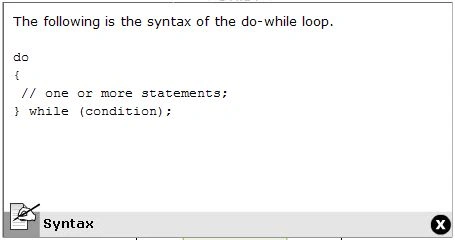
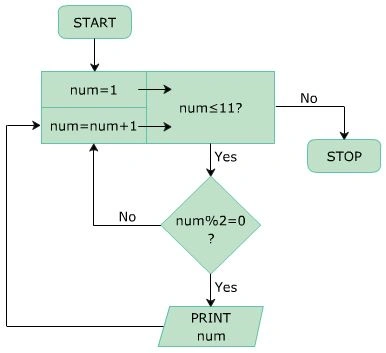
- The do..while loop
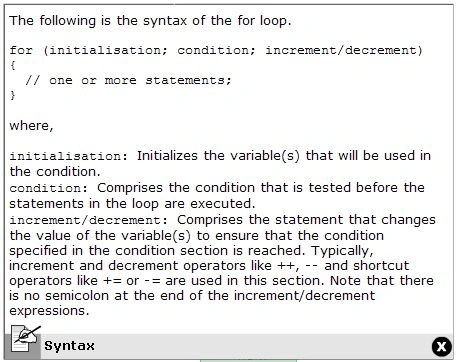
- The for loop
- The foreach loop
1. The "While" Loop
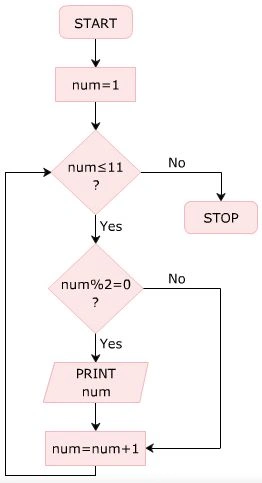
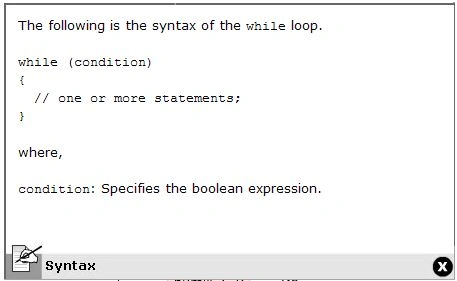
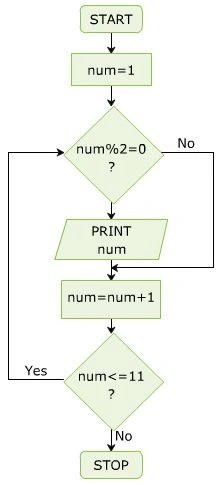
Amatya AgyeyPosted Sep 7, 2016, 6:35 AM
Great 1 .. Keep it up
Nirmal HotaPosted May 28, 2015, 7:44 AM
Good work :)
Pradeep LutarePosted Nov 12, 2013, 2:05 AM
Nice
Sourabh SomaniPosted Nov 1, 2013, 8:09 AM
Very nice article bro
Srinubabu RavillaPosted Oct 31, 2013, 12:35 AM
Very good article ... thank you... Keep posting
Siddharth JainPosted Oct 24, 2013, 8:25 AM
very good one ,....................
Abhishek MaitreyPosted Oct 24, 2013, 2:21 AM
The article is good indeed. Good efforts.
Santosh KumarPosted Oct 21, 2013, 6:54 AM
Very nice clarification.
Mahesh ChandPosted Oct 19, 2013, 7:21 AM
Very nice. I do love presentation and screens. Very clear. Good effort.
ketan italiyaPosted Oct 19, 2013, 5:55 AM
superb article .....thanks
Kiran Kumar TalikotiPosted Oct 18, 2013, 8:14 AM
Great Article. Revised C# Fundamentals Again :)
ganesan lingaduraiPosted Oct 18, 2013, 3:09 AM
very nice super article do this for oops concept.
Ravi ShekharPosted Oct 17, 2013, 11:43 PM
really great article.
Vidya Vrat AgarwalPosted Oct 17, 2013, 11:39 PM
Aakash, this is great effort. I do appreciate your passion.