

Abstract
This article provides a broad overview of the review process for the code written in C# using Visual Studio 2015 and also uncovers best practices for code review.
Code Review is a very important part of any developer’s life. Code review is a technique which allows another developer (not necessarily working in same team or same feature within a team) to go over-n-through your code line-by-line and identify areas for improvement or point out holes. Hence, code review is a process and not a technology. However, there are some developer productivity tools available (mentioned later in this article) which can enable a developer to write good quality code.
Disclaimer
There are numerous guidelines and best practices software development teams follow and depend on. This article will uncover most of those but it may not cover all the best practices around code review. However, I want to assure you that all the guidelines mentioned below will help any individual to practice and apply good coding principles and perform a quality code review.
Is it a must to have my code reviewed by other devs?
Well, you must. But it depends on your team’s development methodology and ALM (Application Lifecycle Management) tool settings. There are ways to bypass the code review by simply just not doing it and straight checking-in the code. It’s not recommended though.
What if my code is not reviewed?
It’s hard to say, but at times and in some cases it might cause serious issues and raise concerns for the whole team. For instance, a condition check is missed, or null is not handled properly or not all error situations are being handled by your exception handling block. Well, these examples might sound very simple and most of the developers do write defensive code and cover such aspects. But what code review can also provide value towards is your “design”, “techniques”, “patterns”, “approach” etc.
How to find a code reviewer
I have worked in various team settings and work environments. Many times I have been invited to perform a code review for a developer who is not part of my team, or rather, I am not part of their team. But what I admire and appreciate here is the fact that someone reached out to another dev in case their team’s developer is either not available or busy with critical production issues, etc. Such a mindset empowers the team to deliver the best written code.
Let’s Begin with Best Practices of Code Review
Here, I am going to list out some areas which are critical from a code review perspective. I tried to highlight the core best practices which are a must in any code review. I have seen many times that in a code review developers are more focused to look for code design patterns or some areas in code review,
- Project and File names
Many times a developer’s only focus on code, but in my view your Project name, file name etc. also matters a lot. It’s not sufficient to deliver well written functional code; a well-defined project and file name is equally important and brings a lot of clarity by offering a sense of purpose being served by a solution, project or a file. For instance see the solution and project name as shown in the image below.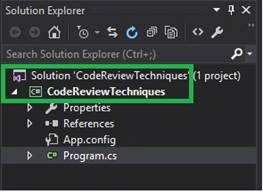
Figure 1 - Properly named Solution and Project - Always begin from the top
Before you really start scanning through the code blocks/statements in a class (.cs) file; I would recommend that you must 1st look at the “using” statements in any .cs file. I have personally observed that many times developers add numerous “using” statements while trying various code blocks to achieve the functionality. But once that functionality is accomplished; many developers tend to forget about cleaning up references of those “using” statements which are no longer needed now and must be removed.
Visual Studio 2015 shows unused using statements in gray color which can be safely removed as shown in the image below.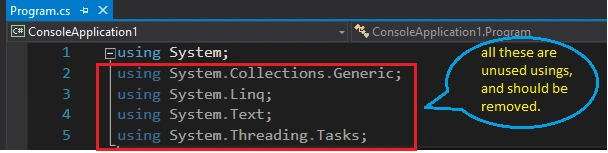
Figure 2 - Un-used using statements are greyed out by default in Visual Studio 2015 - Sort all the using statements
Usual development practice is that we keep adding new using statements at the end of previous ones, for instance as shown in the image below.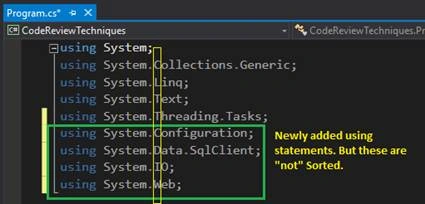
Figure 3 - Newly added using statements
Let’s assume that code is consuming all of the added using statements, but the issue is that these are not sorted. One of the coding best practices is to Sort all using statements. To sort using statements right-click in code editor windows and click on “Organize Usings” then click on “Sort Usings”.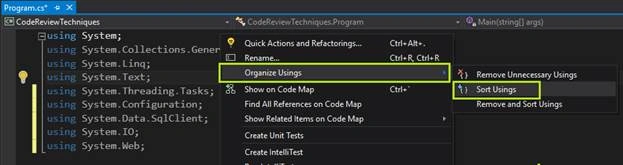
Figure 4 - Sort Usings option in Visual Studio 2015
After performing the “Sort Usings” all the using statements will be alphabetically sorted (this is the only order A Z) and will be arranged as shown in the image below.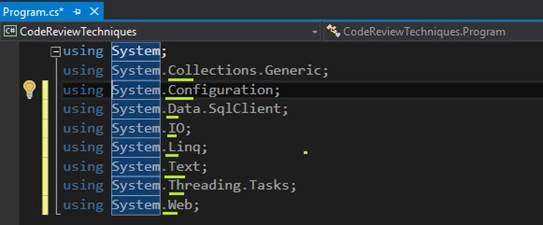
Figure 5 - Alphabetically Sorted Using statement. - Don’t just ignore warnings
As a developer we are more focused on compilation errors and want to see that project/solution build successfully. For instance, consider the code as shown in the image below,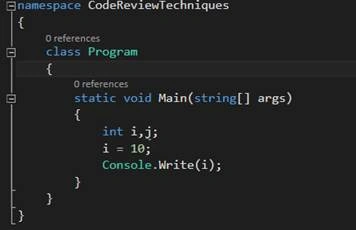
Figure 6 - sample code
This is a very simple code and project will build successfully without any compilation errors. However, as you can see that “j” is used nowhere in the code and so this will cause a warning; which many developers doesn’t seem to care about.
In my view and as many software companies including many Microsoft teams I have worked with enforce 0 warnings policy before check-in. Hence, it is very important to look in detail at the “Error List” View menu Error List, and then observe Warning Tab and must try to have that also show “0 Warning” just like we always work to only see “0 Errors”.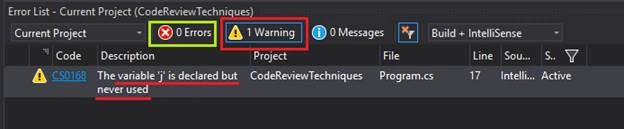
Figure 7 - Error List, highlighting warning in the code - Code Consistency
One very important quality of well written code is “Consistency”. I.e. stick to one style. Let's say that you want to declare an integer variable and it’s obvious that different teams and developers will have different coding guidelines. Many times developers ignore this and code has scattered instances of types/keywords Int32 or int and String or string, this demonstrates that code consistency is violated.
However, using mixed statements will successfully compile the code but makes your code base completely in-consistent.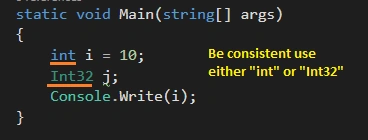
Figure 8 - Code consistency violation - Do care for Null all the times
Null has catastrophic impact on your code functionality. Simplyignore a null check and you will face the consequences. This is why many developer productivity tools like Re-Sharper prompt for any potential “NullReferenceException” which can be triggered from your code.
Make sure that all your if/else take enough care of null and have guard(s) in place, most of the time IsNullOrEmpty or IsNullOrWhiteSpace will come really handy. - Dead code
Many times I have seen that as a developer we are mostly interested in our own code; to be specific, code we are writing. At times we do observe a block of code which is commented for long, but we don’t seem to care, but why not? Well, in my view there are two reasons for this. First, I don’t care as long as my code works. Second, I am working in an agile team and I am committed to finish my task in committed timelines.
First one is an attitude problem, second is timeline and hours remaining to complete the work. But both can do one thing for sure. Open an item in Technical Debt backlog with details to have that file cleaned up. - Naming Convention
All developers today are well aware of Camel and Pascal casing and when to use one over the other. For instance variable and parameter names must follow Camel casing and for class, function, and method names Pascal casing must be used. Make sure this basic principle is applied consistently. - Code Readability
Many times code is written in a way that no one can hardly make sense out of it. I.e. all code is so jumbled up and one line after the other that it’s barely readable. Make sure that code has proper single line spacing wherever applicable between the code blocks. - Handling Unmanaged Resources
Even though .NET Framework takes good care of Memory management via GC (garbage collection) there are limitations on garbage items and from where those can be collected and what not. Many times, it’s wise to handle cleaning of expensive resources like File I/O handles, connections, Network resources, etc. by yourself.
Such items can be disposed of once their usage is over and this can be done using the “using” block for unmanaged code, if you want to automatically handle the disposing of objects once they are out of scope. Another good place to handle such code is finally block for example, File I/O operation to read a file as shown in the image below.
Watch my YouTube channel video here.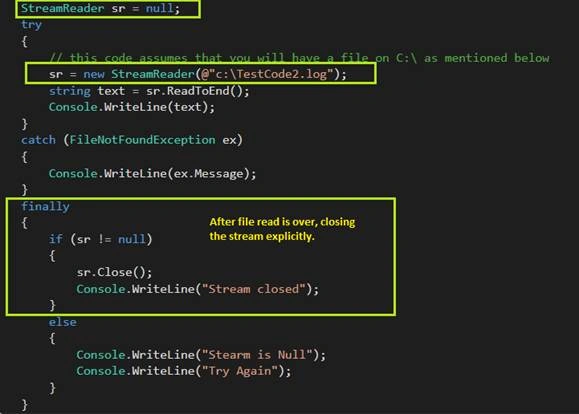
Figure 9 - Handling unmanaged resources by .NET’s StreamReader - Write Defensive Code
.NET Exception Handling is the key to write defensive code and protect your application against any runtime anomalies. Three magic words to solve most of your problems are try/catch and finally.
Proper implementation and usage of Exception Handling and logging any exception messages and details can add a lot of value to application in terms of application monitoring and troubleshooting. - Declare access specifiers explicitly
C# .NET has default scope defined for various types, for instance a variable is private by default and so in a class we like to write just “int i” but it’s more appropriate to be declarative and instead write it as “private int i”.
Do you know what default scope of a class is in C #? Watch my YouTube channel video here. - Self Documenting CodeMany times developers do follow naming convention (camel or pascal etc.) but the given names to variables, methods, functions and class etc. are not meaningful at all. Hence, at times developers write long code comments to describe what is the purpose of each function or variable for instance.In my view, giving "self-describing" names will add a lot of value and also save developer's time in documenting the code; as many software teams have a practice of writing comment above each line of code to explain the objective of code below.For instance, instead of "int age;" you may want to declare "int studentAge;". Similarly, instead of just writing a function with name "GetData()" it will be preferred and more helpful to say "GetStudentsReportData()". Similar techniques can also be applied to class names, functions and Unit Tests etc. But in case of unit tests, name(s) might get really lengthy, but this is totally fine and acceptable.Hence, a unit test method name "TestSuccessWithOneStudentRecordAddedToDb" will be much preferred than just saying "TestOneRecordData".
Summary
Above mentioned code review guidelines are light weight, easy to look for and easy to apply techniques with larger impact on any code base. Mostly it has been evident that simple things are either ignored or not cared about. These best practices can be added up with more guidelines or in combination with other techniques as applicable. Happy Coding…
Sivasankar GorantlaPosted Jul 13, 2020, 3:43 AM
Aren't these part of the Resharper tool?
Dinesh GabhanePosted Nov 8, 2019, 1:12 AM
Nice article
Shakeel KhanPosted Jul 12, 2016, 1:56 AM
Really great point. thanks.
Debsankar PatraPosted Jun 17, 2016, 7:06 AM
Well Explained..
Karthik ElumalaiPosted May 19, 2016, 12:24 AM
Am waiting . And thanks a lot for your words sir...Vidya Vrat Agarwal
Karthik ElumalaiPosted May 18, 2016, 8:33 AM
Sir can you please tell that how to "Open an item in Technical Debt backlog with details to have that file cleaned up. ",I searched in google by i couldn't find an answer.It will be really helpful if you cleared this doubt.Sorry if i asked anything wrong.Thanks in Advance.Vidya Vrat Agarwal
Karthik ElumalaiPosted May 18, 2016, 5:47 AM
Thanks a lot sir..Each and every point you mentioned was very usefull .
Sagar ShindePosted May 16, 2016, 10:42 AM
Nice
Satish Kumar VadlavalliPosted May 16, 2016, 3:46 AM
Excellent article, much thanks. Almost we use every tip.
Pramod VermaPosted May 16, 2016, 3:22 AM
Nice one.
Sonu ChaudharyPosted May 13, 2016, 11:29 AM
good one
Richardson dos Santos NevesPosted May 13, 2016, 7:42 AM
Very nice article, can you create another but with examples? It?s not necessary images, just text.
jenip shresthaPosted May 13, 2016, 2:37 AM
using most of tips but never use sort using... thanks for sharing
Rafnas T PPosted May 12, 2016, 2:45 AM
Nice Article, Thank you.
Abhishek KumarPosted May 11, 2016, 8:28 AM
very informative..Thanks for sharing
Mohammed IbrahimPosted May 11, 2016, 8:17 AM
nice
Jitendra KumarPosted May 11, 2016, 6:08 AM
Excellent Article. Thanks for sharing
AniPosted May 11, 2016, 3:01 AM
Thank you sir for your guidance
rupali patilPosted May 11, 2016, 2:18 AM
Nice Article
Raja TPosted May 11, 2016, 12:31 AM
Nice, Thanks for sharing
Prasham SabadraPosted May 10, 2016, 7:45 AM
Thanks sir for sharing!!!
Prakash TripathiPosted May 10, 2016, 3:44 AM
Good refresher Vidya sir.
Vishal PatelPosted May 10, 2016, 2:40 AM
hello Vidya, your articles always inspire us to do something different then others. can you please suggest any tools for .net code analysis?
Kuppurasu NagarajPosted May 9, 2016, 11:59 AM
Nice Sharing..
Vithal WadjePosted May 9, 2016, 11:16 AM
Excellent article , while reviving code I always focused more on datatype selection , code duplication and unnecessary class libraries but from this article I learned lot which I cant know thanks Vidya Vrat Agarwal sir for another rocking article .
Debasis SahaPosted May 9, 2016, 8:39 AM
Good One..
Vishal PatelPosted May 9, 2016, 3:33 AM
Good article... keep guiding us... Thanks for sharing your knowledge.
Manoj KulkarniPosted May 9, 2016, 2:21 AM
Very helpful article. Thank you for sharing sir
Thiruppathi RPosted May 9, 2016, 1:25 AM
Very nice ...
Sanjay GuptaPosted May 9, 2016, 1:16 AM
Very helpful article thanks for submitting.
Muhammad Aqib ShehzadPosted May 9, 2016, 1:03 AM
good compilation
Hari ShankerPosted May 9, 2016, 12:48 AM
Nice Thanq Very Much
Manish Kumar ChoudharyPosted May 8, 2016, 1:00 AM
Very helpful thanks for sharing.
Ankur MistryPosted May 7, 2016, 1:47 PM
Nice share
Humayun Kabir MamunPosted May 7, 2016, 4:26 AM
Nice...
NitinPosted May 7, 2016, 4:08 AM
Thanks for sharing
Anbu ManiPosted May 7, 2016, 1:33 AM
Nice
Sr KarthigaPosted May 6, 2016, 8:59 PM
good one sir
Vignesh ManiPosted May 6, 2016, 5:04 PM
Good one sir
Bhuvanesh MohankumarPosted May 6, 2016, 4:36 PM
Handbook for every developers and lead
Neeraj KumarPosted May 6, 2016, 1:42 PM
Nice...
Vincent Maverick DuranoPosted May 6, 2016, 11:16 AM
Nice write up! But I also love to see you add a section for proper naming of Methods and Fucntions. This would really help developers easily review codes without guessing what the Method do. For example if you write a code to get an order from database, some developers will just write: var data = GetData(); not really helpful. But if they would rewrite that to something like var orders = GetCustomerOrders(); it would be more helpful.
Abhinav AbhishekPosted May 6, 2016, 10:16 AM
superb
Kuppurasu NagarajPosted May 6, 2016, 9:09 AM
Nice Sharing..
Sonu ChaudharyPosted May 6, 2016, 8:17 AM
good one sir..
Pankaj Kumar ChoudharyPosted May 6, 2016, 7:55 AM
Superb Information sir......
Venkat MungariPosted May 6, 2016, 6:53 AM
Best Article For New Developers
Nitesh KejriwalPosted May 6, 2016, 6:33 AM
This is a great read Vidya Vrat Agarwal. I believe the 2nd heading should be "Always begin from the top" instead "Always being from the top" :)
Ravi PatelPosted May 6, 2016, 6:32 AM
Thank you so much sir. for great article
Sibeesh VenuPosted May 6, 2016, 6:16 AM
That was such a great read. Thank you so much. Will forward this to all of my colleagues.
Arvind SinghPosted May 6, 2016, 6:15 AM
Nice Article.
Muhammad Aqib ShehzadPosted May 6, 2016, 5:35 AM
nice share
Debasis SahaPosted May 6, 2016, 5:24 AM
Good One.. Thanks for sharing..