

This rare dissertation is committed to demonstrating the cracking and byte patching of a binary executable using IDA Pro to subvert various security constraints, as well as generating or producing the latest modified version (patched) of that specific binary. IDA Pro is typically utilized to analyze the disassembled code of a binary so that the internal mechanism can be comprehended and identify the inherent vulnerability in the source code.
This article has the following contents
- Binary Sample
- Patching Configuration in IDA Pro
- Binary Analysis
- Binary Cracking and Patching with IDA Pro
- Script Patching Substitute
- Final Note
IDA Pro appears to have managed mystical potentials in the reverse engineer's minds by having the impression that merely opening a binary with IDA will reveal all the secrets of a target file. IDA Pro is intended to assist you in consideration of the behavior of a binary by offering us disassembled code. IDA Pro is not designed to modify or patch the binary code to suit your needs like other tools such as OllyDbg and CFF Explorer. It is only a static-analysis disassembler tool. It can only facilitate your attempts to locate software vulnerabilities, bugs, and loopholes that are typically used by both White Hat and Black Hat professionals. Ultimately, it is up to your skills and how you apply them as to whether IDA makes your search for vulnerabilities easier. Essential This tutorial requires a thorough knowledge of Assembly Programming and Hex Code manipulation because patching a binary with IDA Pro especially deals with assembly opcode instructions. Besides that, the reverse engineer is supposed to operate the IDA Pro Software IDE features perfectly. This operation lists the following tools of the trade.
- The Target Binary (C /C++ code)
- IDA Pro Interactive Dissembler
- IDA-Script File (*.idc files)
- Assembly Language skills
- ASCII Converter
Binary Sample
This article exposes the demonstration of byte patching over a typical C++ binary that essentially requires a user password to validate his identity and let him log into the system and such confidential information is only provided to the registered person indeed. There is of course no direct method to breach into this application without being authenticated except to reverse engineer or patch the critical bytes responsible for doing the validation. The following code will make the binary executable live as binaryCrack.exe.
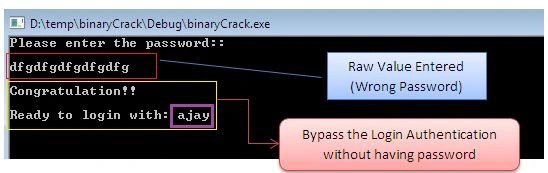
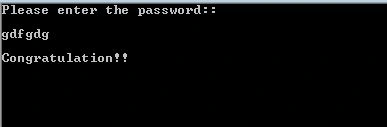
We can use any compiler to execute the aforementioned binary source code that makes an executable as binaryCrack.exe and when we run that file, it will prompt us to enter the password. If we enter the correct password as “aAjay then it shows the congratulatory message otherwise issues the Wrong Password message as in the following.
#include <stdio.h>
#include <stdlib.h>
#include <string.h>
#include <conio.h>
#define password "ajay"
int _tmain(int argc, _TCHAR * argv[]) {
  char pwd[100];
  printf("Please enter the password::\n\n");
  scanf("%s", pwd);
  if (strcmp(pwd, password) == 0) {
    printf("Congratulation!!\n\n");
    printf("Ready to login with: %s", password);
  } else {
    printf("Wrong password");
  }
  getch();
  return 0;
}
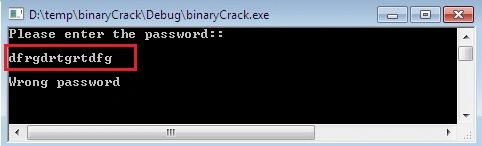
We might not have a real password and in such circumstances, we can't proceed without this information. So the only option left is Reverse Engineering this binary and to manipulate the sensitive bytes to suit your needs as we shall see in the next sections. Patching Configuration in IDA Pro The patching or editing of assembly code features is normally invisible in the IDA Pro. You can double-check it from the Edit menu that there are no Patch program options. Thus, to see this option, open the ileaguecfg configuration file of IDA Pro located at the Drive: \Program Files\IDA PRO Advanced Edition\cfg folder and scroll down to the DISPLAY_PATCH_SUBMENU option that is typically set to NO. So, make the following changes and save this file.

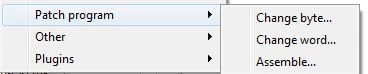
After saving this file, re-launch the IDA PRO, and the moment you change the submenu option in the configuration file, you will see that the Patch program option becomes visible in the Edit menu as in the following.
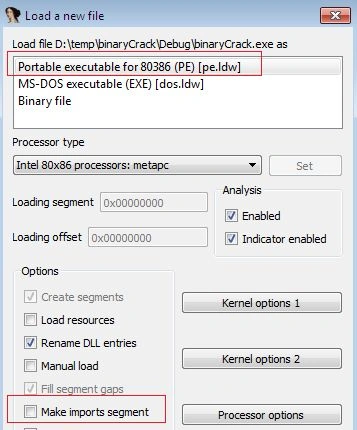
Now, load the target binary into IDA Pro, it will ask to create a new database, as usual, and then select the PE file option as in the following figure. An important point to remember is, don't forget to uncheck the Make imports segment option because some useful data can be lost from the database if this option is enabled as in the following.
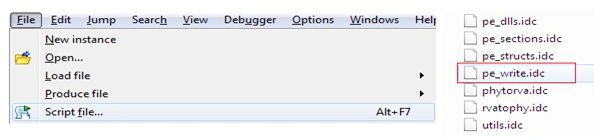
The target file will be loaded into the IDA Pro but we could still not modify the byte sequence of the binary file even if the Patch program option is enabled in the Edit menu earlier. So here, the role of the special IDA script files came into light as they can modify the byte like OllyDbg as well as write the changes into the executable to make the effect permanent. The IDC script files can be downloaded from here. When downloaded, extract the files in a separate folder on the file system of your machine. There are a couple of script files that are provided, but mainly two script files are significant as in the following.
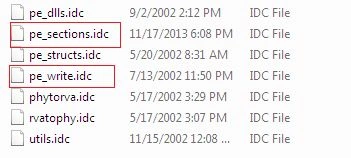
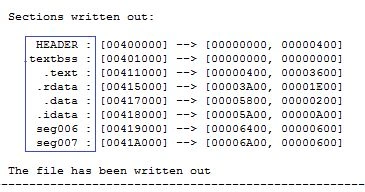
After loading the target binary into the IDA Pro, open the folder where the previous IDA script files are located and execute the pe_sections.idc file to extend new functionality into IDA Pro for such binary patching and writing. You can ensure the new specifications from the Segments (shift + F7) windows that certain new segments are automatically added to.
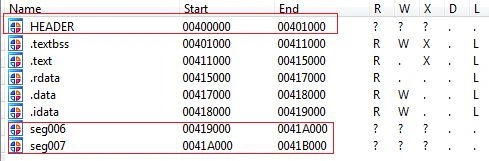
After successful completion of such operations, we can modify as well as write the byte sequence into the binary file. Binary Analysis We have only the binary executable so it is nearly impossible to understand the logic implementation without the source code. But we can disassemble the source code of any binary by employing IDA Pro because unless we are aware of the logic flow, we do not know how to subvert any security mechanism. Hence, let's analyze the proper logic flow path of the binary file. Since we can consider the following image, IDA Pro disassembles the binary into raw assembly instruction sets. This program first, prompts the user to enter the password by displaying a string message and then compares this value to a predefined value “aAjay which might be the real password. The comparison happens via the string class strcmp method and if the value is 0 then the entered value is correct otherwise incorrect.
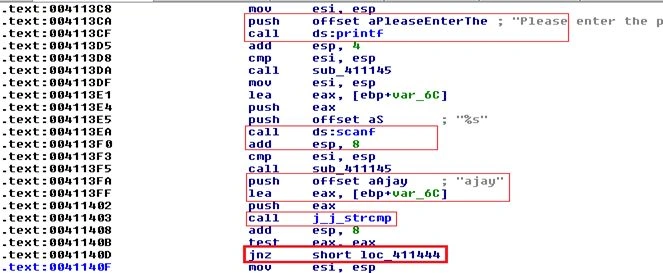
If the value of the tax register is 1 then the execution is shifted towards the loc_411444 block by the jnz statement, where the “wrong password” message would be echoed to the screen as in the following.

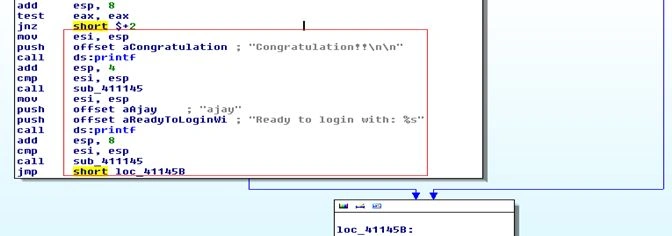
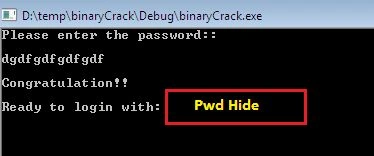
And if the value of eax is 0 then the jump won't throw the execution anywhere. The program indicates to us that we have entered the correct password as in the following.
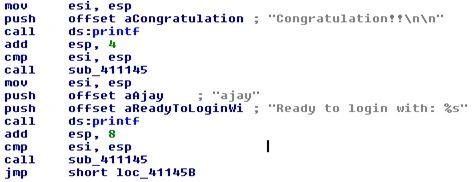
We can easily anticipate that the Jump instruction determines whether the password is correct or incorrect. If the tax register has the value 1 then execution is diverted towards the “wrong password” box flow otherwise the “congratulation” message would be displayed. We are implying from the execution flow that everything depends on the JNZ instruction. So, the reverse engineer would surely be interested in this instruction because manipulation of this instruction can produce different results. Binary Cracking and Patching As we have concluded from the analysis, the outcome of this binary application is regulated by the jnz short 1oc_411444 statements. The 1oc_411444 instruction belongs to the unmatched password displaying block and execution is directly jumping to this block as you can see in the Red arrow.
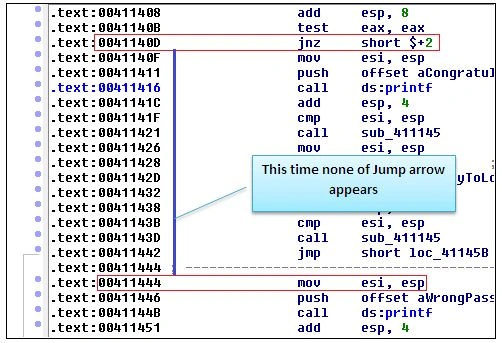
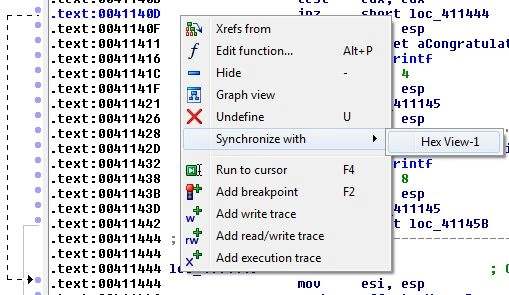
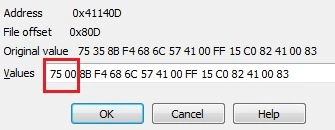
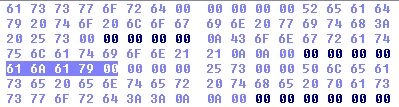
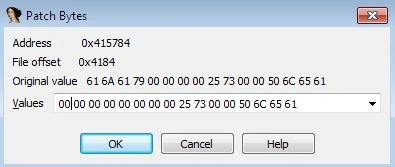
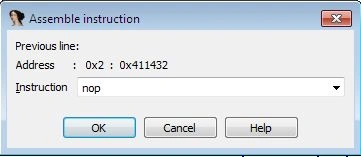
However, all we need to do is change the corresponding jnz statement-related bytes. So right-click on the current location of this statement and synchronize it with Hex Editor View to examine this statement byte sequence as in the following:
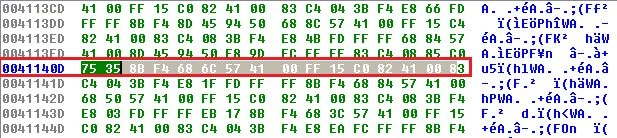
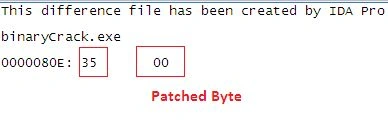
The hex view offers 16 bytes of sequence in one line and every two bytes represent only one assembly instruction set such that the hex value 75 35 belongs to .text: 0041140D address location where the assembly code jnz short 10c_411444 is implemented as the following.
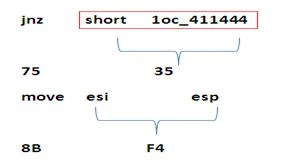
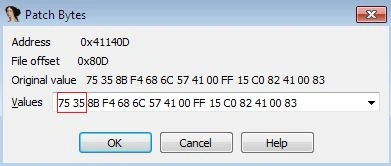
So we need to identify the correct bytes to a specific instruction so that we can modify it to suit our needs. The following figure shows the hex code that refers to which instruction is in the following.




Gaurav Kumar AroraPosted Nov 23, 2014, 9:45 AM
awesome. Ajay Yadav keep posting good stuffs
Guest UserPosted Nov 20, 2014, 11:55 AM
Ajay Yadav marvellous!
Vithal WadjePosted Nov 19, 2014, 11:32 PM
outstanding,keep it up