

Binding image with DropDownList is an important concept while we are working in project. This mechanism is not achieved by simple dropdownlist. We have to add some additional jQuery to get this thing done. Here in the following link you can download the required jQuery.
Download mirrors for JQuery.dd.js.
Create a new ASP.NET project. Add a new web form in it as I have shown in the following screenshot.
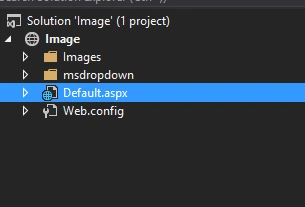
Here, I have downloaded the jQuery from above link and added to my project.
This contain some CSS files and some jQuery files.
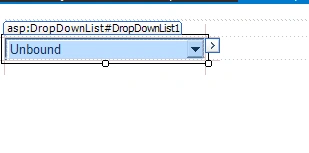
Now in my web form I have added one ASP.NET DropDownList as follows.
Download mirrors for JQuery.dd.js.
Create a new ASP.NET project. Add a new web form in it as I have shown in the following screenshot.
Here, I have downloaded the jQuery from above link and added to my project.
This contain some CSS files and some jQuery files.
Now in my web form I have added one ASP.NET DropDownList as follows.
- <body>
- <form id="form1" runat="server">
- <div> </div>
- <asp:DropDownList ID="DropDownList1" runat="server" Width="200px" Height="16px"> </asp:DropDownList>
- </form>
- </body>
Now here is my database table where, I get my country name.

Here is my code to bind the country and url to DropDownList.
Here is my code to bind the country and url to DropDownList.

Amina GacemPosted Feb 27, 2018, 5:16 AM
Hello,Thank you for this nice post. But I have problem when tried it. Images can not be resized even when I added the style attribute. And also, the DropDownList is always droped down.Here is my code : On Page_Load : if (!IsPostBack) { using (var connector = new Connector()) { domains = connector.GetObjectList<Domain>(); } listDomain.DataSource = domains; listDomain.DataValueField = "Id"; listDomain.DataTextField = "DomainName"; listDomain.DataBind(); BindTitle(); } protected void BindTitle() { if (ListDomain != null) { foreach (ListItem li in ListDomain.Items) { li.Attributes["title"] = "./images/Flag" + li.Text+".png"; li.Attributes["style"] = "height: 10px"; } } } Any Help ? Thanks
Anish AnsariPosted Nov 12, 2015, 8:43 AM
Good One
Santhakumar MunuswamyPosted Nov 11, 2015, 8:46 AM
Good one
Ravi PatelPosted Nov 6, 2015, 3:08 AM
nice expalnation
Sibeesh VenuPosted Nov 5, 2015, 7:57 AM
Nice Share
Raja TPosted Nov 5, 2015, 7:35 AM
Nice, Thanks for sharing
Rajeesh MenothPosted Nov 5, 2015, 7:19 AM
Thanks for the Information!
Ali AhmedPosted Nov 5, 2015, 3:11 AM
very nice and easy...