

Blazor has been one of the most transformative technologies in the Asp.Net Core ecosystem, enabling developers to build modern web applications using C# and .NET instead of relying exclusively on JavaScript. With the release of Asp.Net Core 10.0 (as part of the .NET 10 LTS wave), Microsoft has significantly advanced Blazor in terms of performance, developer productivity, flexibility, and user experience. This release focuses not only on improving the fundamentals—like rendering and resource optimization—but also on making Blazor a first-class choice for building full-stack web apps, hybrid solutions, and even enterprise-scale systems.
In this article, we will explore the most important Blazor enhancements in Asp.Net Core 10.0, why they matter, and how they will reshape development for the future.
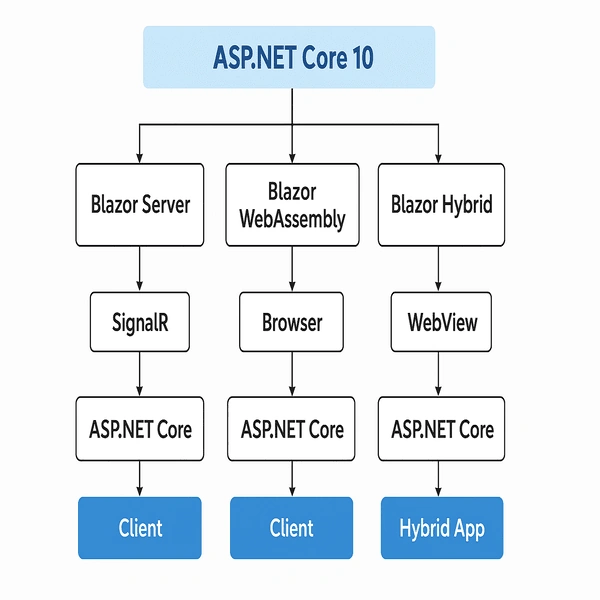
1. Faster Startup and Asset Loading
One of the most noticeable improvements in Blazor for .NET 10 is the dramatic reduction in startup time , particularly for Blazor WebAssembly applications. Historically, Blazor WebAssembly apps required downloading relatively large framework and library files before they could run, which sometimes created friction compared to JavaScript frameworks.
Enhancements in .NET 10
Static Assets with Fingerprinting and Compression: Scripts and framework files are now served as precompressed and fingerprinted static assets . This allows browsers to aggressively cache them and reuse them across sessions or even different apps.
Preloading Support: Developers can now preload Blazor’s JavaScript and WebAssembly assets via
<LinkPreload />, reducing the "time-to-interactive."Native AOT Benefits: Ahead-of-time compilation reduces payload size and improves execution speed on WebAssembly.
Impact: Applications feel more responsive and interactive, even on low-bandwidth or mobile connections, making Blazor WebAssembly far more competitive with SPA frameworks like React and Angular.
2. Persistent Component State
Blazor Server and Blazor WebAssembly both face challenges when it comes to maintaining state across app lifecycle events such as page reloads , reconnections , or pre-rendering scenarios . Asp.Net Core 10 introduces persistent component state to solve this problem.
What it does
Components can now persist their state (e.g., form input, UI context, filters) across page reloads and server reconnects.
State can be preserved not only in memory but also serialized for persistence between user sessions.
Impact: This eliminates frustrating experiences where a user refreshes the browser and loses their progress. For server-side Blazor apps, this also makes reconnection scenarios far smoother.
    @page "/counter"
@inject PersistentComponentState ApplicationState

<h3>Counter with Persistent State</h3>

<p>Current count: @currentCount</p>
<button @onclick="IncrementCount">Click me</button>

@code {
    private int currentCount;

    protected override void OnInitialized()
    {
        if (ApplicationState.TryTakeFromJson<int>("counter", out var savedCount))
        {
            currentCount = savedCount;
        }
    }

    private void IncrementCount()
    {
        currentCount++;
        ApplicationState.PersistAsJson("counter", currentCount);
    }
}
3. Improved Blazor Hybrid Integration
Blazor Hybrid apps (running Razor components inside .NET MAUI or WPF/WinForms) have become increasingly popular. With Asp.Net Core 10, Microsoft has refined the BlazorWebView control and related hybrid features.
Improvements include
Better Resource Loading: Hybrid apps now benefit from the same static asset compression and caching improvements as Blazor WebAssembly.
Enhanced Developer Tooling: Hybrid apps integrate more tightly with Hot Reload , enabling faster iteration during development.
Consistent Rendering: Rendering differences between WebAssembly, Server, and Hybrid modes have been minimized.
Impact: Hybrid apps are now a realistic option for production, giving developers the ability to share Blazor components across desktop, mobile, and web.
4. Validation Enhancements
Input validation is critical for any serious application. In Asp.NET Core 10, Blazor introduces stronger validation capabilities :
Nested Object Validation: Complex models with child objects or collections now validate consistently without custom workarounds.
Skip Validation: Developers can selectively skip validation in scenarios where it’s unnecessary, improving performance.
Alignment with
System.Text.Json: Validation behavior is now consistent with JSON serialization and model binding, reducing developer confusion.
Impact: Blazor forms are more reliable, with less boilerplate validation code required, improving both security and developer productivity.
    @page "/register"
@using System.ComponentModel.DataAnnotations

<EditForm Model="user" OnValidSubmit="HandleValidSubmit">
    <DataAnnotationsValidator />
    <ValidationSummary />

    <InputText @bind-Value="user.Name" placeholder="Name" />
    <InputText @bind-Value="user.Address.City" placeholder="City" />
    <InputText @bind-Value="user.Address.ZipCode" placeholder="Zip" />

    <button type="submit">Register</button>
</EditForm>

@code {
    private User user = new();

    private void HandleValidSubmit()
    {
        Console.WriteLine($"Registered: {user.Name}");
    }

    public class User
    {
        [Required] public string Name { get; set; }
        public Address Address { get; set; } = new();
    }

    public class Address
    {
        [Required] public string City { get; set; }
        [Required, StringLength(5)] public string ZipCode { get; set; }
    }
}
Join the conversation! Your thoughts help the community grow.