

Introduction
In our previous articles, we built a Task Management AI Agent , secured it with Azure AI Content Safety , and added comprehensive observability with Application Insights. However, we've been using .NET MVC with Razor views for the user interface—a traditional approach that limits our ability to create rich, interactive AI experiences.
Modern AI applications demand responsive, real-time interfaces with features like streaming responses, file uploads, and conversation history. To enable these capabilities, we need to separate our concerns: a robust .NET backend for business logic and a modern frontend framework for the user experience.
What you'll learn
Restructuring a monolithic .NET app into frontend and backend services
Building a Next.js 16 chat interface with React 19 and TypeScript
Implementing conversation persistence with PostgreSQL and dual-database architecture
Deploying the frontend to Azure Static Web Apps with CDN distribution
Setting up CI/CD pipelines for independent frontend and backend deployments
Managing conversation threads with metadata extraction and efficient JSON storage
Why this matters
Better User Experience : Modern UI patterns (ChatGPT-inspired interface, smooth animations, responsive design)
Independent Scaling : Scale frontend CDN separately from backend compute
Developer Productivity : Hot module replacement, TypeScript safety, component reusability
Foundation for Advanced Features : Enables future streaming, voice input, file uploads, and multimodal interactions
Production-Ready Architecture : Separate deployments, better security, improved performance
What we won't cover in this article (intentionally deferred):
File Upload Support : Not critical for MVP, adds complexity without immediate value
Source code : GitHub - TaskAgent with Next.js Frontend
The Problem with Monolithic UI
Our current .NET MVC application works, but has limitations:
Current Architecture Constraints

Challenges
Limited Interactivity : Razor views require full page refreshes
Tight Coupling : UI changes require backend redeployment
Scaling Inefficiency : Can't scale static content separately from compute
Developer Experience : No hot module replacement, limited tooling
Complex State Management : Difficult to manage conversation state client-side
The New Architecture: Frontend and Backend Separation
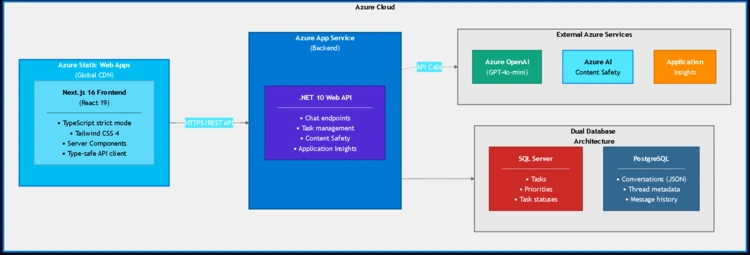
We'll transform our monolithic application into a modern, distributed architecture:
Key benefits
Independent deployments : Update frontend without touching backend
Global CDN distribution : Fast load times worldwide
Horizontal scaling : Scale databases, backend, and CDN independently
Better security : API-only backend, no mixed concerns
Modern development : TypeScript, hot reload, component libraries
Part 1: Dual Database Strategy
One of our key architectural decisions is using two separate databases for different concerns:
Why Two Databases?

PostgreSQL for Conversations: Native JSON Support
We use PostgreSQL specifically for its native JSON support , which is perfect for storing conversation threads:
Key advantages
Flexible Schema : AI agent conversations evolve (new message types, metadata)
Property Order Preservation : JSON type preserves property order (critical for
$typedeserialization)Indexed Queries : Can create GIN indexes on JSON fields for fast searches
Native Operators : Rich query capabilities (
@>,->,->>)Future-Ready : Easy to add pgvector extension for RAG (semantic search)
Conversation Thread Storage Pattern

Each conversation is stored as a single JSON blob with extracted metadata:
// What gets stored in PostgreSQL (SerializedThread column)
{
  "storeState": {
    "messages": [
      {
        "role": "user",
        "contents": [
          {
            "$type": "text",
            "text": "create a task about learning Next.js with medium priority"
          }
        ]
      },
      {
        "createdAt": "2025-11-16T23:03:26+00:00",
        "role": "assistant",
        "contents": [
          {
            "$type": "functionCall",
            "callId": "call_QoZcRh5igDmsVQitvAHBLtbf",
            "name": "CreateTask",
            "arguments": {
              "title": "Learn Next.js",
              "description": "Study the fundamentals of Next.js framework",
              "priority": "Medium"
            }
          }
        ]
      },
      {
        "role": "tool",
        "contents": [
          {
            "$type": "functionResult",
            "callId": "call_QoZcRh5igDmsVQitvAHBLtbf",
            "result": "✅ Task created successfully!"
          }
        ]
      },
      {
        "createdAt": "2025-11-16T23:03:28+00:00",
        "role": "assistant",
        "contents": [
          {
            "$type": "text",
            "text": "✅ Task created successfully!\n**Title:** Learn Next.js"
          }
        ]
      }
    ]
  }
}
Message Types in Thread
role: "user"- User input messagesrole: "assistant"+$type: "functionCall"- Agent function invocations (internal)role: "tool"+$type: "functionResult"- Function execution results (internal)role: "assistant"+$type: "text"- Final agent responses (visible to user)
Why blob storage?
Microsoft Agents Framework maintains conversation state internally. Rather than duplicating this into relational tables, we store the complete serialized thread and extract metadata for querying.
Why JSON type (not JSONB)? The json type preserves property order, which is critical for System.Text.Json polymorphic deserialization. The Microsoft Agents Framework requires $type to be the first property for correct deserialization. While JSONB offers better performance for queries, JSON ensures compatibility with the framework's serialization requirements.
Implementation: PostgresThreadPersistenceService
Here's the key service that manages conversation persistence:
// Infrastructure/Services/PostgresThreadPersistenceService.cs
public class PostgresThreadPersistenceService : IThreadPersistenceService
{
    private readonly ConversationDbContext _context;
    private readonly ILogger<PostgresThreadPersistenceService> _logger;

    public async Task SaveThreadAsync(string threadId, string serializedThread)
    {
        // Extract metadata for search and display
        var (title, preview, messageCount) = ExtractMetadataFromJson(serializedThread);

        var existingThread = await _context.ConversationThreads
            .FirstOrDefaultAsync(t => t.ThreadId == threadId);

        if (existingThread == null)
        {
            var newThread = ConversationThread.Create(
                threadId, serializedThread, title, preview, messageCount
            );
            _context.ConversationThreads.Add(newThread);
        }
        else
        {
            existingThread.UpdateThread(serializedThread, title, preview, messageCount);
        }

        await _context.SaveChangesAsync();
    }

    private (string title, string preview, int messageCount) ExtractMetadataFromJson(
        string serializedThread)
    {
        using var doc = JsonDocument.Parse(serializedThread);
        var root = doc.RootElement;

        string title = "New conversation";
        string preview = string.Empty;
        int messageCount = 0;

        if (root.TryGetProperty("storeState", out var storeState) &&
            storeState.TryGetProperty("messages", out var messages))
        {
            messageCount = messages.GetArrayLength();

            // Extract first user message as title (max 50 chars)
            foreach (var message in messages.EnumerateArray())
            {
                if (message.TryGetProperty("role", out var role) &&
                    role.GetString() == "user")
                {
                    title = ExtractTextFromContents(message, 50);
                    break;
                }
            }

            // Extract last assistant text message as preview (max 100 chars)
            preview = ExtractLastAssistantPreview(messages, 100);
        }

        return (title, preview, messageCount);
    }
}
Key features
Automatic title generation from first user message (max 50 chars)
Preview from last assistant text message (max 100 chars)
Efficient upsert logic (create or update)
Metadata extraction without full thread deserialization
Navigates nested JSON structure:
storeState → messages → contents[0].text
Database Configuration
We use two separate connection strings in appsettings.json :
{
  "ConnectionStrings": {
    "TasksConnection": "Server=localhost;Database=TaskAgentDb;Trusted_Connection=true;",
    "ConversationsConnection": "Host=localhost;Port=5432;Database=taskagent_conversations;Username=postgres;Password=your-password"
  }
}
And two DbContexts in the Infrastructure layer:
// Infrastructure/Data/TaskDbContext.cs - SQL Server
public class TaskDbContext : DbContext
{
    public DbSet<TaskItem> Tasks { get; set; }

    public TaskDbContext(DbContextOptions<TaskDbContext> options) : base(options) { }
}

// Infrastructure/Data/ConversationDbContext.cs - PostgreSQL
public class ConversationDbContext : DbContext
{
    public DbSet<ConversationThread> ConversationThreads { get; set; }

    public ConversationDbContext(DbContextOptions<ConversationDbContext> options) : base(options) { }

    protected override void OnModelCreating(ModelBuilder modelBuilder)
    {
        modelBuilder.Entity<ConversationThread>(entity =>
        {
            entity.HasKey(e => e.ThreadId);

            // Store SerializedThread as PostgreSQL json type (preserves property order)
            entity.Property(e => e.SerializedThread)
                .HasColumnType("json")
                .IsRequired();

            // Metadata columns for efficient queries
            entity.Property(e => e.Title).HasMaxLength(200).IsRequired();
            entity.Property(e => e.Preview).HasMaxLength(500);

            // Indexes for conversation listing and filtering
            entity.HasIndex(e => e.UpdatedAt).HasDatabaseName("IX_ConversationThreads_UpdatedAt");
            entity.HasIndex(e => e.IsActive).HasDatabaseName("IX_ConversationThreads_IsActive");
            entity.HasIndex(e => e.CreatedAt).HasDatabaseName("IX_ConversationThreads_CreatedAt");
        });
    }
}
Registration in InfrastructureServiceExtensions.cs :
// Register both DbContexts with their respective connection strings
services.AddDbContext<TaskDbContext>(options =>
    options.UseSqlServer(configuration.GetConnectionString("TasksConnection")));

services.AddDbContext<ConversationDbContext>(options =>
    options.UseNpgsql(configuration.GetConnectionString("ConversationsConnection")));
Why PostgreSQL json type (not jsonb )? The json type preserves property order, which is critical for System.Text.Json polymorphic deserialization. The Microsoft Agents Framework requires $type to be the first property for correct deserialization.
Part 2: Building the Next.js Frontend
With our database strategy in place, let's build the modern frontend that will consume our backend APIs.
Project Structure
We organized the repository as a monorepo with clear separation:

Tech Stack Choices
Why Next.js 16?
App Router : Server Components by default (better performance)
React 19 : Latest features, improved performance
Server Components : Reduce JavaScript sent to client
Built-in optimization : Image optimization, code splitting, automatic prefetching
Why TypeScript?
Type safety catches errors at compile time
Better IDE support (autocomplete, refactoring)
Self-documenting code
Easier refactoring as the app grows
Why Tailwind CSS 4?
Utility-first: Fast prototyping
No CSS bloat: Only used classes in production
Consistent design system
Excellent DX: IntelliSense support
Key Frontend Components
1. Chat Interface (ChatGPT-Inspired Design)
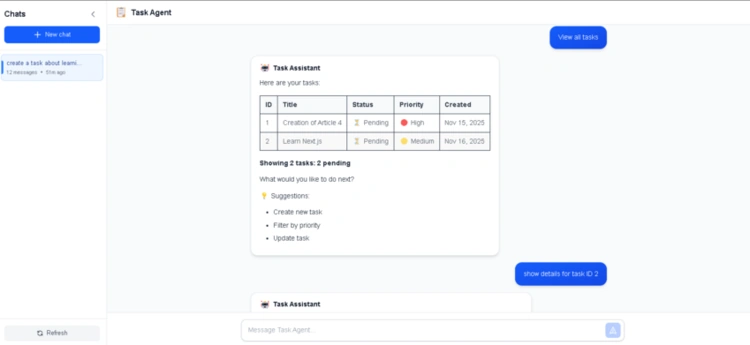
The main chat interface integrates the conversation sidebar with the chat area:
// components/chat/ChatInterface.tsx
export function ChatInterface() {
  const [isSidebarOpen, setIsSidebarOpen] = useState(false);

  const {
    messages,
    isLoading,
    threadId,
    handleSubmit,
    sendSuggestion,
    loadConversation,
  } = useChat();

  const hasMessages = messages.length > 0;

  return (
    <div className="h-screen flex bg-gray-50">
      {/* Conversation Sidebar */}
      <ConversationSidebar
        isOpen={isSidebarOpen}
        onClose={() => setIsSidebarOpen(false)}
        onConversationSelect={handleConversationSelect}
        currentThreadId={threadId}
      />

      {/* Main Chat Area */}
      <div className="flex-1 flex flex-col">
        {/* Header - Always visible */}
        <ChatHeader onToggleSidebar={toggleSidebar} />

        {/* Messages - Scrollable middle section */}
        <div className="flex-1 overflow-y-auto">
          {hasMessages ? (
            <ChatMessagesList messages={messages} />
          ) : (
            <EmptyChatState onSuggestionClick={sendSuggestion} />
          )}
        </div>

        {/* Input Area - Fixed at bottom */}
        <ChatInput onSubmit={handleSubmit} disabled={isLoading} />
      </div>
    </div>
  );
}
Key UX patterns
Dual-pane Layout : Sidebar for conversations, main area for chat
Adaptive Empty State : Centered welcome screen when no messages
Fixed Input : Always visible at bottom (ChatGPT-style)
Independent Scroll : Only message area scrolls
Smart Suggestions : Clickable buttons from AI responses
2. Custom Chat Hook (State Management)
We built a custom hook for complete control over the chat flow:
// hooks/use-chat.ts
export function useChat(options: UseChatOptions = {}): UseChatReturn {
  const [messages, setMessages] = useState<ChatMessage[]>([]);
  const [isLoading, setIsLoading] = useState(false);
  const [threadId, setThreadId] = useState<string | null>(null);

  const sendMessageInternal = async (message: string) => {
    if (!message.trim() || isLoading) return;

    // Optimistic update: Add user message immediately
    const userMessage: ChatMessage = {
      id: `temp-${Date.now()}`,
      role: "user",
      content: message,
      createdAt: new Date().toISOString(),
    };
    setMessages((prev) => [...prev, userMessage]);
    setIsLoading(true);

    try {
      // Call backend API
      const response = await sendMessage({ message, threadId });

      // Update threadId if new conversation
      if (response.threadId && !threadId) {
        setThreadId(response.threadId);
        options.onThreadCreated?.(response.threadId);
      }

      // Add assistant response
      const assistantMessage: ChatMessage = {
        id: response.messageId,
        role: "assistant",
        content: response.message,
        createdAt: response.createdAt,
        metadata: { suggestions: response.suggestions || [] },
      };
      setMessages((prev) => [...prev, assistantMessage]);
    } catch (err) {
      // Rollback on error
      setMessages((prev) => prev.slice(0, -1));
      options.onError?.(err);
    } finally {
      setIsLoading(false);
    }
  };

  return { messages, isLoading, threadId, sendMessageInternal, ... };
}
Why custom implementation?
Full control over request/response cycle
Optimistic updates with rollback on error
No external SDK dependencies
Callback system for thread creation
Prepared for future streaming migration
3. Conversation Management
Separate hook for managing the conversation list:


Join the conversation! Your thoughts help the community grow.