

📌 Executive Summary
In many financial, regulatory, and compliance-driven applications, validating identity details like PAN (Permanent Account Number) is a critical step. Traditionally, such validations are implemented through backend services hosted on VMs or full-fledged web apps.
But with Azure and Power Platform, it's now possible to build a completely serverless, scalable, event‑driven, and low‑maintenance validation architecture — without writing backend infrastructure code or hosting servers.
In this article, I walk through how I designed and built a PAN Validation API using:
Azure Functions (.NET 8 Isolated)
Power Automate Custom Connector
Power Pages
No local development tools at all — built entirely in Azure Portal
🎯 Problem Statement
We needed a solution that can:
Validate PAN format & DOB
Perform deny-list checks
Provide a reusable API endpoint for Power Platform
Scale automatically based on demand
Avoid VM‑based deployments and reduce operational overhead
Work seamlessly with external users via Power Pages
Additionally, the solution should be secure, easy to extend, and ideally built rapidly without local IDEs .
⚙️ Solution Overview
The solution uses a serverless, event-driven design:
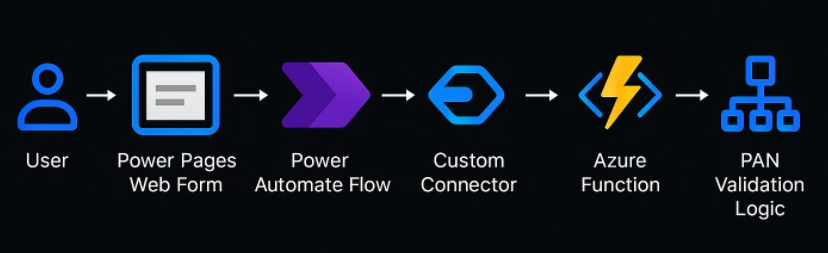
User → Power Pages Web Form → Power Automate Flow → Custom Connector → Azure Function → PAN Validation Logic → Response Back to Portal
Each component plays a specific role in the flow.
1️⃣ Azure Function App (Serverless API Layer)
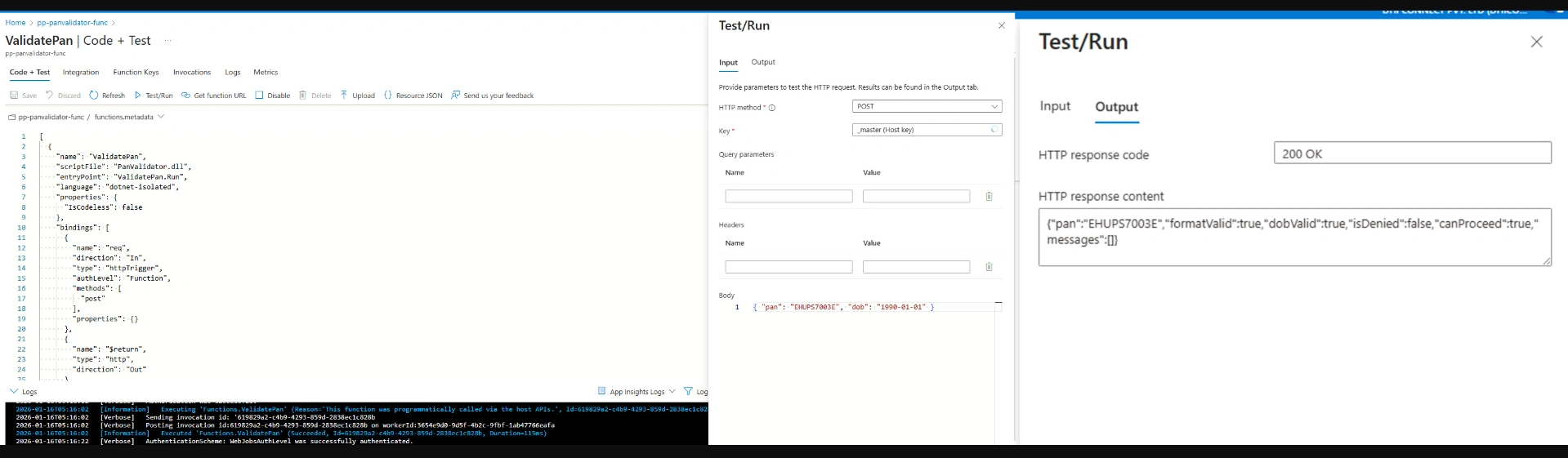
The heart of the solution is an HTTP-triggered Azure Function written in .NET 8 Isolated — created completely from the Azure Portal.
Why Azure Functions?
Zero infrastructure management
Pay-per-execution via Consumption Plan
Auto-scaling capability
Extremely fast to build and deploy
   [Function("ValidatePan")]
    public async Task<HttpResponseData> Run([HttpTrigger(AuthorizationLevel.Function, "post")] HttpRequestData req)
    {
        var body = await new StreamReader(req.Body).ReadToEndAsync();
        var payload = JsonSerializer.Deserialize<Request>(body, new JsonSerializerOptions { PropertyNameCaseInsensitive = true });

        var res = req.CreateResponse();
        res.Headers.Add("Content-Type", "application/json");

        if (payload is null || string.IsNullOrWhiteSpace(payload.Pan) || string.IsNullOrWhiteSpace(payload.Dob))
        {
            res.StatusCode = HttpStatusCode.BadRequest;
            await res.WriteStringAsync(JsonSerializer.Serialize(new { error = "pan and dob are required" }));
            return res;
        }

        var isFormatValid = PanRegex.IsMatch(payload.Pan.Trim());
        var isDenied = DenyList.Contains(payload.Pan.Trim());
        var dobIsValid = DateOnly.TryParse(payload.Dob, out var dob) && dob <= DateOnly.FromDateTime(DateTime.UtcNow.AddYears(-18));

        var result = new
        {
            pan = payload.Pan,
            formatValid = isFormatValid,
            dobValid = dobIsValid,
            isDenied,
            canProceed = isFormatValid && dobIsValid && !isDenied,
            messages = new[]
            {
                !isFormatValid ? "Invalid PAN format." : null,
                !dobIsValid ? "Applicant must be 18+ and DOB must be valid." : null,
                isDenied ? "PAN is deny-listed." : null
            }.Where(m => m != null)
        };

        res.StatusCode = HttpStatusCode.OK;
        await res.WriteStringAsync(JsonSerializer.Serialize(result));
        return res;
    }
Capabilities inside the Function
✔ Validate PAN format (regex-based)
✔ Validate DOB
✔ Apply deny‑list / rule‑engine logic
✔ Return structured response including
{
  "pan": "ABCDE1234F",
  "formatValid": true,
  "dobValid": true,
  "isDenied": true,
  "canProceed": false,
  "messages": ["PAN is deny-listed."]
}
Since Function Apps support .NET 8 Isolated, the code runs in a decoupled and flexible hosting model, perfect for enterprise extensions.
2️⃣ Power Automate Custom Connector (API Gateway for Power Platform)
Once the Azure Function is ready, I built a Custom Connector inside Power Automate to expose it as a reusable action.
Why use a Custom Connector?
Provides a strongly-typed interface for your Function
Acts as a gateway with input/output schemas
Allows secure passing of Function Keys
Can be reused across apps, flows, and Power Pages
The connector defines:
Base URL
Authentication (Function Key)
Request schema
Response schema
This becomes the “API contract” for the Power Platform.
3️⃣ Power Pages Integration (User-Facing Validation)
Power Pages gives us a professional, low‑code, externally facing website.
How Power Pages uses the backend
A form is created to collect PAN input
On submit, the Power Automate flow triggers the Custom Connector
API response is captured and shown back to the user
Errors, decline messages, and validation results are displayed in real-time
This makes the solution perfect for:
Customer onboarding
Regulatory validations
Self‑service portals
Branch‑less financial services
Everything remains secure, controlled, and compliant.
🧩 High-Level Architecture Diagram
🌟 Key Benefits of This Architecture
1. Fully Serverless
No servers. No patching. No downtime planning.
Everything scales automatically.
2. No Local Development Tools Needed
All components (Function, Connector, Flows, Pages) were created using:
Azure Portal
Power Platform portal
Perfect for lightweight, rapid MVPs or PoCs.
3. Enterprise-Ready Security
Function Key secured API
Custom Connector abstracts the backend
Power Pages provides authenticated/anonymous access modes
Logging via Application Insights
4. Extremely Easy to Extend
Want to add:
Aadhaar validation?
GSTN validation?
CKYC checks?
Additional rule engines?
Just add more functions — the architecture remains clean.
5. Low Cost
Azure Functions on Consumption Plan cost practically nothing for low-to-medium traffic.
📂 GitHub Repository (Source Code + Diagrams + Connector Definition)
https://github.com/Rajkiran44/pan-validator-func
🏁 Conclusion
This project demonstrates how powerful and efficient modern cloud-native architectures can be when combining Azure Serverless and Power Platform.
Join the conversation! Your thoughts help the community grow.