

Introduction
This tutorial is an introduction to Test Driven Development (TDD) in Visual
Studio 2010 (VS2010) with C# 4 and ASP.NET 4. This will focus on as using the
tool and coding as much as possible and not a great deal of words so enjoy the
ride.
We are covering some material that was presented in my earlier tutorial
http://domscode.com/2010/05/21/net-tutorial-c4-0-and-test-driven-development-cannonattack/
so if you haven't used VS2010 and TDD have a look.
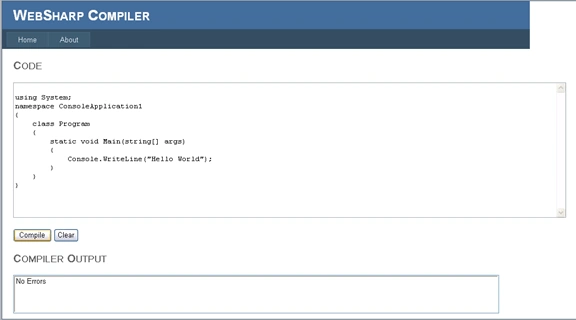
The WebSharpCompiler Requirements/Specs:
The following is a combination of requirements and specifications that will give
us an idea of what we are trying to build:
- ASP.NET Application;
- Textbox will contain code to compile
- Empty Textbox is not allowed to be compiled
- A Compile button will trigger compile
- A Clear button will clear the textbox
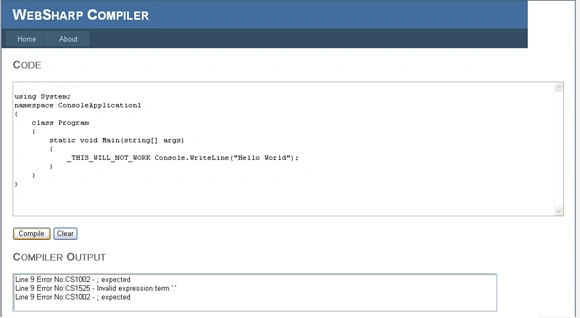
- When [Compile] is clicked, text from textbox will be compiled using a C# compiler and messages from compile displayed in a Listbox
Iteration 1
We are going to setup the project and build our first test.
Iteration 1 - Creating the Solution and our first test
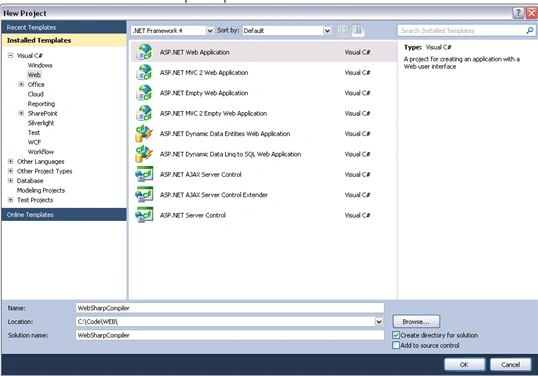
- Start Visual Studio
- Click the File menu
- Click New Project...
- Click Web
- Select ASP.NET Web Application
- Name it WebSharpCompiler
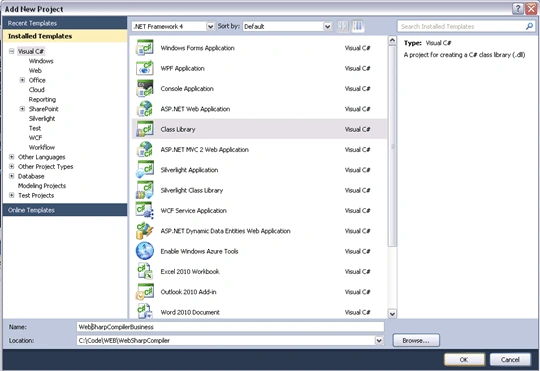
- Now add a Class library project (right
click on the solution and select ADD->New Project) as below, call it
WebSharpCompilerBusiness:
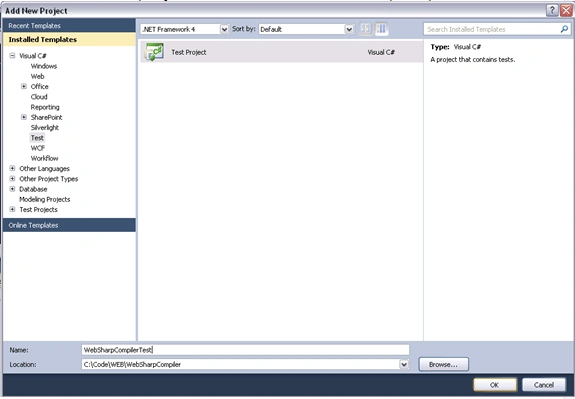
- Now add a test project as below, call it
WebSharpCompilerTest
- Add a reference to the
WebSharpCompilerBusiness class library project from the WebSharpCompilerTest
project (click on References in WebSharpCompilerTest and select ADD
Reference...)
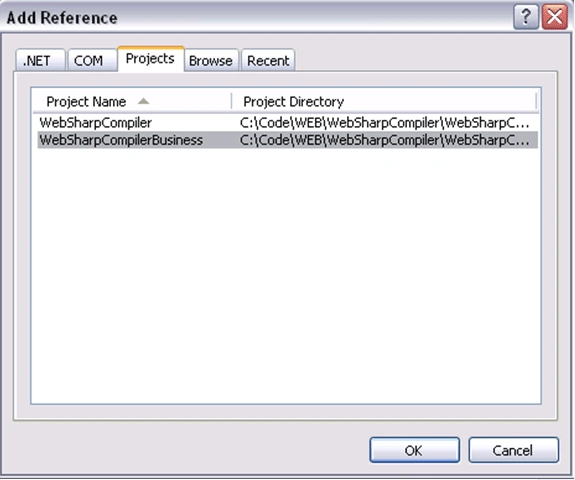
- Also add a reference from the WebSharpCompiler web project to the WebSharpCompilerBusiness(we need this when we create the web page later on).
- In WebSharpCompilerTest rename the file UnitTest1.cs to WebSharpCompilerTest.cs.
- Rename Class1 in WebSharpCompilerBusiness
to WebSharpCompiler - if you see the following message for either rename
actions:

- Click Yes
- Right click on the WebSharpCompilerTest and select Set as Startup Project.
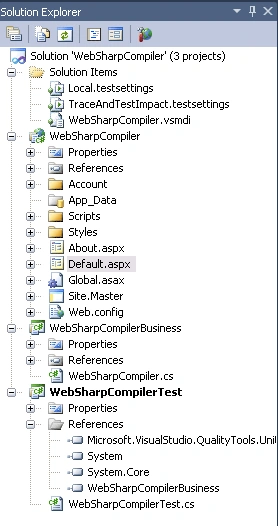
- Solution should now look like
- We need to add our first test so double click on WebSharpCompilerTest.cs.
- Add the following at the top of the file :
Using WebSharpCompilerBusiness ;
- Replace existing TestMethod1 with the
following code:
[TestMethod]
public void TestCompilerNotNull()
{ WebSharpCompiler compiler = new WebSharpCompiler();
Assert.IsNotNull(compiler.Compile(""));
} - As you can see we call Compile but it doesn't exist so lets add a new method
- Right click on the Compile text and select Generate -> Method Stub
- If we look at the generated code in
WebCompilerTest.cs we see:
public object Compile(string p)
{
List<string> messages = new List<string>();
if (string.IsNullOrEmpty(p))
{
messages.Add("program text cannot be null or empty");
}
return messages;
}
- Now if we try to run the test [CTRL-F5} we
should see

- So that's RED in our good old Red Green
Refactor process. Now its time to fix this method as follows:
public object Compile(string p)
{
List<string> messages = new List<string>();
if (string.IsNullOrEmpty(p))
{
messages.Add("program text cannot be null or empty");
}
return messages;
}
- If we run the test now we find...

- OK so that's the green we wanted, so now
time to refactor. So we'll clean up the usings, rename the parameter and
replace the return type with a more specific type as follows:
public List<string> Compile(string programText)
{
List<string> messages = new List<string>();
if (String.IsNullOrEmpty(programText))
{
messages.Add("program text cannot be null or empty");
}
CompilerResults compilerResults = ProcessCompilation(programText);
foreach (CompilerError error in compilerResults.Errors)
{
messages.Add(String.Format("Line {0} Error No:{1} - {2}", error.Line, error.ErrorNumber, error.ErrorText));
}
return messages;
}
Just remember you can use some cool VS2010 features to make these changes including:
- Right click on the code window and click organize usings->Remove and Sort
- Right click on a variable and click refactor->Rename
Iteration 2
Nitin PanditPosted Jun 24, 2017, 2:21 PM
Thanks for this Article sir, but actually i also want to get output of my code then what can do?
Ahmad TasnimPosted Apr 23, 2017, 6:36 AM
Hey Dominic, I configured the project and its working perfectly for CSHARP but when i am trying for C++ getting error "System.NotImplementedException: The method or operation is not implemented".... Please help
Ahmad TasnimPosted Apr 20, 2017, 6:57 AM
Hey Dom,Thanks for the great example. I have one question. I want to create a web application through which I can test C++ code. Compiling and running etc. Can you please guide me?
Michel JoePosted Nov 18, 2015, 1:24 PM
Can you please edit for displaying output as well
Md Almajid KoushikPosted Jul 6, 2014, 5:01 PM
Great Article !!!!!
Swati AgarwalPosted Mar 14, 2014, 2:15 AM
Yes , it is very helpful..
ARUN kumarPosted Jan 21, 2012, 4:49 AM
thanks mr.dom but how to display the output
ARUN kumarPosted Jan 21, 2012, 4:49 AM
thanks mr.dom but how to display the output
ShinurajPosted Feb 17, 2011, 12:03 AM
good to read