

Visual Studio 2005 codename Whidbey is the successor of Visual Studio 2003, which comes with .NET Framework 2.0 and certainly is the most powerful tool for developers. It not only provides a neater and easily manageable IDE, it also brings more powerful and customizable user interfaces for both Windows and Web developers. See What's new in Visual Studio 2005 for more details.
In this article, you will see how easy is it to develop a full fledged Web site in no time using Visual Studio 2005.
Create a new Web site application using File->New->Web Site menu of Visual Studio 2005, which launches the dialog shown in Figure 1. As can see from Figure 1, there are six different options including empty, general, Intranet, and Internet web sites, Web services, and Crystal Reports application.
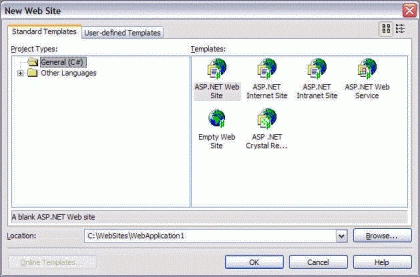
Figure 1.
In our case, I select ASP.NET Internet Site. You may also have noticed that there is no IIS option on this dialog for asking us to provide a virtual directory. Now Visual Studio 2005 no longer required IIS and this Web site is launched on a random port.
Now click OK to create the Web site project.
That's it. Your Web site is ready to launched. Now if you run the application, the output looks like Figure 2.
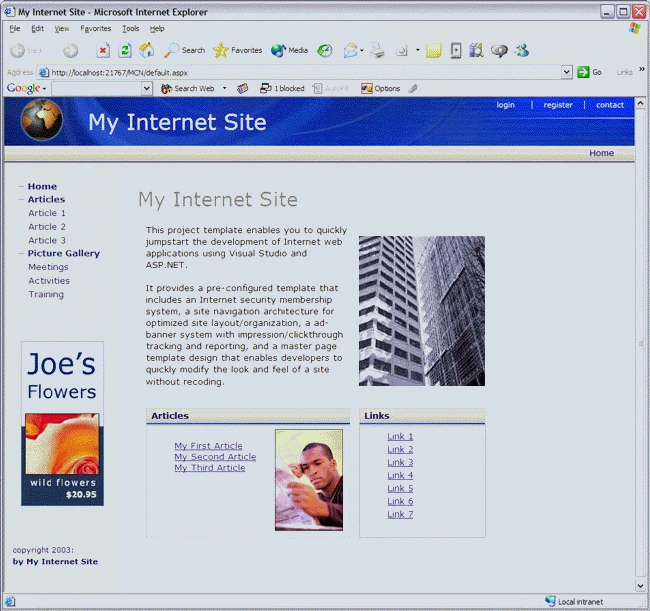
ketheeshkanth thambirajahPosted Dec 20, 2009, 8:24 AM
Can u tell me HOW TO USE THE DOWNLOADED TEMPLATE IN VISUAL STUDIO EITHER 2005 OR 2006, i want to know everthing from the begining like how to bring that template into the development area of visual studio and editting and so on , pls explain it in more detail thanks
Fabio CabellaPosted Nov 17, 2005, 4:10 AM
Hi mahesh, Did I understand well: this article explains how to click on a icon?!?! I know, a good site should have many articles. But if those articles are saying nothing like this, well you're the wrong way promoting this site. Cabbi