

1. Introduction
The evolution of artificial intelligence has moved far beyond simple automation and rule-based systems. Today, organizations are embracing a new paradigm that is "AI Agents" intelligent systems capable of understanding context, making decisions, and executing tasks autonomously. These agents are transforming how modern applications operate, shifting from passive tools to active participants in business workflows.
For developers in the Microsoft ecosystem, this transformation presents a significant opportunity. With the power of .NET and C#, combined with cloud-based AI capabilities such as Azure AI Foundry, it is now possible to build scalable, enterprise-grade AI agents that seamlessly integrate with existing systems. From invoking APIs and processing enterprise data to orchestrating multi-step workflows, AI agents can enhance productivity and unlock new levels of efficiency.
This article explores how to design and build AI agents using C# and .NET, leveraging Azure’s AI ecosystem. It will guide you through the core concepts, architecture, and practical approaches needed to move from traditional application development to intelligent, agent-driven systems.
2. Basics of AI agents and how they work
An AI agent is more than just a chatbot. It is an intelligent system that uses Large Language Models (LLMs) to understand user intent, enabling it to interpret complex inputs in a meaningful way. Beyond simply responding, it can take real actions such as calling APIs, querying databases, or triggering workflows to accomplish tasks. It also maintains context using memory, allowing for more coherent and personalized interactions over time. Additionally, an AI agent can follow defined workflows and decision logic, enabling it to plan, execute, and complete multi-step processes efficiently, making it a powerful component in modern, automated applications.

3. Capabilities of Azure AI Foundry
Azure AI Foundry provides a comprehensive, unified environment for building, deploying, and managing AI-powered applications and agents. It enables developers to design intelligent systems that can reason, plan, and execute tasks by orchestrating models, tools, and workflows in a single platform. With seamless integration capabilities, it allows AI agents to interact with APIs, databases, and enterprise services, transforming them from simple conversational tools into action-oriented systems. The platform also supports knowledge-driven solutions through retrieval-augmented generation (RAG), enabling agents to leverage documents, PDFs, and structured data for more accurate and context-aware responses. Additionally, it includes built-in features for testing, evaluation, monitoring, and applying safety guardrails, making it well-suited for developing scalable, secure, and production-ready AI solutions.
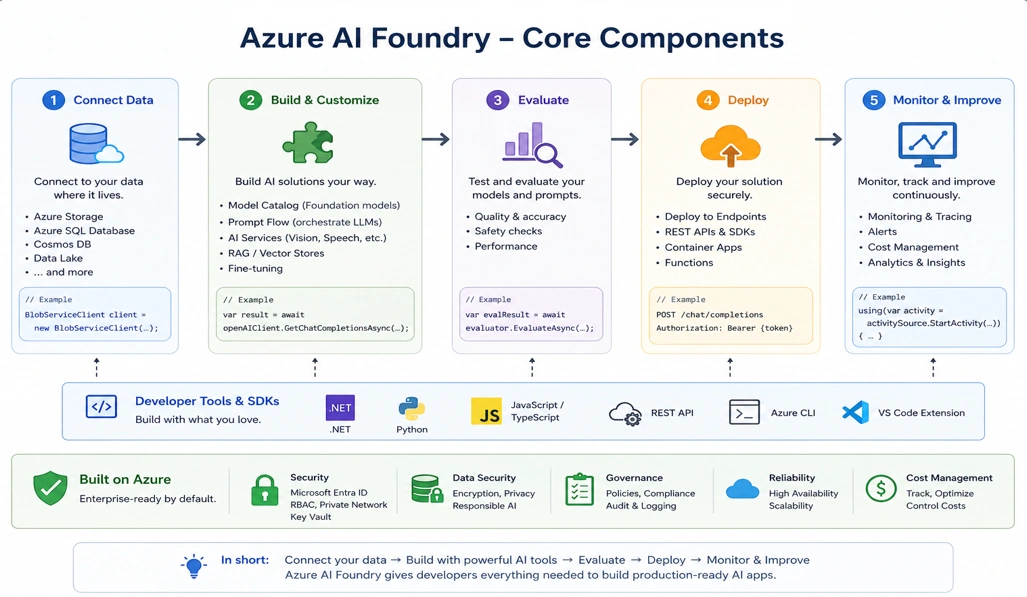
4. AI Agent–Focused Global Trends & Metrics
| Category | AI Agent–Specific Insight | Impact on .NET + Azure AI Foundry |
|---|---|---|
| AI Agent Adoption | Enterprises are moving from chatbots (e.g., ChatGPT) to task-executing AI agents | Need to build agents that can automate workflows in .NET apps |
| Enterprise AI Platforms | Microsoft is investing heavily in agent-based AI systems | Strong ecosystem for building enterprise-grade agents |
| Agent Development Platforms | Azure AI Foundry supports agent workflows, tools, and evaluation | Simplifies end-to-end AI agent development lifecycle |
| Tool Integration Trend | AI agents are increasingly connected to APIs, databases, and services | .NET makes it easy to expose and consume tools (APIs/plugins) |
| Knowledge-Driven Agents (RAG) | Agents use enterprise data via retrieval-augmented generation | Integration with Azure AI Search for intelligent agents |
| Developer Ecosystem | Millions of .NET developers can extend apps with AI agents | Faster adoption in existing enterprise systems |
| Business Automation | AI agents reduce manual effort by automating repetitive decision-making tasks | Ideal for EDI, finance, HR, and supply chain systems |
| Market Direction | AI agents expected to be core to future enterprise applications | Positions .NET + Azure as a strong foundation for AI-first apps |

5. Real-world Scenarios of AI Agents
AI agents can be applied across multiple industries to automate complex tasks, improve operational efficiency, and enable intelligent decision-making. Some key real-world applications include:
Finance:
Fraud detection and risk analysis
Real-time financial insights and reporting
Healthcare:
Patient support agents for scheduling and assistance
Basic diagnostics and information delivery
IT & DevOps:
Automating testing and deployment pipelines
Assisting developers with debugging and code suggestions
Monitoring systems and resolving incidents
Data & Analytics:
Generating insights from large datasets
Summarizing reports and business data
Supporting data-driven decision-making
Customer Support:
Building intelligent chatbots and virtual assistants
Handling FAQs and automating ticket resolution
Improving response time and customer experience
Enterprise & Supply Chain:
Automating order processing and tracking
Monitoring shipments and logistics in real time
Optimizing inventory and supply chain operations
Business Systems Integration:
Integrating with ERP systems (e.g., SAP, Microsoft Dynamics)
Automating data exchange between enterprise applications
Streamlining cross-system workflows
6. Build AI-Agents using C# and .NET
The .NET platform is enterprise-ready and widely adopted across business systems, making it a strong foundation for building modern applications. It offers seamless integration with the Azure ecosystem, enabling developers to leverage cloud-based AI services efficiently. Known for its high performance, scalability, and robust security features, .NET ensures that applications can meet demanding enterprise requirements. Additionally, it provides easy integration with existing APIs and databases, allowing organizations to extend their current systems with minimal disruption. With these advantages in place, let’s now build a working AI agent in C# step by step.
Step 1: Create Project in Visual Studio 2022
Open Microsoft Visual Studio 2022
Click Create a new project
Select: Console App (.NET)
Configure:
Project Name: AIAgentDemo
Framework: .NET 8
Click Create
Step 2: Install Required NuGet Packages
Go to: Tools → NuGet Package Manager → Manage NuGet Packages
Install:
Azure.AI.OpenAI
Microsoft.SemanticKernel
Step 3: Configure Azure OpenAI
// Open Program.cs and add:
using Azure;
using Azure.AI.OpenAI;
string endpoint = "https://YOUR-RESOURCE.openai.azure.com/";
string apiKey = "YOUR_API_KEY";
var client = new OpenAIClient(new Uri(endpoint), new AzureKeyCredential(apiKey));
Step 4: First AI Response (Basic Assistant)
// Replace Main method with:
var response = await client.GetChatCompletionsAsync(
    "gpt-4",
    new ChatCompletionsOptions
    {
        Messages =
        {
            new ChatMessage(ChatRole.System, "You are an AI assistant."),
            new ChatMessage(ChatRole.User, "Explain EDI 850 process")
        }
    });
Console.WriteLine(response.Value.Choices[0].Message.Content);
// Run the project (F5)
Step 5: Convert Assistant into AI Agent (Tool Calling)
// Add a tool definition:
var options = new ChatCompletionsOptions();
options.Tools.Add(new ChatCompletionsFunctionToolDefinition
{
    Name = "getOrderStatus",
    Description = "Get order status by ID",
    Parameters = BinaryData.FromObjectAsJson(new
    {
        type = "object",
        properties = new
        {
            orderId = new { type = "string" }
        },
        required = new[] { "orderId" }
    })
});
Step 6: Handle Tool Execution (Agent Action)
// Add logic after response:
if (response.Value.Choices[0].FinishReason == CompletionsFinishReason.ToolCalls)
{
    string orderId = "12345";
    // Simulated backend logic
    string result = $"Order {orderId} is shipped";
    Console.WriteLine(result);
}
// Now your AI agent can take actions, not just respond
Step 7: Add Conversation Memory
var messages = new List<ChatMessage>
{
    new ChatMessage(ChatRole.System, "You are an intelligent AI agent."),
    new ChatMessage(ChatRole.User, "Where is my order?")
};
messages.Add(new ChatMessage(ChatRole.Assistant, "Please provide order ID"));
Step 8: Use Semantic Kernel (Advanced Orchestration)
Using Microsoft Semantic Kernel:
using Microsoft.SemanticKernel;
var builder = Kernel.CreateBuilder();
builder.AddAzureOpenAIChatCompletion(
    "gpt-4",
    endpoint,
    apiKey
);
var kernel = builder.Build();
var result = await kernel.InvokePromptAsync("Summarize EDI 850 process");
Console.WriteLine(result);
Step 9: Add Knowledge (RAG Concept)
Integrate with: Azure AI Search
Simple example:
string context = "EDI 850 is a purchase order transaction...";
string prompt = $"Use this context:\n{context}\nAnswer the question.";
Step 10: Run & Test in Visual Studio
Conclution
As the demand for intelligent automation continues to grow, AI agents are quickly becoming a cornerstone of modern software architecture. They represent a shift from reactive applications to proactive systems that can reason, act, and continuously improve. For developers working with .NET, this is a pivotal moment to embrace AI-driven development and extend the capabilities of existing enterprise applications.
By leveraging platforms like Azure AI Foundry, developers can simplify the complexity of building AI solutions, focusing more on business logic and less on infrastructure. The integration of large language models, tool orchestration, and knowledge-driven systems enables the creation of powerful, scalable AI agents tailored to real-world use cases.
Ultimately, building AI agents in C# and .NET is not just about adopting new technology—it is about redefining how software delivers value. Organizations that invest in this approach today will be better positioned to innovate, automate, and compete in an increasingly AI-driven future.
Join the conversation! Your thoughts help the community grow.