
The Problem: A Raw LLM Call Is Not Enough
Imagine you’ve just integrated Claude API into your .NET app. You send a message, you get a response. It works. But then your users start asking for things like:
“Book a meeting with the client and send them a confirmation email.”
“Check if order #4521 has shipped and notify the customer if it hasn’t.”
“Summarise my inbox and flag anything urgent.”
A single API call cannot do any of these. Claude can describe what should happen, but it cannot act. It has no memory of previous requests, no access to your database, no ability to send emails or call your APIs. It is, in the most literal sense, stateless.
This is where the distinction between an LLM and an AI Agent becomes the most important architectural decision you will make.
LLM vs AI Agent side-by-side comparison — stateless machine vs human-like orchestration layer.

LLM vs Agent — The Core Distinction
This is the foundation everything else is built on, so it is worth getting absolutely clear.
The LLM: A Brilliant Machine with Amnesia
An LLM — in this case Claude — is a stateless inference engine. Every API call is completely isolated. Claude has been trained on an enormous amount of data and can reason, write, analyse, and generate with impressive capability. But it has no persistence. It walks into every conversation having forgotten everything that came before, unless you hand it the notes yourself.
Think of it like this: an LLM is a brilliant employee with amnesia. They know everything, remember nothing, and do exactly what you hand them right now — nothing more, nothing less.
Here is what a raw LLM call looks like structurally:
Input → Claude processes with its trained data → OutputThat is the full picture. No memory. No actions. No loops. Just input and output.
The Agent: The Manager Built Around That Employee
An AI agent is the orchestration layer you build around the LLM. It gives Claude memory, tools, decision-making loops, and the ability to act on the world. The agent is not a product Anthropic ships — it is architecture you design.
An agent has:
Memory — conversation history, user profiles, past interactions stored in your database
Tools — functions Claude can call: query a database, send an email, call a REST API, read a file
A decision loop — Claude reasons, picks a tool, your code executes it, Claude reads the result and decides what to do next
Goal orientation — it keeps looping until the job is done, not just until one response is generated
The analogy completes itself: the agent is the manager who remembers everything, decides what to do next, and delegates to that brilliant amnesiac employee to get it done.
The LLM is the brain. The agent is the brain plus memory, plus hands, plus a decision loop. You build the agent. Claude is the intelligence inside it.
How the Agent Loop Works
The agent loop is the heartbeat of any agentic system. It follows a simple Think → Act → Observe → Repeat cycle.
The Agent Loop — step-by-step sequence from user prompt through tool_use, code execution, tool_result, and back to Claude until final response.
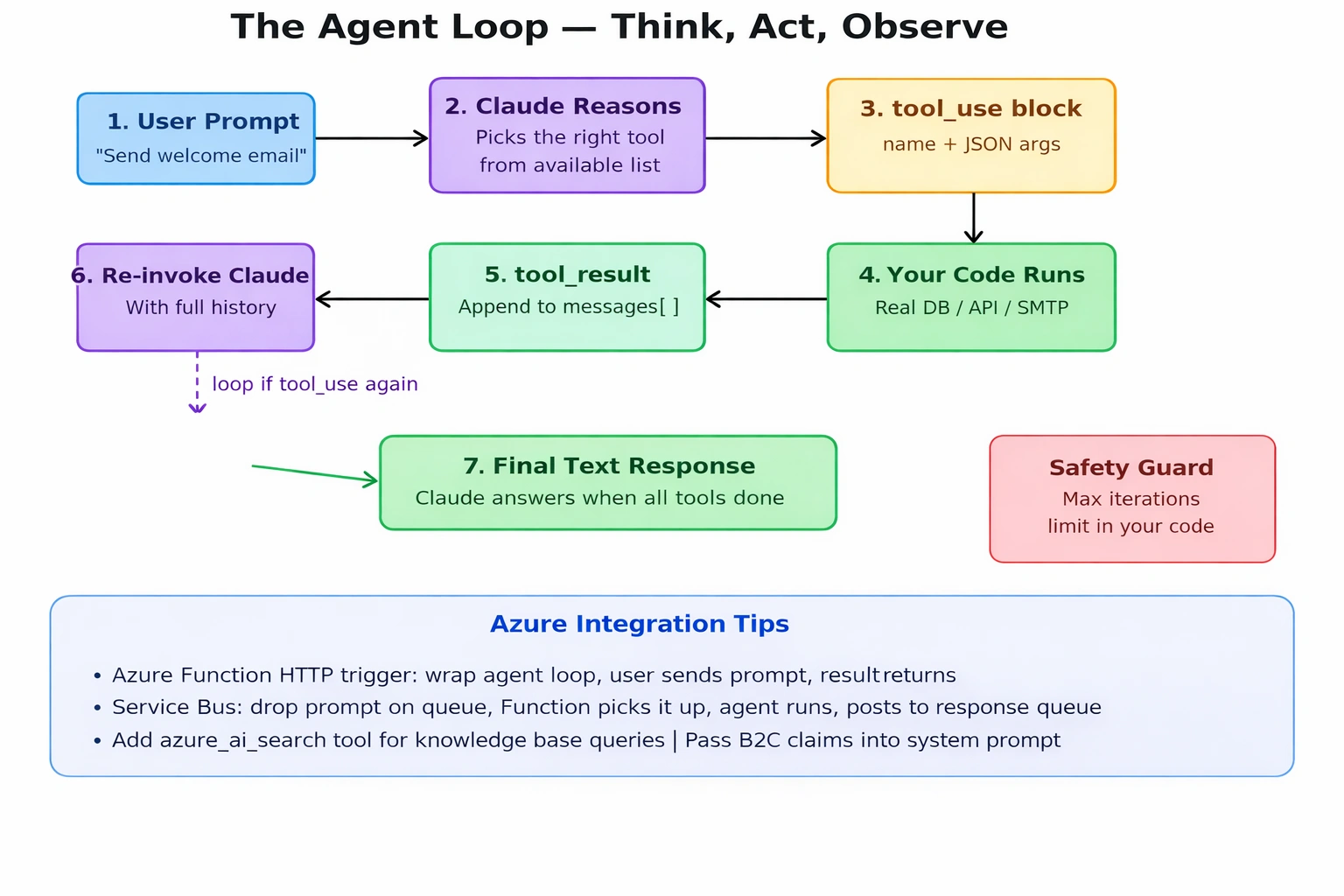
Step 1 — User sends a prompt
The user asks: “Find the customer [email protected] and send him a welcome email.”
Step 2 — Claude reasons
Claude reads the prompt, the system instructions, the available tools, and the conversation history. It decides it needs to look up the customer first before sending anything.
Step 3 — Claude returns a tool_use block
Instead of a text answer, Claude responds with a structured call: “Run the get_customer tool with email = [email protected]”.
Step 4 — Your code executes the tool
Your C# code receives the tool call, runs the actual database query, and gets the result back.
Step 5 — You append a tool_result to the messages
You add Claude’s tool call and your result to the conversation history and send it back to Claude.
Step 6 — Claude reasons again
Now Claude knows the customer exists. It generates the welcome email content and calls send_email with the appropriate arguments.
Step 7 — Your code sends the email
Your tool implementation runs the actual SMTP or API call.
Step 8 — Claude gives the final response
With the job done, Claude returns a text block: “Done — welcome email sent to John Smith at [email protected].”
This entire cycle can involve two tool calls, five tool calls, or twenty — Claude keeps looping until the task is complete or it determines it cannot proceed.
Tool Use and JSON Schema — What Claude Actually Sees
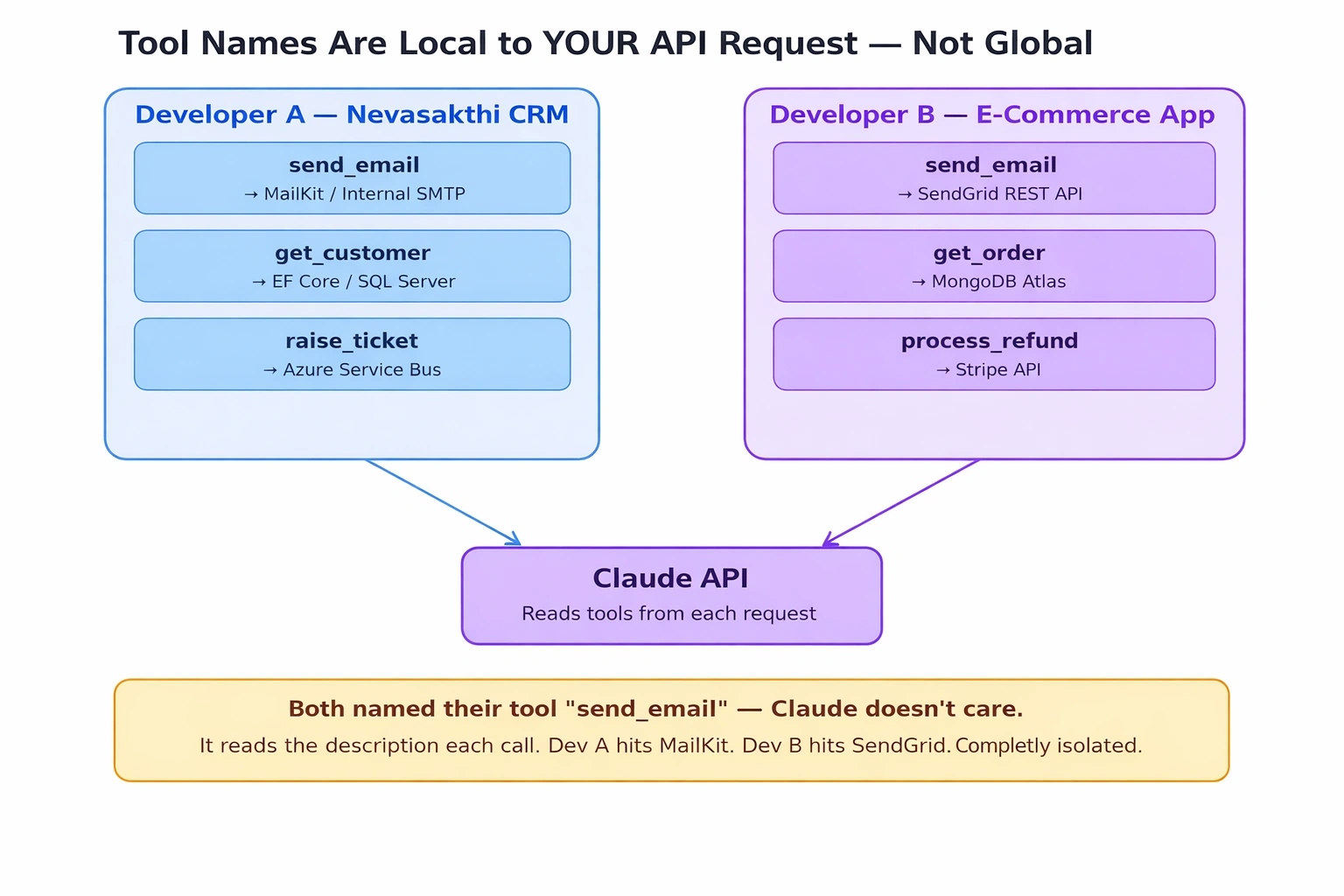
Tools Are Not Global. They Are Yours.
There is no central registry of tools at Anthropic. Claude has no pre-built send_email function. Every tool you define exists only within that single API request. Two developers can both define a tool called send_email — they are completely independent. Claude reads whatever you pass in the tools array of each request, and that is the only reality it operates within.
Tool scope diagram — Developer A and Developer B both define send_email, both point to Claude API, but their implementations are completely isolated.
The Schema Format — Fixed Envelope, Variable Content
Every tool follows this fixed outer shape defined by Anthropic’s API spec:
{
  "name": "send_email",
  "description": "Sends a professional email to a customer.",
  "input_schema": {
    "type": "object",
    "properties": { },
    "required": []
  }
}
The three keys — name, description, input_schema — never change. What changes is what you put inside properties, based on what your tool needs as input.
Supported types inside properties: string (with optional enum), number/integer (with min/max), boolean, array (with items), object (nested), and anyOf with null for optional fields. Not supported: $ref, allOf, oneOf, if/then/else.
A complete real-world tool definition in C#:
var sendEmailTool = new Tool
{
    Name = "send_email",
    Description = "Sends a professional email to a customer. " +
                  "Use this only after confirming the customer exists.",
    InputSchema = new InputSchema
    {
        Type = "object",
        Properties = new Dictionary<string, Property>
        {
            ["to"] = new Property { Type = "string", Description = "Recipient email address" },
            ["subject"] = new Property { Type = "string", Description = "Email subject line, max 80 characters" },
            ["body"] = new Property { Type = "string", Description = "Email body in plain text" },
            ["priority"] = new Property
            {
                Type = "string",
                Enum = new[] { "low", "normal", "high" },
                Description = "Email priority, defaults to normal"
            }
        },
        Required = new List<string> { "to", "subject", "body" }
    }
};
Building the Agent in C# / .NET 8
Here is a complete, production-ready agent loop using Anthropic.SDK.
Step 1 — Define your tools
var tools = new List<Tool>
{
    new Tool
    {
        Name = "get_customer",
        Description = "Looks up a customer by email from the CRM database.",
        InputSchema = new InputSchema
        {
            Type = "object",
            Properties = new Dictionary<string, Property>
            {
                ["email"] = new Property { Type = "string", Description = "The customer's email address" }
            },
            Required = new List<string> { "email" }
        }
    },
    new Tool
    {
        Name = "send_email",
        Description = "Sends an email to a customer.",
        InputSchema = new InputSchema
        {
            Type = "object",
            Properties = new Dictionary<string, Property>
            {
                ["to"]      = new Property { Type = "string" },
                ["subject"] = new Property { Type = "string" },
                ["body"]    = new Property { Type = "string" }
            },
            Required = new List<string> { "to", "subject", "body" }
        }
    }
};
Step 2 — Build the agent loop
var client = new AnthropicClient();

var messages = new List<Message>
{
    new Message
    {
        Role = RoleType.User,
        Content = "Find the customer [email protected] and send him a welcome email."
    }
};

int maxIterations = 10;
int iteration = 0;

while (iteration++ < maxIterations)
{
    var response = await client.Messages.GetClaudeMessageAsync(new MessageParameters
    {
        Model     = AnthropicModels.Claude3Sonnet,
        MaxTokens = 1024,
        System    = "You are a CRM assistant. Always look up the customer before sending email.",
        Tools     = tools,
        Messages  = messages
    });

    messages.Add(new Message { Role = RoleType.Assistant, Content = response.Content });

    if (response.StopReason == "end_turn")
    {
        var finalText = response.Content.OfType<TextBlock>().FirstOrDefault()?.Text;
        Console.WriteLine($"Agent: {finalText}");
        break;
    }

    if (response.StopReason == "tool_use")
    {
        var toolResults = new List<Content>();

        foreach (var block in response.Content.OfType<ToolUseBlock>())
        {
            var result = await ExecuteTool(block.Name, block.Input);
            toolResults.Add(new ToolResultBlock { ToolUseId = block.Id, Content = result });
        }

        messages.Add(new Message { Role = RoleType.User, Content = toolResults });
    }
}
Step 3 — Implement your tools
static async Task<string> ExecuteTool(string toolName, JsonElement input)
{
    return toolName switch
    {
        "get_customer" => await GetCustomer(input.GetProperty("email").GetString()!),
        "send_email"   => await SendEmail(
                              input.GetProperty("to").GetString()!,
                              input.GetProperty("subject").GetString()!,
                              input.GetProperty("body").GetString()!),
        _ => $"Unknown tool: {toolName}"
    };
}
Guardrails in Tool Implementation
Here is a critical point that many developers miss: Claude is not a security boundary.
When Claude calls send_email, it passes arguments to your function. What actually happens inside that function is entirely your responsibility. Claude never sees your validation logic, business rules, or compliance checks. It only sees what you return.
There are three patterns:
Pattern 1 — Blind send: Claude generates the email, your code sends it immediately. Simple, but risky.
Pattern 2 — Human approval: Your tool returns the draft for user review before sending. Safest, but slower.
Pattern 3 — Code guardrails (recommended for production): validate in your tool implementation.
static async Task<string> SendEmail(string to, string subject, string body)
{
    if (!to.EndsWith("@nevasakthi.com") && !IsApprovedDomain(to))
        return JsonSerializer.Serialize(new { success = false, reason = "Recipient domain not approved." });

    if (ContainsSensitiveContent(body))
        return JsonSerializer.Serialize(new { success = false, reason = "Email body contains sensitive content. Please revise." });

    body += "\n\n---\nThis email was generated by Nevasakthi AI Assistant.";
    await LogEmailAudit(to, subject);
    await _mailKitService.SendAsync(to, subject, body);
    return JsonSerializer.Serialize(new { success = true });
}
When your tool returns success: false with a reason, Claude reads that result and retries with corrected content. You can also add a system prompt instruction to make Claude self-review before calling the tool — two independent safety nets.
Managing Growing Conversation History
Claude is stateless. Memory is your responsibility — you pass it in the messages array every time. As conversation grows, token costs rise proportionally. Three strategies:
Sliding window: Keep only the last N messages, drop the oldest. Simple and predictable cost.
Summarise old turns: Use a cheap Haiku model call to compress older turns. Retains meaning at low cost.
Prompt caching: Mark large repeated context with
cache_control. Approximately 90% cheaper on cached tokens.
// Sliding window
while (_history.Count > MaxMessages)
    _history.RemoveAt(0);

// Prompt caching
System = new List<SystemMessage>
{
    new SystemMessage
    {
        Text = largeSystemContext,
        CacheControl = new CacheControl { Type = CacheControlType.Ephemeral }
    }
};
Key mental model: you always maintain the full history in your app, but you send only a managed slice to Claude.
LLM vs Agent — Comparison
| Capability | LLM (raw API call) | AI Agent |
|---|---|---|
| Memory between calls | None — stateless | Yes — you manage it |
| Can call external APIs | No | Yes — via tools |
| Can send emails | No | Yes — via tool implementation |
| Loops until task done | No — one response | Yes — loops until end_turn |
| Makes decisions | Responds to prompt only | Picks tools, plans steps |
| Access to your database | No | Yes — via tool |
| Cost per interaction | One call | Multiple calls (loop) |
| Complexity | Simple | You build the orchestration |
Real-World Use Cases
CRM and Customer Operations
Look up customer records, update account status, draft and send personalised outreach emails
Analyse support tickets, categorise them, route to the right team, draft suggested responses
Azure-Native Workflows
Azure Function HTTP trigger wraps the agent loop — user sends prompt, agent runs, result returns
Drop user message onto Service Bus queue, Function picks it up, agent runs, posts result to response queue
Add an
azure_ai_searchtool to let the agent query your knowledge base before respondingPass Azure B2C user claims into the system prompt so the agent always knows who it is acting for
Document Intelligence
Accept uploaded contracts, run through Claude with review criteria, output structured risk assessments
Process invoice batches, extract line items, validate against purchase orders, flag discrepancies
Email Automation (Daily Batch)
Read inbox via IMAP (MailKit), summarise with Claude, generate
.docxreport via OpenXMLNo conversation history needed for batch jobs — each run is a fresh request with emails as context
Summary
An LLM is a stateless inference engine — brilliant, fast, and completely amnesiac. An AI agent is the orchestration layer you build around it: memory, tools, decision loops, guardrails, and goal-oriented execution. Claude is the brain; your .NET code is the skeleton, nervous system, and memory that brings it to life.
The agent loop — Think → Act → Observe → Repeat — is the pattern that unlocks real-world utility. Tools are local to your API call, not global. Memory is your responsibility. Guardrails live in your tool implementations, not in Claude. And growing conversation history is managed by you through sliding windows, summarisation, or prompt caching.
If you are building anything beyond a simple Q&A interface in .NET, you are building an agent — whether you call it that or not. Understanding the distinction clearly is what separates a demo from a production system.
Join the conversation! Your thoughts help the community grow.