

Introduction
In the previous articles of this series, we discussed how to build the API Gateway in ASP.NET Core.
And in this article , we will discuss QoS (Quality of Service) module of Ocelot.
If you want to look at the previous articles of this series, please visit the links given below.
- Building API Gateway Using Ocelot In ASP.NET Core - Basic
- Building API Gateway Using Ocelot In ASP.NET Core - Authentication
- Building API Gateway Using Ocelot In ASP.NET Core - Logging
- Building API Gateway Using Ocelot In ASP.NET Core - Rate Limiting
What is QoS?
Quality of service is the ability to provide different priorities to different applications, users, or data flows, or to guarantee a certain level of performance to a data flow.
Ocelot uses Polly to achieve this job. And I will use version 4.0.0 of Ocelot to build the following sample.
Preparation
Preparation
We need to create two projects and ensure that they can run well.
After run them up, we will add configuration of QoS to this route : http://localhost:9000/customers.
Add QoS In configuration.json
We only need to add a node named QoSOptions.
The QoSOptions node contains 3 important properties.
We only need to add a node named QoSOptions.
The QoSOptions node contains 3 important properties.
- ExceptionsAllowedBeforeBreaking
This value must greater than 0. It means that the circuit breaker will break after a certain number of exceptions occur. - DurationOfBreak
This value specifies how long the circuit breaker will stay open after it is tripped. The unit of this value is milliseconds. - TimeoutValue
This value specifies that a request will automatically be timed out if it takes more than this value. The unit of this value is milliseconds as well.
Here is a sample that shows you how to configure it.
- {
- "DownstreamPathTemplate": "/api/values",
- "DownstreamScheme": "http",
- "DownstreamHostAndPorts": [
- {
- "Host": "localhost",
- "Port": 9001
- }
- ],
- "UpstreamPathTemplate": "/customers",
- "UpstreamHttpMethod": [ "Get" ],
- "QoSOptions": {
- "ExceptionsAllowedBeforeBreaking":2,
- "DurationOfBreak":5000,
- "TimeoutValue":2000
- }
- }
- //others.....
The above configuration means that when we visit http://localhost:9000/customers:
If the server does not response for 2 seconds, it will throw a timeout exception.
If the server throws a second exception, the server will not be accessible for five seconds.
Note
Note
There is another property of QoSOptions named TimeoutStrategy. The default value of this property is TimeoutStrategy.Pessimistic. However, at this time, we can not change this value yet.
For showing the result, I made some change on the APIService.
For showing the result, I made some change on the APIService.
- private static int _count = 0;
- // GET api/values
- [HttpGet]
- public IEnumerable<string> Get()
- {
- _count++;
- System.Console.WriteLine($"get...{_count}");
- if(_count <= 3)
- {
- Thread.Sleep(5000);
- }
- return new string[] { "value1", "value2" };
- }
Let's take a look at the result of this:

When we visit the first time, it tells us that circuit is breaking for 5000 ms.
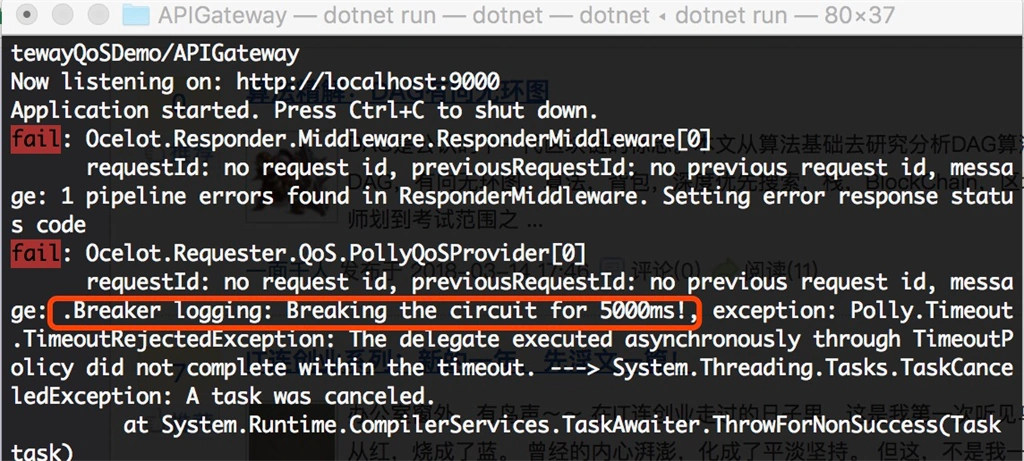
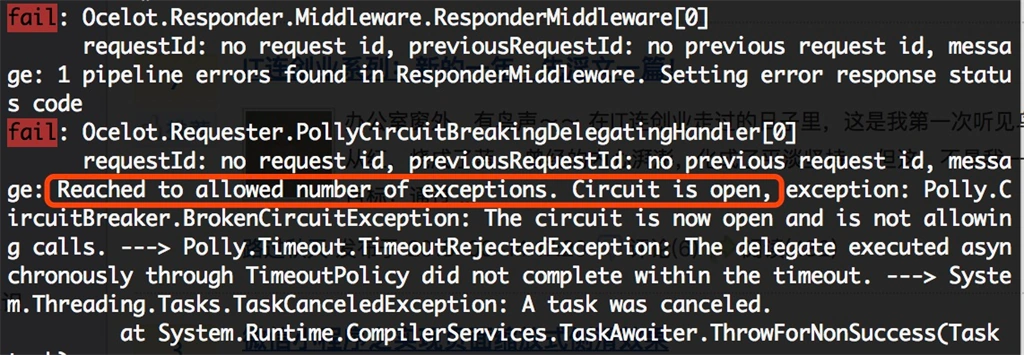
The second time it tells us that the circuit is open, and we can not visit the services for five seconds.
After five seconds, the service is accessible.
When we visit the first time, it tells us that circuit is breaking for 5000 ms.
The second time it tells us that the circuit is open, and we can not visit the services for five seconds.
After five seconds, the service is accessible.
Now, we have finished the job.
Here is the source code you can find in my github page .
Summary
This article introduced how to use QoS module in Ocelot.
This article introduced how to use QoS module in Ocelot.
I hope this can help you!
Kha BuiPosted May 22, 2023, 1:53 AM
Thank your articles.
AntarikshPosted Apr 15, 2021, 11:56 AM
Thank you for the article. I have a question , If api returning any exception , Ocelot QOS feature is not handling the exception. Can you please clear how we can handle exception using Ocelot and poly.
MJ EbrahimiPosted Sep 10, 2020, 3:06 PM
Good article. For the record, this article was added to this awesome repository. https://github.com/mjebrahimi/Awesome-Microservices-NetCore
Deepak NaiduPosted May 22, 2019, 1:24 PM
Thanks for the articles that you have on API Gateway, I have a question can I use Ocelot for consuming external APIs provided by 3rd party companies?
ali javanyPosted Jan 4, 2019, 2:20 PM
Is that working like SSO?
Tridip BhattacharjeePosted Mar 20, 2018, 7:15 AM
When people use api gateways.....in case of micro service ?