

Introduction
In this article, you will learn an easy way to build your API Gateway using Ocelot in ASP.NET Core. Maybe you will ask the question, what is API Gateway.
Let's take a look at the below screenshot first.
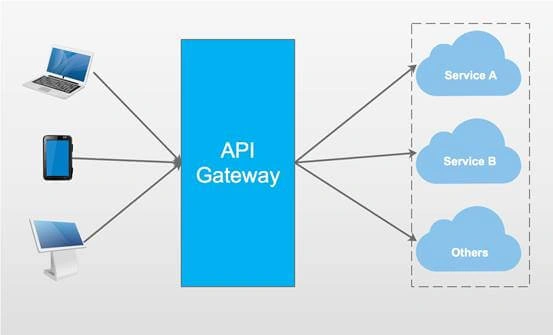
The above screenshot can help you understand it clearly.
API Gateway is an entry to our systems. It contains lots of things, such as Routing, Authentication, Service discovery, Logging .etc.
OcelotOcelot is aimed at people using .NET running a micro-services / service orientated architecture who need a unified point of entry into their system. You can visit this project’s Github page to find more information.
I will use a simple demo to show you how to use Ocelot.
Let's begin!
Step 1Create three projects at first.
| Project Name | Project Type | Description |
| APIGateway | ASP.NET Core Empty | entry of this demo |
| CustomersAPIServices | ASP.NET Core Web API | API Service that handles something about customers |
| ProductsAPIServices | ASP.NET Core Web API | API Service that handles something about products |
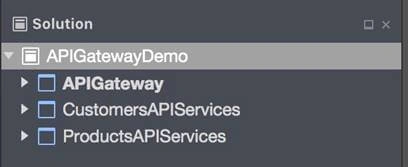
Finish the two API services at first. Create a CustomersController in CustimersAPIServices project.
- [Route("api/[controller]")]
- public class CustomersController : Controller
- {
- [HttpGet]
- public IEnumerable<string> Get()
- {
- return new string[] { "Catcher Wong", "James Li" };
- }
- [HttpGet("{id}")]
- public string Get(int id)
- {
- return $"Catcher Wong - {id}";
- }
- }
In order to specify the App URL of this service, we should add UseUrls in the Program class.
- public static IWebHost BuildWebHost(string[] args) =>
- WebHost.CreateDefaultBuilder(args)
- .UseStartup<Startup>()
- .UseUrls("http://localhost:9001")
- .Build();
Create a ProductsController in ProductsAPIServices project.
- [Route("api/[controller]")]
- public class ProductsController : Controller
- {
- [HttpGet]
- public IEnumerable<string> Get()
- {
- return new string[] { "Surface Book 2", "Mac Book Pro" };
- }
- }
Edit the Program class to add UseUrls as well.
- public static IWebHost BuildWebHost(string[] args) =>
- WebHost.CreateDefaultBuilder(args)
- .UseStartup<Startup>()
- .UseUrls("http://localhost:9002")
- .Build();
Note
You also can specify the App URL in the Project Options page.
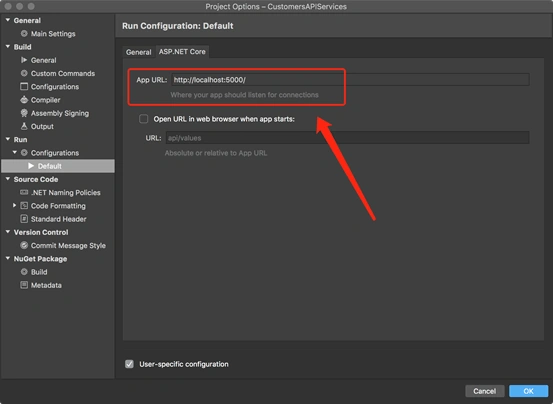
Run the customer service and product service.
Open two terminals and use the "dotnet run" command to start them.
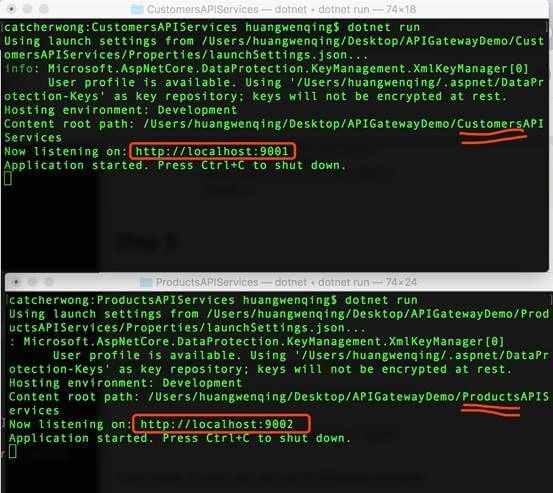
As you can see, customer service is listening to http://localhost:9001 and product service is listening on http://localhost:9002.
Open the browser to verify whether the service is OK.
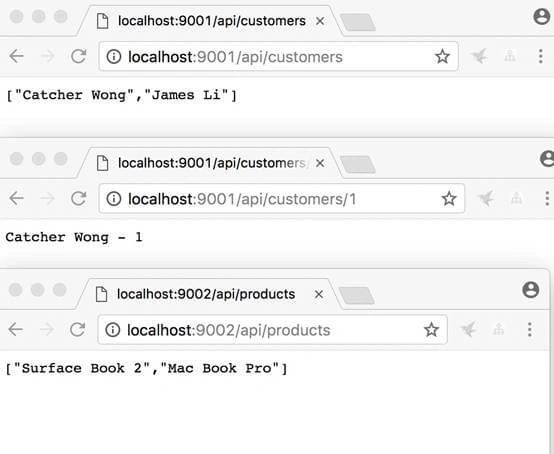
Luckily, everything was going well.
Step 4Now, we should turn to APIGateway project. We should install Ocelot package at first.
Install-Package Ocelot
After installing this package, you can find some dependence on it.
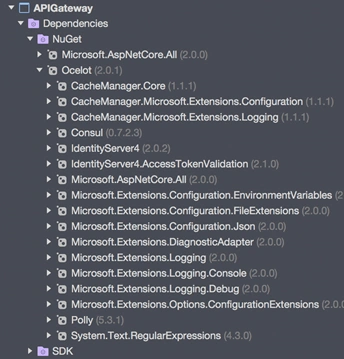
Add a configuration.json file.
- {
- "ReRoutes": [
- {
- "DownstreamPathTemplate": "/api/customers",
- "DownstreamScheme": "http",
- "DownstreamHost": "localhost",
- "DownstreamPort": 9001,
- "UpstreamPathTemplate": "/customers",
- "UpstreamHttpMethod": [ "Get" ]
- },
- {
- "DownstreamPathTemplate": "/api/customers/{id}",
- "DownstreamScheme": "http",
- "DownstreamHost": "localhost",
- "DownstreamPort": 9001,
- "UpstreamPathTemplate": "/customers/{id}",
- "UpstreamHttpMethod": [ "Get" ]
- },
- {
- "DownstreamPathTemplate": "/api/products",
- "DownstreamScheme": "http",
- "DownstreamPort": 9002,
- "DownstreamHost": "localhost",
- "UpstreamPathTemplate": "/api/products",
- "UpstreamHttpMethod": [ "Get" ]
- }
- ],
- "GlobalConfiguration": {
- "RequestIdKey": "OcRequestId",
- "AdministrationPath": "/administration"
- }
- }
This file is the configuration of the API Gateway. There are two sections to the configuration- an array of ReRoutes and a GlobalConfiguration.
The ReRoutes are the objects that tell Ocelot how to treat an upstream request. The Global configuration is a bit hacky and allows overrides of ReRoute specific settings.
Take this part to explain the ReRoutes section.
- {
- "DownstreamPathTemplate": "/api/customers/{id}",
- "DownstreamScheme": "http",
- "DownstreamHost": "localhost",
- "DownstreamPort": 9001,
- "UpstreamPathTemplate": "/customers/{id}",
- "UpstreamHttpMethod": [ "Get" ]
- }
The items start with Downstream which means that our request will be forwarded to http://localhost:9001/api/customers/{id}.
The items start with Upstream which means that we should use HTTP GET method with /customers/{id}` to visit this service.
Step 6Edit the Startup class so that we can use Ocelot in this project.
- public class Startup
- {
- public Startup(IHostingEnvironment env)
- {
- var builder = new Microsoft.Extensions.Configuration.ConfigurationBuilder();
- builder.SetBasePath(env.ContentRootPath)
- //add configuration.json
- .AddJsonFile("configuration.json", optional: false, reloadOnChange: true)
- .AddEnvironmentVariables();
- Configuration = builder.Build();
- }
- //change
- public IConfigurationRoot Configuration { get; }
- public void ConfigureServices(IServiceCollection services)
- {
- Action<ConfigurationBuilderCachePart> settings = (x) =>
- {
- x.WithMicrosoftLogging(log =>
- {
- log.AddConsole(LogLevel.Debug);
- }).WithDictionaryHandle();
- };
- services.AddOcelot(Configuration, settings);
- }
- //don't use Task here
- public async void Configure(IApplicationBuilder app, IHostingEnvironment env)
- {
- await app.UseOcelot();
- }
- }
Don't forget to add the configuration.json file to the Configuration .
Step 7This is a very important step to configure Ocelot.
We should create a new instance of IWebHostBuilder. And, don't use var here !!!
- public class Program
- {
- public static void Main(string[] args)
- {
- IWebHostBuilder builder = new WebHostBuilder();
- builder.ConfigureServices(s =>
- {
- s.AddSingleton(builder);
- });
- builder.UseKestrel()
- .UseContentRoot(Directory.GetCurrentDirectory())
- .UseStartup<Startup>()
- .UseUrls("http://localhost:9000");
- var host = builder.Build();
- host.Run();
- }
- }
We also specify the App URL of the API Gateway here.
Step 8Run your API Gateway.
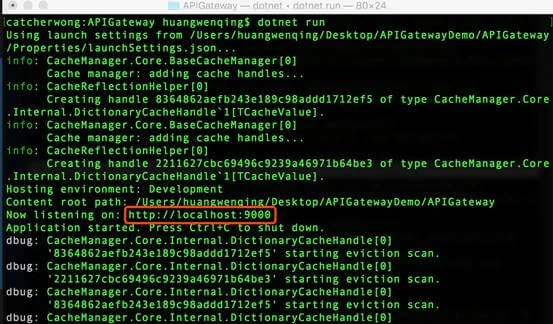
As you can see, our API Gateway is running on http://localhost:9000
We open the browser to visit our services.

When visiting http://localhost:9000/api/products, we will get the result from http://localhost:9002/api/products .
When visiting http://localhost:9000/customers, we will get the result from http://localhost:9001/api/customers .
When visiting http://localhost:9000/customers/1, we will get the result from http://localhost:9001/api/customers/1.
Here is the source code you can find on my Github page.
Summary
This article introduced how to build API Gateway via Ocelot. Hope this will help you!
By the way, this is a very easy demo; there are some important things I did not mention in this article, such as Service discovery, Authentication, and Quality of Service
Ajay RaoPosted Mar 23, 2022, 2:19 AM
Is it possible to call and route an react web application via OCELOT, though OCELOT says its an API gateway technology. i want to expose only the OCELOT gateway by deploying it in a DMZ and deploy my react-web-app (based on react/redux) and RESTful web services (based on DOTNET CORE) behind the firewall and the database on a independent server behind the firewall. we tried but the request is not going through when we try to access the react-web-application
mahmoud alaskalanyPosted Oct 29, 2021, 4:41 PM
How to make swagger work if am hosting the all three projects under virtual directories in same website iis
Ashish KumarPosted May 14, 2021, 5:36 AM
Configuration = builder.Build(); is giving Configuration is type but used as a variable error. How to resolve it?
Hamid KhanPosted Feb 3, 2021, 7:07 PM
Thanks for sharing.....................
Hamid KhanPosted Feb 3, 2021, 7:07 PM
Very simple way that's good you explain.........................
Khanh NguyenPosted Sep 11, 2020, 8:32 AM
How to get path file wwwroot in micro service when I call DefaulGateWay. I try https://localhost:44336/api/combohome/demo.xlsx so wwwroot in port 3003. Can everyone help me.
MJ EbrahimiPosted Sep 10, 2020, 3:05 PM
Good article. For the record, this article was added to this awesome repository. https://github.com/mjebrahimi/Awesome-Microservices-NetCore
Sadat ChowdhuryPosted Aug 13, 2020, 10:44 PM
Hi Wong - I have downloaded the application and it is working perfectly in my local machine i.e http://localhost. I tried to host this in IIS with a real IP to access it from outside of my local machine i.e internet but can't access. Please advise what I need to change so that my micro services are accessible from internet.
Shyam TomarPosted Dec 31, 2019, 9:48 AM
Catcher Wong I am using visual studio 2019, and download your code, but it does not work, always get 404 page error. Can you tell why this does not work in VS 2019 and .Core Version 2.1[Used your Solution]
RASHI shrivastavaPosted Sep 19, 2019, 10:53 AM
If i will use the code in dotnet core 2.2 in visual studio 2019 .It is generating error in WithMicrosoftLogging.What is the reason?
RASHI shrivastavaPosted Sep 17, 2019, 6:32 AM
Can it supports dotnet core 2.2 ?
Ravian ReaverPosted Jul 10, 2019, 5:12 AM
Hey Catcher Wong! Thanks a lot for this tutorial! could you please do service a discovery tutorial using Consul ?
Mohamed BerradaPosted Jun 7, 2019, 9:46 AM
Hola Catcher ! I'm wondering if there's any other way than the one specified just right below (cf. gamarra post). I tried the "dowstreamHost": 0.0.0.0 so we won't have to hardcode each time the host responsible for the microservice. Didn't work out. Great article by the way, thank you !
giancarlo gamarraPosted Apr 17, 2019, 7:19 PM
Hi, How can we use ocelot in production enviroment, because we are using localhost
Daman SinghPosted Mar 19, 2019, 11:17 PM
Very articulate and nicely presented example to start with..
Tran Minh PhongPosted Sep 27, 2018, 9:44 PM
Hi ad, How to add multi configuration.json to Startup.cs? Ex: configuration1.json { "ReRoutes": [ { "DownstreamPathTemplate": "/api/v1/Controller8001/GetValue1", "DownstreamScheme": "http", "DownstreamHostAndPorts": [ { "Host": "localhost", "Port": 8001 } ], "UpstreamPathTemplate": "/api/v1/Controller8001/GetValue1", "UpstreamHttpMethod": [ "GET" ] } ], "GlobalConfiguration": { } } configuration2.json { "ReRoutes": [ { "DownstreamPathTemplate": "/api/v1/Controller8002/GetValue2", "DownstreamScheme": "http", "DownstreamHostAndPorts": [ { "Host": "localhost", "Port": 8002 } ], "UpstreamPathTemplate": "/api/v1/Controller8002/GetValue2", "UpstreamHttpMethod": [ "GET" ] } ], "GlobalConfiguration": { } } Startup.cs public Startup(IHostingEnvironment env) { Configuration = new ConfigurationBuilder() .SetBasePath(env.ContentRootPath) .AddJsonFile("configuration1.json", optional: true, reloadOnChange: true) .AddJsonFile("configuration2.json", optional: true, reloadOnChange: true) .AddEnvironmentVariables() .Build(); } public void ConfigureServices(IServiceCollection services) { services.AddMvc(); services.AddOcelot(Configuration); } public void Configure(IApplicationBuilder app) { app.UseMvc(); app.UseOcelot().Wait(); } When run api gateway, call api/v1/Controller8002/GetValue2 then received notification is 404 Notfound. Call api/v1/Controller8002/GetValue2 -> OK. api/v1/Controller8001/GetValue1 -> service http://localhost:8001 api/v1/Controller8002/GetValue2 -> service http://localhost:8002
John KeersPosted Jul 26, 2018, 6:45 AM
{ "ReRoutes": [ { "DownstreamPathTemplate": "/api/customers", "DownstreamScheme": "http", "DownstreamHostAndPorts": [ { "Host": "localhost", "Port": 9001 } ], "UpstreamPathTemplate": "/customers", "UpstreamHttpMethod": [ "Get" ] }, { "DownstreamPathTemplate": "/api/customers/{id}", "DownstreamScheme": "http", "DownstreamHostAndPorts": [ { "Host": "localhost", "Port": 9001 } ], "UpstreamPathTemplate": "/customers/{id}", "UpstreamHttpMethod" : [ "Get" ] }, { "DownstreamPathTemplate": "/api/products", "DownstreamScheme": "http", "DownstreamHostAndPorts": [ { "Host": "localhost", "Port": 9002 } ], "UpstreamPathTemplate":"/api/products", "UpstreamHttpMethod":[ "Get" ] } ], "GlobalConfiguration": { "RequestIdKey": "OcRequestId", "AdministrationPath": "/administration" } }
John KeersPosted Jul 26, 2018, 6:45 AM
The full configuration.json file now looks like this: -
John KeersPosted Jul 26, 2018, 6:45 AM
Ok got this running now but I had to make some changes. In the configuration file I had to remove "DownstreamHost" and "DownstreamPort" and replace them with an array similar to this: - "DownstreamHostAndPorts": [ { "Host": "localhost", "Port": 80, } ],
John KeersPosted Jul 26, 2018, 3:01 AM
There are changes to Startup.cs and Program.cs in .net Core 2.1, will you be putting together another article highlighting the changes you need to make to get Ocelot to work?
Luong HoangPosted Jul 19, 2018, 11:46 PM
Can i use ocelot for load balancing instead of Haproxy
Mrs SsipiPosted Jun 20, 2018, 2:30 AM
Hi. Do I have to set every project as startup projects for it to work? Or just the APIGateway?
Former memberPosted Jun 14, 2018, 10:01 AM
Thank you for this article. Very nice.
ΛPosted Mar 25, 2018, 9:10 AM
By the way, ReRoutes now require a single property DownstreamHostAndPorts instead of two separate ones
Daniel SilionPosted Feb 16, 2018, 9:35 AM
Thank you for the detailed article. Have you tried adding Ocelot to a Service Fabric stateless service for an on premise deployment?