

Abstract / Overview
The Claude Agent SDK, introduced by Anthropic in September 2025, allows developers to build general-purpose AI agents that extend well beyond coding. Initially powering Claude Code, the SDK is now rebranded to reflect its broader scope: finance assistants, research tools, customer support bots, and productivity agents.
This article covers the architecture, agent workflow, tool design, integration patterns, limitations, and best practices. It also provides a side-by-side comparison with LangChain and AutoGPT to clarify where the Claude Agent SDK fits in the growing AI ecosystem.
Conceptual Background
Claude began as a coding assistant, but its underlying harness—looping through context gathering, action, and verification—proved effective for many workflows. To scale this capability, Anthropic expanded the SDK into a general-purpose agent framework.
Core principles:
Gather context efficiently with search, embeddings, and subagents.
Act via tools ranging from bash commands to structured APIs.
Verify work iteratively, ensuring outputs meet strict requirements.
This cycle mirrors how humans approach problem-solving: research → execution → quality control → refinement.
Step-by-Step Walkthrough
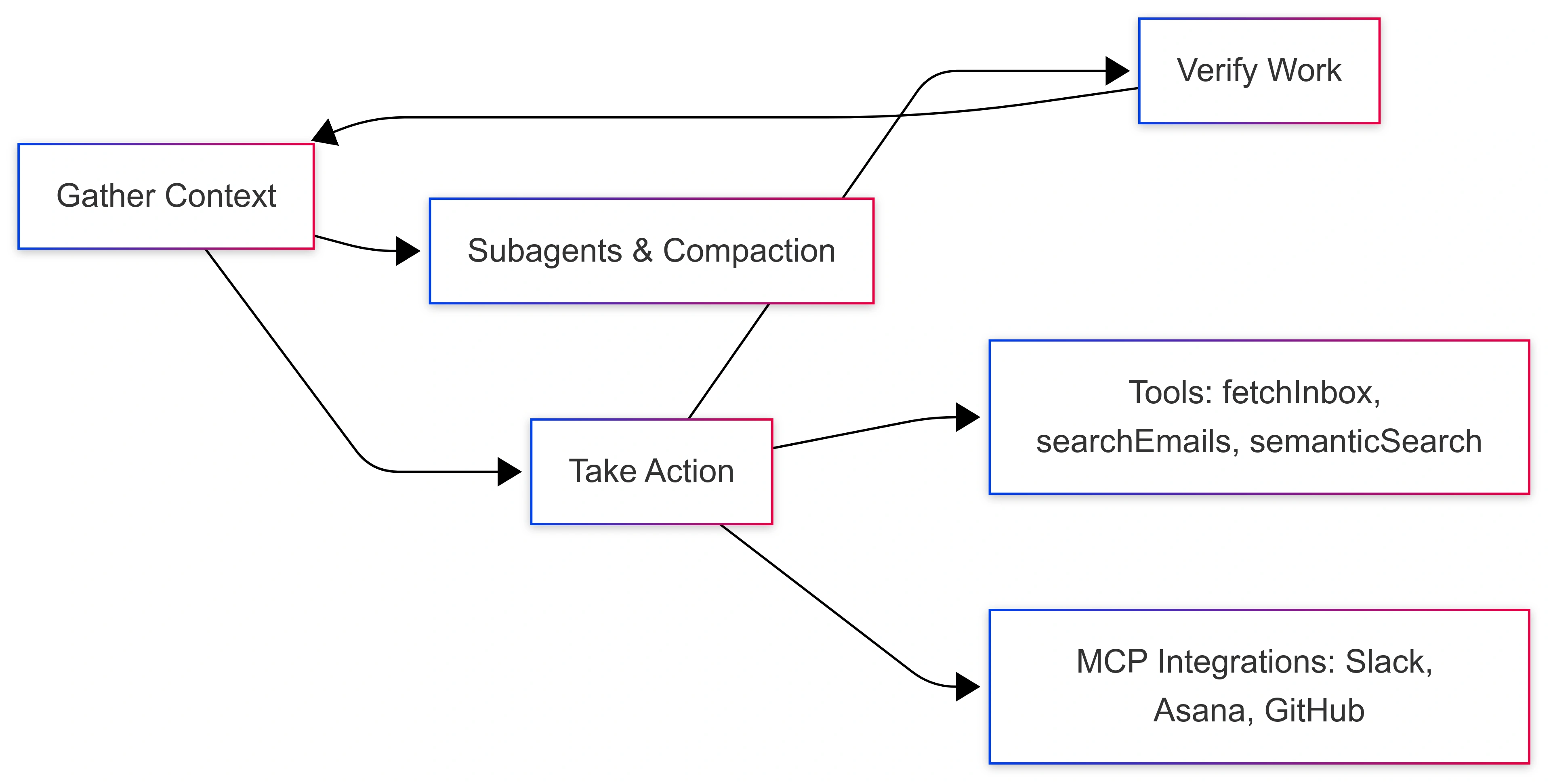
1. Gather Context
Agents require dynamic context management. Claude Agent SDK supports:
Agentic search: Uses the file system (
grep,tail) for precise extraction.Semantic search: Embeds and retrieves relevant data, faster but less transparent.
Subagents: Isolated threads with their own context windows, ideal for parallel tasks.
Compaction: Summarizes old context to stay within memory limits.
Example: A support agent queries tickets, assigns subagents to filter by category, and compacts past conversations into summaries.
2. Take Action
Claude agents execute work through tools.
Custom tools: Purpose-built for high-frequency operations like
fetchInboxorupdateTickets.Bash commands: Allow log analysis, file parsing, or batch operations.
Generated scripts: Claude can draft scripts dynamically, adapting workflows.
MCP (Model Context Protocol): Provides standardized, safe integrations with services such as Slack, GitHub, Asana, or Google Drive.
3. Verify Work
Reliability depends on verification. Options include:
Rule-based checks (e.g., formatting, schema validation).
Regression tests (compare against known good outputs).
Self-correction loops (Claude refines output until criteria are met).
This loop prevents silent failures and boosts agent trustworthiness.
Example Code Snippet
# Claude Agent SDK custom tool: fetchInbox
from claude_agent_sdk import Tool

class FetchInbox(Tool):
    def __init__(self):
        super().__init__(name="fetchInbox", description="Fetches emails from inbox")

    def execute(self, params):
        emails = self.email_api.get_inbox(limit=params.get("limit", 50))
        return emails
Sample Workflow JSON
{
  "agent_name": "EmailAssistant",
  "loop": ["gather_context", "take_action", "verify_work"],
  "tools": [
    {"name": "fetchInbox", "type": "custom", "priority": "high"},
    {"name": "searchEmails", "type": "custom"},
    {"name": "semanticSearch", "type": "optional"}
  ],
  "subagents": [
    {"name": "search_subagent", "role": "email filter", "parallel": true}
  ],
  "integrations": [
    {"service": "Slack", "protocol": "MCP"},
    {"service": "Asana", "protocol": "MCP"}
  ]
}
Use Cases / Scenarios
Finance Assistants: Automate portfolio analysis and risk evaluation.
Research Agents: Parse academic papers and synthesize findings.
Customer Support: Process tickets, automate resolutions, escalate edge cases.
Personal Productivity: Manage calendars, tasks, and travel itineraries.
Join the conversation! Your thoughts help the community grow.