

Introduction
Twilio is a cloud communications platform as a service company based in San Francisco, California. Twilio allows software developers to programmatically make and receive phone calls, send and receive text messages, and perform other communication functions using its web service APIs.
Programmable Video
Programmable Video is the service provided by Twilio, Connect multiple users (limited) in a single video Conference, so that those users can interact with each other with the live conference or run-time video chat.
Step 1 - Build Node.Js application
Node js code is used for API calls, to authenticate the user and in return will get token of the user. After getting various user-specific tokens, we can connect to the same room created by Twilio to make a video conference.
- require('dotenv').load()
- const express = require('express')
- const app = express()
- var AccessToken = require("twilio").jwt.AccessToken;
- var VideoGrant = AccessToken.VideoGrant;
- app.get('/token/:identity', function (req, res) {
- const identity = req.params.identity;
- // Create an access token which we will sign and return to the client,
- // containing the grant we just created
- var token = new AccessToken(
- process.env.TWILIO_ACCOUNT_SID,
- process.env.TWILIO_API_KEY,
- process.env.TWILIO_API_SECRET
- );
- // Assign the generated identity to the token
- token.identity = identity;
- const grant = new VideoGrant();
- // Grant token access to the Video API features
- token.addGrant(grant);
- // Serialize the token to a JWT string and include it in a JSON response
- res.send({
- identity: identity,
- jwt: token.toJwt()
- })
- })
- app.listen(3001, function () {
- console.log('Programmable Video Chat token server listening on port 3001!')
- })
Step 2 - Build React.Js application
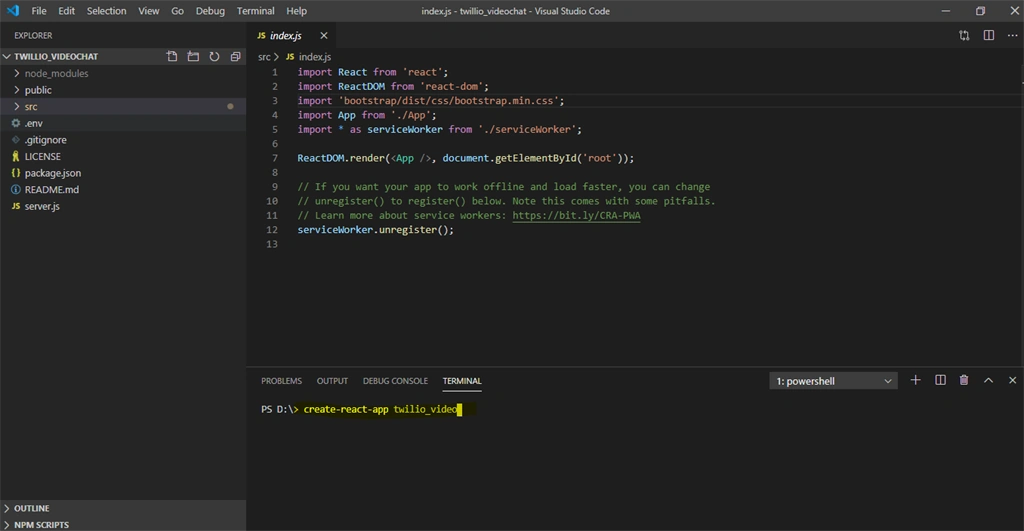
Configured basic ReactJs application using the create-react-app command. Using this command will get the default well-structured application of React.
Step 3 - Twilio Configuration
If you do not have an account on Twilio, you can sign up (Register), then configure your account.
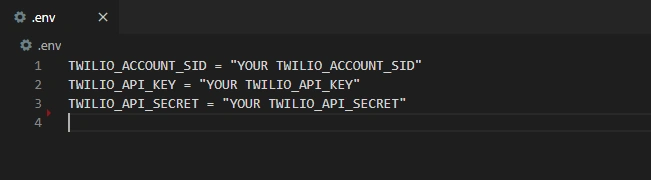
You can get your configuration key(s) from:
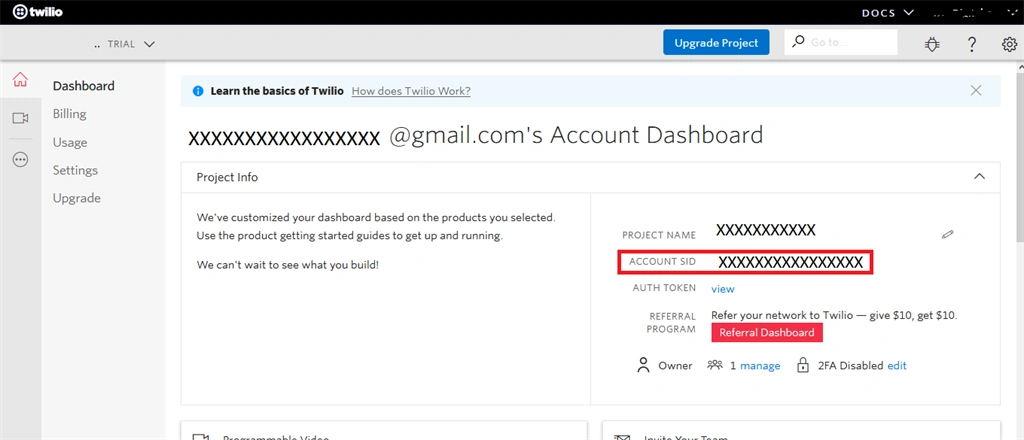
- TWILIO_ACCOUNT_SID: Get you to TWILIO_ACCOUNT_SID from the Twilio account dashboard.
- TWILIO_API_KEY & TWILIO_APP_SECRET
Go to TWILIO_API_KEY && TWILIO_API_SECRET from Twilio account's programmable video dashboard.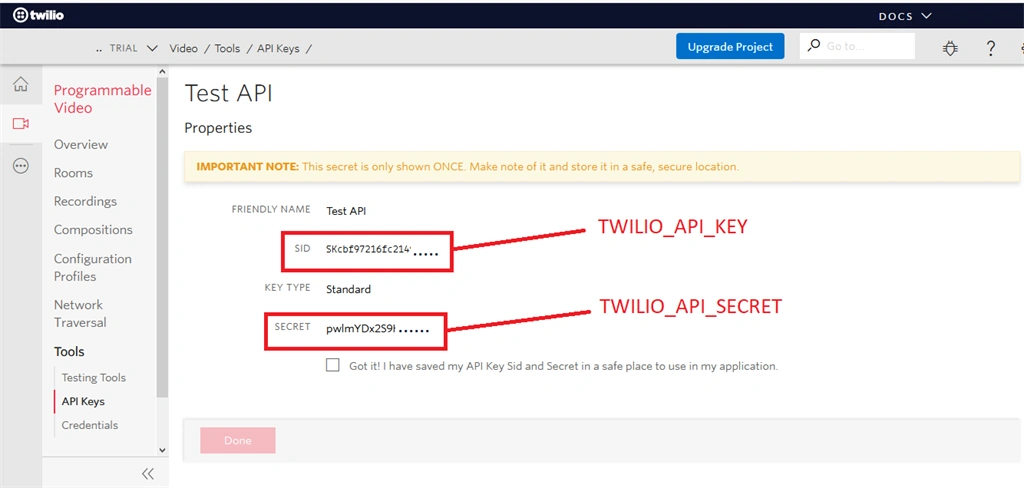
- Let’s make our .env file and add the following code to it, replacing each key and token with the one found in our Twilio console.
Twilio Code - Predefined Functions(App.js)
Twilio API provided predefined functions to get connected with
different users. Provided we get token, create a room, join a room, attachTracks, attachParticipants, detachTracks, etc.. with the use of
predefined function we can get connect with different users and make a track of each user who is connected or who is not.
- import React, { Component } from 'react'
- import Video from 'twilio-video';
- import axios from 'axios';
- import './global.css';
- import { ToastsContainer, ToastsStore } from 'react-toasts';
- import "react-loader-spinner/dist/loader/css/react-spinner-loader.css";
- import Loader from 'react-loader-spinner';
- class App extends Component {
- constructor(props) {
- super(props);
- this.state = {
- userName: "",
- identity: null,
- peerUserId: 0,
- peerIdentity: "",
- roomName: '*****', // Room Name
- roomNameErr: false, // Track error for room name TextField
- previewTracks: null,
- localMediaAvailable: false,
- hasJoinedRoom: false,
- hasParticipantsJoinedRoom: false,
- activeRoom: '', // Track the current active room
- jwt: ''
- }
- this.joinRoom = this.joinRoom.bind(this);
- this.roomJoined = this.roomJoined.bind(this);
- this.leaveRoom = this.leaveRoom.bind(this);
- this.detachTracks = this.detachTracks.bind(this);
- this.detachParticipantTracks = this.detachParticipantTracks.bind(this);
- }
- getTwillioToken = () => {
- const currentUserName = this.refs["yourname"].value;
- if (currentUserName.length === 0) {
- ToastsStore.error("Please enter the username!");
- return;
- }
- axios.get('/token/' + currentUserName).then(results => {
- const { identity, jwt } = results.data;
- this.setState(
- {
- identity,
- jwt
- }, () => {
- if (jwt.length === 0 || identity.length === 0) {
- ToastsStore.error("Issue to fetch token!");
- } else {
- this.setState({ userName: currentUserName });
- this.joinRoom();
- }
- });
- });
- }
- joinRoom() {
- if (!this.state.roomName.trim()) {
- this.setState({ roomNameErr: true });
- return;
- }
- console.log("Joining room '" + this.state.roomName + "'...");
- let connectOptions = {
- name: this.state.roomName
- };
- if (this.state.previewTracks) {
- connectOptions.tracks = this.state.previewTracks;
- }
- // Join the Room with the token from the server and the
- // LocalParticipant's Tracks.
- Video.connect(this.state.jwt, connectOptions).then(this.roomJoined, error => {
- ToastsStore.error('Please verify your connection of webcam!');
- ToastsStore.error('Webcam-Video permission should not block!');
- });
- }
- attachTracks(tracks, container) {
- tracks.forEach(track => {
- container.appendChild(track.attach());
- });
- }
- // Attaches a track to a specified DOM container
- attachParticipantTracks(participant, container) {
- var tracks = Array.from(participant.tracks.values());
- this.attachTracks(tracks, container);
- }
- detachTracks(tracks) {
- tracks.forEach(track => {
- track.detach().forEach(detachedElement => {
- detachedElement.remove();
- });
- });
- }
- detachParticipantTracks(participant) {
- var tracks = Array.from(participant.tracks.values());
- this.detachTracks(tracks);
- }
- roomJoined(room) {
- // Called when a participant joins a room
- console.log("Joined as '" + this.state.identity + "'");
- this.setState({
- activeRoom: room,
- localMediaAvailable: true,
- hasJoinedRoom: true
- });
- // Attach LocalParticipant's Tracks, if not already attached.
- var previewContainer = this.refs.groupChat_localMedia;
- console.log('previewContainer.querySelector(video)', previewContainer.querySelector('.video'));
- if (!previewContainer.querySelector('.video')) {
- this.attachParticipantTracks(room.localParticipant, this.refs.groupChat_localMedia);
- }
- // Attach the Tracks of the Room's Participants.
- room.participants.forEach(participant => {
- console.log("Already in Room: '" + participant.identity + "'");
- this.setState({
- peerIdentity: participant.identity
- })
- var previewContainer = this.refs.remoteMedia;
- this.attachParticipantTracks(participant, previewContainer);
- });
- // When a Participant joins the Room, log the event.
- room.on('participantConnected', participant => {
- console.log("Joining: '" + participant.identity + "'");
- this.setState({
- peerIdentity: participant.identity,
- partnerConnected: true
- })
- });
- // When a Participant adds a Track, attach it to the DOM.
- room.on('trackAdded', (track, participant) => {
- console.log(participant.identity + ' added track: ' + track.kind);
- var previewContainer = this.refs.remoteMedia;
- this.attachTracks([track], previewContainer);
- });
- // When a Participant removes a Track, detach it from the DOM.
- room.on('trackRemoved', (track, participant) => {
- console.log(participant.identity + ' removed track: ' + track.kind);
- this.detachTracks([track]);
- });
- // When a Participant leaves the Room, detach its Tracks.
- room.on('participantDisconnected', participant => {
- console.log("Participant '" + participant.identity + "' left the room");
- this.detachParticipantTracks(participant);
- });
- // Once the LocalParticipant leaves the room, detach the Tracks
- // of all Participants, including that of the LocalParticipant.
- room.on('disconnected', () => {
- if (this.state.previewTracks) {
- this.state.previewTracks.forEach(track => {
- track.stop();
- });
- }
- this.detachParticipantTracks(room.localParticipant);
- room.participants.forEach(this.detachParticipantTracks);
- this.state.activeRoom = null;
- this.setState({ hasJoinedRoom: false, localMediaAvailable: false });
- });
- }
- leaveRoom() {
- this.state.activeRoom.disconnect();
- this.setState({ hasJoinedRoom: false, localMediaAvailable: false, peerIdentity: '' });
- }
- render() {
- /* Hide 'Join Room' button if user has already joined a room */
- let joinOrLeaveRoomButton = this.state.hasJoinedRoom ? (
- <button className="btn btn-warning" onClick={this.leaveRoom} > Leave Room</button>
- ) : (
- <button className="btn btn-success ml-2" onClick={this.getTwillioToken} >Join Room</button>
- );
- /** */
- return (
- <React.Fragment>
- <div className="container">
- <div className="row mt-3">
- <div className="col-6">
- <div className="card">
- <div className="card-body">
- <div ref="groupChat_localMedia"></div>
- <div className="text-center">
- {!this.state.hasJoinedRoom && <Loader type="Puff" color="#00BFFF" />}
- </div>
- </div>
- <div className="card-footer">{this.state.hasJoinedRoom ? <button className="btn btn-warning" onClick={this.leaveRoom} > Leave Room</button> : <span> </span>}</div>
- </div>
- </div>
- <div className="col-6">
- <div className="card">
- <div className="card-body">
- <div ref="remoteMedia"></div>
- <div className="text-center">
- {!this.state.hasParticipantsJoinedRoom && !this.state.peerIdentity && <Loader type="Puff" color="#00BFFF" />}
- </div>
- </div>
- <div className="card-footer text-center">
- {(!this.state.hasParticipantsJoinedRoom && !this.state.peerIdentity) ? <span>Wait for peer user to connect channel !!!</span> : <span>Peer User Name : {`${this.state.peerIdentity}`}</span >}
- </div>
- </div>
- </div>
- </div>
- </div>
- <ToastsContainer store={ToastsStore} />
- </React.Fragment>
- )
- }
- }
- export default App;
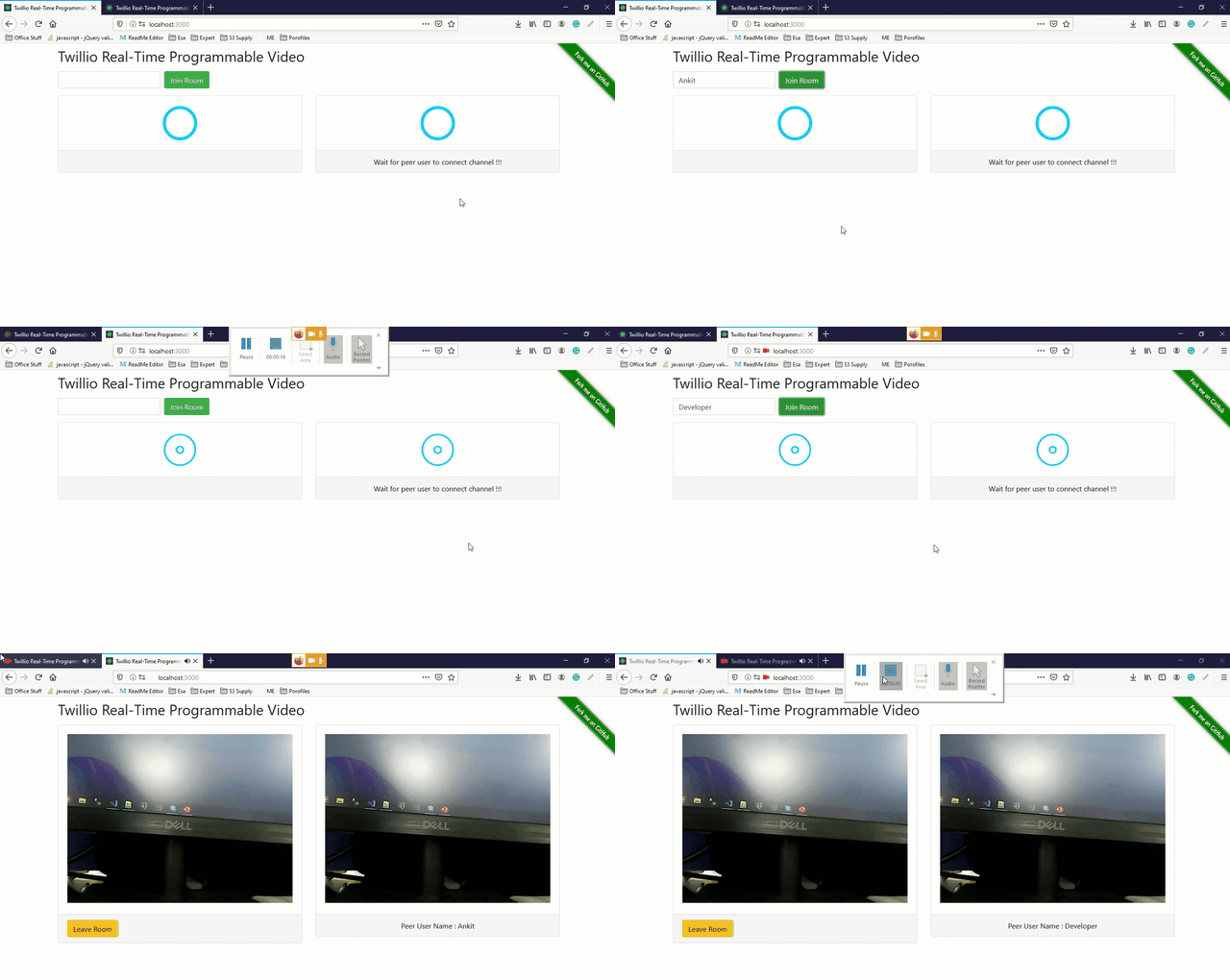
For More Details:
Join the conversation! Your thoughts help the community grow.