

Introduction
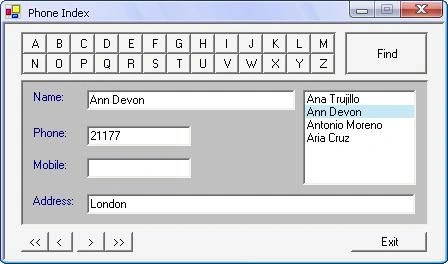
When I wrote a phone index program using VB6, I wanted to add twenty-six buttons to my form for alphabetical English characters A..Z (one button holds one character) to search for records in the database file of my phone index. I found it easy because the VB6 allows you to create an array of buttons or an array of any control.
When I wanted to re-write the same program using C# or VB.Net I found the addition of twenty-six buttons to the form not practical because Visual Studio .Net does not have the same capability that VB6 has to create an array of controls.
In this article you will find it very easy to create an array of buttons using VB.NET; you can use this idea to create a tool for searching in a database file. You can read my article about Button Array using C#.
This article has two parts:
First part: Explain how to create an array of buttons.
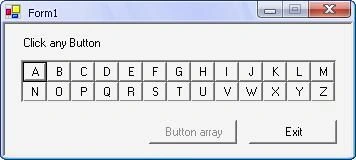
You can see this trial when you run ButtonArray project.
Remark: When extracting the file (btnArrayVB.zip) you will find two projects: ButtonArray project, and MyPhone project.
Code:
' The following procedure to create array of buttons:
Private Sub AddButtons()
Dim xPos As Integer = 0
Dim yPos As Integer = 0
Dim n As Integer = 0
' Declare and Initialize one variable
Dim btnArray(26) As System.Windows.Forms.Button
For i As Integer = 0 To 25
btnArray(i) = New System.Windows.Forms.Button
Next i
While (n < 26)
With (btnArray(n))
.Tag = n + 1 ' Tag of button
.Width = 24 ' Width of button
.Height = 20 ' Height of button
If (n = 13) Then ' Location of second line of buttons:
xPos = 0
yPos = 20
End If
' Location of button:
.Left = xPos
.Top = yPos
' Add buttons to a Panel:
pnlButtons.Controls.Add(btnArray(n)) ' Let panel hold the Buttons
xPos = xPos + .Width ' Left of next button
' Write English Character:
.Text = Chr(n + 65)
' ****************************************************************
' You can use following code instead previous line
' Dim Alphabet() As Char = {"A", "B", "C", "D", "E", "F", "G", _
' "H", "I", "J", "K", "L", "M", "N", "O", "P", "Q", "R", "S", "T", _
' "U", "V", "W", "X", "Y", "Z"}
' .Text = Alphabet(n)
' ****************************************************************
' for Event of click Button
Gohil JayendrasinhPosted Jul 17, 2012, 9:14 AM
Thanks for posting this for windows application searching functionality...
Gohil JayendrasinhPosted Jul 17, 2012, 9:13 AM
Hi Shubham.. you can do this using repeater like <asp:repeater onitemcommand="get_results"> <itemtemplate> <asp:linkbutton commandname="search" commandargument='<%#container.DataItem%>' text='<%#container.DataItem%>' /> <itemtemplate> </asp:repeater> protected override void OnLoad(EventArgs e) { if(IsPostBack) return; MyRepeater.DataSource = new string[] {"A", "B", "C", etc. }; MyRepeater.DataBind(); } protected void get_results(object sender, ItemCommandEventArgs e) { if(e.CommandName != "search") return; AnotherControl.DataSource = GetResultsFor(e.CommandArguement); AnotherControl.DataBind(); }
Arjun PanwarPosted Apr 11, 2012, 12:13 AM
Hi, Thanks for giving this great idea.
Shubham SrivastavaPosted Apr 10, 2012, 6:47 PM
the logic of array button is great but i want to know that can i implement the same logic in asp.net ?