In this series of Interview questions, I tried to cover a very minor questions which sometimes gives out of syllabus feeling during interview. This is the second part of the series. Here is the first part. Hope you find it very helpful.
What is Method Overloading?
Method overloading is Compile time polymorphism. In this type of Polymorphism, a class have same methods with different signatures. Overload method must have same name with different parameters, return type and access modifier are not bother by the compiler. A method can be overload in same, super or sub class.
    class Prints
    {
           void Print(int i)
           {
                Console.WriteLine(“The value is:” + i);
           }
           void Print(float j)
           {
                Console.WriteLine(“The value is:” + j);
           }
           static void Main()
           {
                Prints p = new();
                p.Print(2); //The value is 2
                p.Print(2.34)// The value is 2.34
           }
    }
Why return type not considered as a part of Method Overloading?
To prevent call site ambiguity, return type is not considered for method overloading. Also, according to the MS documentation, the method signature for Method overloading only consists of method name and parameter list.
What is Virtual keyword?
Virtual keyword is used in the base class to define a method that will be overridden in a derived class. Virtual method can’t be private.
What is Method Overriding?
Method overriding allows user to define an implementation of base class method in derived class. This is Runtime (Dynamic) polymorphism. This is very beneficial when developer needs an additional logic in derived class. The signature of derived class method must be same as of base class method.
public class BaseClass
{
     public virtual void BaseMethod ()
     {
          Console.WriteLine(“Base Class method in Base Class”);
     }
}
public class DerivedClass : BaseClass
{
     public override void BaseMethod ()
     {
          Console.WriteLine(“Base Class method in Derived Class”);
     }
 }
 static void Main()
 {
      DerivedClass dc = new();
      dc.BaseMethod();
 }
 //output
Base Class method in Derived Class
Can we override a method in same class?
No, we can’t override a method in same class. If someone tried to do the same, it leads to compile time error “The method is already defined”.
Is Virtual method from base class must be override in derived class?
No, it’s not necessary and required to override every virtual method from base class, because some methods do not need an additional implementation (override) in derived class, they can be used as it is what is defined in base class.
What is a Constructor? Define its types.
A Constructor is special function that is automatically called when the object of that class is created. Here are few points about constructors:
Name of constructor is same as class name.
Constructor do not have any return type even void.
It automatically triggers when object is created using new keyword.
A class can have multiple parametrized constructors.
There are 2 categories of Constructors:
Further there are following types of Constructors in C#:
    public class SampleClass
    {
          public SampleClass ()
          {
               Console.WriteLine(“Constructor called”);
          }
     }
    public class SampleClass
    {
          public string _name;
          public SampleClass (string name)
          {
               _name = name;
          }
    }
    public class SampleClass
    {
         public string _name;
         // Standard parameterized constructor
         public SampleClass (string name)
         {
               _name = name;
         }
         // Copy Constructor
         public SampleClass (SampleClass sc)
         {
               this. name = sc.name;
         }
    }
    // Usage
    SampleClass sc1 = new("james");
    SampleClass sc2 = new(sc1); // sc2 is now a separate copy of sc1
    public class SampleClass
    {
          static SampleClass ()
          {
          }
    }
Private Constructor : A Private constructor has private accessibility i.e. when a class has private constructor then we can’t create object of that class outside the class. It is used in Singleton design pattern. A class with only private constructor can’t be instantiated (outside the class) and inherited, but if a class have both public and private constructors then it is possible.
    public class SampleClass
    {
          private SampleClass ()
          {
          }
    }
What is a Destructor?
A Destructor (also called Finalizer) is special function used to perform some specific operations like cleanup memory, release objects etc. by the Garbage Collector. Here are few points about destructors:
The name of destructor is same as class name followed by ~ (tilde) sign.
It does not have any return type (like int, void etc.), access level (public, private) or parameters.
There will only 1 destructor per class.
The destructor is only for classes not for struct.
It is automatically called by GC when it needs, developer don’t have access on it i.e. this is non deterministic (no specific time or control when it will run).
    public class SampleClass
    {
          //constructor
          public SampleClass ()
          {
               Console.WriteLine(“Constructor called”);
          }
          //destructor
          ~ SampleClass ()
          {
                Console.WriteLine(“Destructor called”);
          }
     }
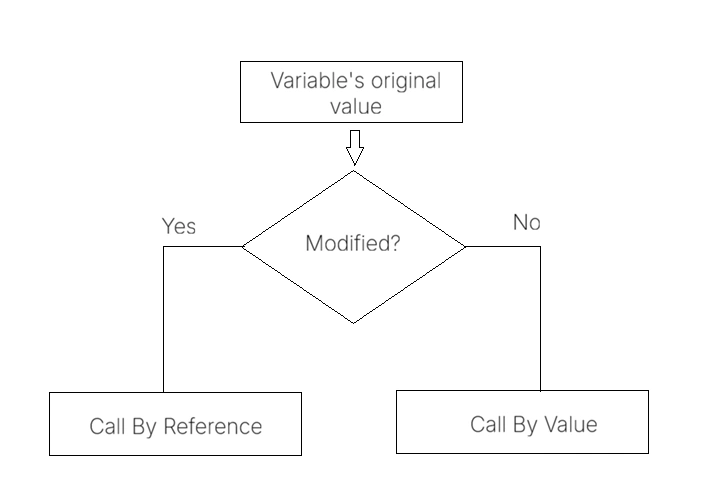
What is Call by reference and Call by value?
Call by reference and Call by value are standard method to pass an argument to a method.
Call by Value : Call by Value is the default approach used by C#. A copy of original variable is passed to the calling method. If we make changes in passed copy of variable, then original variable will not affect.
public class Program
{
      static void Main()
      {
          int i = 90;
          int j = i;
          j = 100;
          Console.WriteLine(j);//100
          Console.WriteLine(i);//90
       }
 }
Call by Reference : In Call by Reference a variable’s reference (original memory address) is passed as a reference to the calling method. If we make changes in passed variable, then original values are changed as both are pointing to same memory address. It requires ref and out keyword to pass variable’s reference.
public class Program
{
      static void Main()
      {
            int i = 90;
 	     UpdateValue(ref i);
            Console.WriteLine(i);//100
       }
	static void UpdateValue(ref int j)
	{
	      j = 100;
	}
 }
String is reference type or value type?
String is reference type and other data type like int, float, struct are value type.
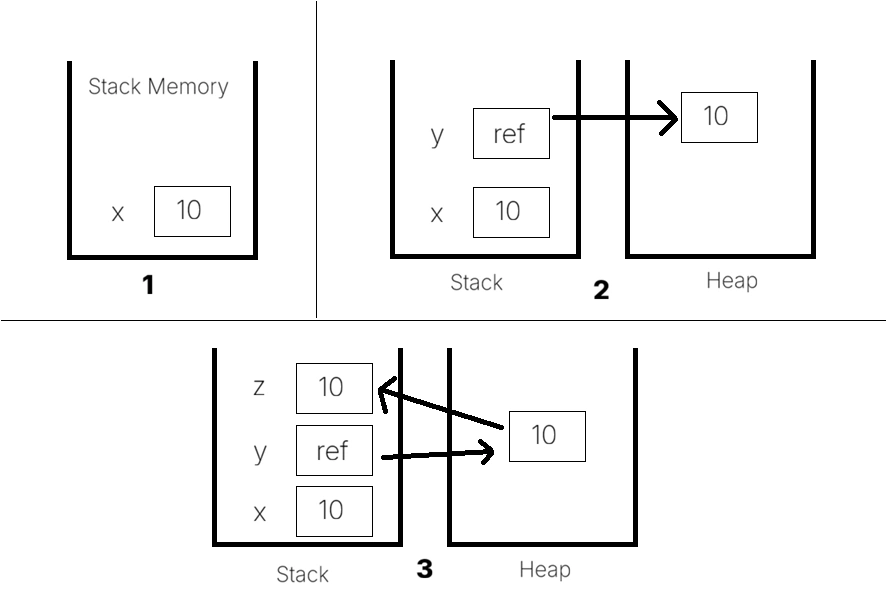
What is Boxing and Unboxing?
Boxing is the process of converting a value type (int, double) to a reference type (object). When a value type is boxed, a new object is allocated to the heap and variable is copied into it.
Unboxing is the process of converting a reference type (object) to value type. The value is copied from the heap into stack.
 int x = 10;
 object y = x; //boxing
 int z = (int)y; //unboxing
What is ref and out keywords?
Ref and Out keywords are used to pass an argument by reference. If a methods have ref and out keyword used, then Method overloading is not possible.
| Ref | Out |
|---|
| Parameters must be initialized. | Parameter initialization not necessary. |
| In calling method, the initialization not necessary. | In calling method, the initialization is necessary. |
| It has two-way flow; data sent to the calling method and received updated one. | It has one way flow, just to send data to original method. |
    public class Program
    {
      public static int RefMethod(ref int k)
      {
	   k += 1;
           return k;
      }
      public static int OutMethod(out int k)
      {
	   k = 1000;
          k += 1;
          return k;
      }
      static void Main()
      {
           int i = 90, j;
 	    var s1 = RefMethod(ref i); //91
           var s2 = OutMethod(out j);//1001
      }
 }
What is difference between Finalize and Dispose?
Both methods are used for cleanup resources.
| Finalize | Dispose |
|---|
| Implicitly called by GC. | Explicitly called by Developer. |
| Defined in System.Object class. | It is part of IDisposable interface. |
| Non deterministic, as it being called by GC whenever he needs it. | Deterministic, called immediately when control hits. |
| Primarily used to cleanup unmanaged resources. | It cleans up both managed and unmanaged resources. |
| Performance is low. | Performance is high. |
What is difference between string and String? Both are same?
String and string are same. String is a class with namespace System.String and string with small letter s is just an alias of it and it is (string) is reserved keyword.
What is Stack and Heap memory?
Stack and Heap are two types of memory allocated to a variable.
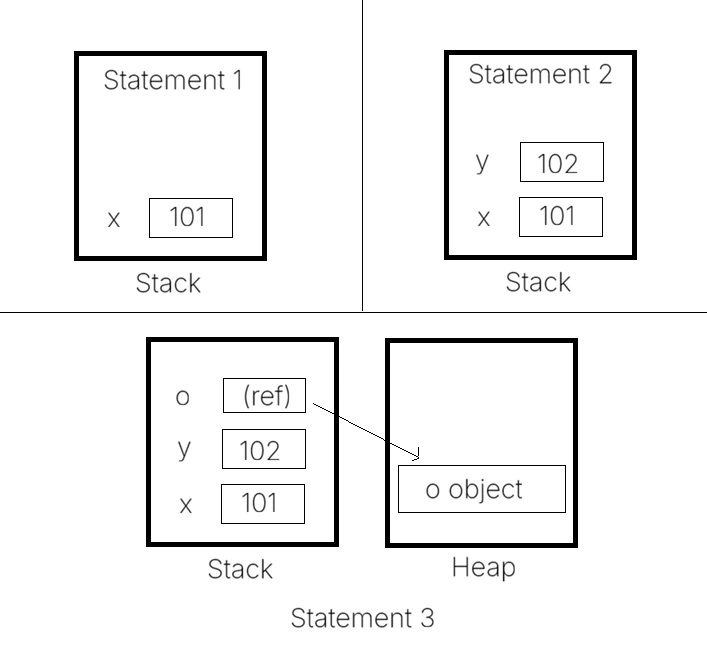
public void SomeMethod()
{
      int x = 101; // statement 1
      int y = 102; // statement 2
      object o = new(); // statement 3
}
When statement 1 is executed, the compiler allocated some memory in the stack. Same happened with statement 2. The stack memory keep track of running memory needed for application.
When statement 3 is executed i.e. an object is created using new keyword then a memory is allocated to the object in heap and a reference pointer is added to the stack memory.
When all 3 statements are executed and control is exited from method, it will clear the variables created on stack with LIFO approach. It will not de allocate Heap memory, which will deallocated by GC itself.
| Stack | Heap |
|---|
| It is managed by CPU (automatically). | It is managed by GC. |
| It is faster. | It is slower than Stack. |
| Its size based on thread. | It can be expanded dynamically. |
| It can be accessed easily. | It can’t be access easily, it requires complex management. |
| It stores int, char, struct and references of objects. | It stores reference type, objects and arrays etc. |
What is Struct? How it is different from Class?
Struct is a collection of variables of different data types under single unit. It is value type by nature. Structs are used to create small data centric types that are passed by value, offering performance benefits as it avoids overhead of GC to collect immutable objects.
struct s { int id, float f, string s };
| Class | Struct |
|---|
| Class can be inherited | Struct can’t be inherit. |
| It is reference type. | It is value type. |
| Default constructor present by default. | No Default constructor present by default. User can define by itself. |
| It can be instantiated with new keyword. | It can be instantiated without new keyword. |
| It stores data into Heap memory. | It stores data into Stack memory. |
Struct is reference type or value type?
Struct is value type as it stores its data directly in its own memory (usually stack) rather than in heap memory.
What is Tuple?
Tuple allows to store elements of different data types under same row. It is reference type and immutable by nature. Tuple can store maximum 8 elements. For storing more than 8 items you need to use nested Tuples. A Tuple can be created using following methods:
 Tuple<string, string, int> sample = new ("name1", "name2", 2003);
 var sample = Tuple.Create(“name1", "name2", 2003);
  var sample = (“name1", "name2", 2003);
 //To access Tuple entries
 var s1 = sample.Item1; //Name1
 var s2 = sample.Item2; //Name2
 var s3 = sample.Item3; //2003
What is Record?
Record is a special kind of reference type designed for encapsulation and immutability. The Record is focus on Immutable nature like it can’t be changed. Classes are basically focus on object identity.
 public record Employee (int ID, string Name);
 public record Employee
 {
     public int ID { get; set; }
     public string Name { get; set; }
 }
Two record objects with same property values are considered same.
 var e1 = new Employee(25, ”Ram”);
 var e2 = new Employee(25, ”Ram”);
 Console.WriteLine(e1 == e2);  // True (compared by value)
What is difference between Array and ArrayList?
| Array | ArrayList |
|---|
| Array is fixed in size. | ArrayList is dynamic in size, it can be increased/decreased. |
| Array is strongly type. | Arraylist is not strongly type, user can add multiple data type variables. |
| Array don’t accept null values. | Arraylist can accept null values. |
| Insertion and deletion from an Array are fast. | Insertion and deletion are slower than Array. |
| Its namespace is System.Array | Its namespace is System.Collection |
| Its supports multi dimensions. | It is single dimension. |
string[] a1 = new string[3];
a1[0]=”Hello dear”;
a1[1]=”Bye dear”; | ArrayList a1 = new ArryList();
a1.add(null);
a1.insert(1, ”hi”); |
What is Reflection?
Reflection is the process of describing the meta data of types, methods and fields in the code, like what are the methods in that assembly, what are the properties in that assembly, are they public, are they private, etc.
Some of the useful methods are as follows:
GetFields(): It returns all the public fields of the current System.Type.
GetProperties(): It returns all the public properties of the current System.Type.
GetMethods(): It returns all the public methods of the current System.Type.
GetMembers(): It returns all the public members of the current System.Type.
What is string Concatenation and why StringBuilder is preferred for it?
String concatenation is the process of joining strings. There are several ways:
 string name = "John Doe";
 string greeting = $"Hello, {name}!";
 string first = "Hello";
 string second = "World";
 string result = first + " " + second; // "Hello World"
 first += " " + second; // "Hello World"
  var sb = new System.Text.StringBuilder();
  for (int i = 0; i < 10; i++)
  {
      sb.Append(i).Append(" ");
  }
  string result = sb.ToString();
string[] words = { "Apple", "Orange", "Banana" };
string concat = string.Concat(words);           // "AppleOrangeBanana"
string[] words = { "Apple", "Orange", "Banana" };
string CSV = string.Join(", ", words);          // "Apple, Orange, Banana"
string formatted = string.Format("Item price is: {0:C}", 20); // "Item price is: $20"
StringBuilder is mutable that uses same memory location to save the result, that is why is recommended for larger loop iterations and perform better.
What are Extension methods?
Exception methods concept allows user to add new methods in the existing class without modifying the source code of original type and no need to compile the original type. This feature was added to C# 3.0. Here are few points about Extension methods:
Only Static class can be used for Extension methods.
Extension methods must be static.
First parameter should be the name of original class for which it is to be added.
“this” keyword must be used before param name. This keyword tells the compiler that it is an Extension method.
Namespace can be different for both classes.
namespace ExtensionMethods
{
    public static class StringExtension
    {
        public static int GetWordCount(this string input)
        {
            if (!string.IsNullOrEmpty(input))
            {
                return input.Split(' ').Length;
            }
            else
            {
                return 0;
            }
        }
    }
}

static void Main()
{
     string para = "Lorem Ipsum is simply dummy text of the printing and typesetting industry.";
     Console.WriteLine("The  " + para + "  have  " + para.GetWordCount() + "  words ");
}
What are Generic and Non-Generic collections?
Generic collections require to define data type for which they will store data, they need a specific data type data to be stored. On the other hand Non generic collections are store object as data, here data type does not matter. It can store different types of data with different data types.
| Generic collections | Non-Generic collections |
|---|
| It comes under System.Collections.Generic namespace. | It comes under System.Collections namespace. |
| It is type safe. | It is not type safe i.e. type of stored data is checked at runtime. |
| Its performance is high as no boxing/unboxing needed. | It is slower than Generic collection in performance point of view. |
| No casting required. | Explicit casting required. |
| Best for modern tech. | Used for legacy code. |
Explain Stack and Queue?
Stack is generic & non generic collection that uses LIFO (Last In First Out) approach. Under System.Collection namespace it is non generic and under System.Collection.Generic namespace it is generic collection.
using System.Collections;
class Program
{
     static void Main(string[] args)
     {
          Stack stack = new Stack();
          stack.Push(10);
          stack.Push("Hello");
     }
}

using System.Collections.Generic;
class Program
{
     static void Main(string[] args)
     {
          Stack<string> stack = new();
          stack.Push("First");
          stack.Push("Second");
          Console.WriteLine(stack.Pop()); // Outputs: "Second"
     }
}
Push method is used to add entry in Stack. Pop method is used to remove top entry from stack. Peek method is used to get first top entry without removing it.
Queue is generic & non generic collection that uses FIFO (First In First Out) approach. Under System.Collection namespace it is non generic and under System.Collection.Generic namespace it is generic collection.
using System.Collections;
class Program
{
     static void Main(string[] args)
     {
          Queue queue = new Queue();
          queue.Enqueue(101);
          queue.Enqueue("Hello");
     }
}

using System.Collections.Generic;
class Program
{
     static void Main(string[] args)
     {
         Queue<string> queue = new Queue<string>();
         queue.Enqueue("First");
         queue.Enqueue("Second");
         Console.WriteLine(queue.Dequeue()); // Outputs: "First"
      }
}
Enqueue method is used to add entry in Queue. Dequeue method is used to remove top entry from Queue. Peek method is used to get first entry without removing it.
What is ASP.Net Core?
ASP.Net Core is a free open-source and cloud optimized framework that can run cross platform application. It was initially released in 2016. It is updated version of .Net framework. Even number releases like (.Net core 6, .Net core 8) are designed as Long Term Support (LTS) releases. They will receive support and patches for 3 years, whereas odd number releases are Short Time Support (STS) and will get 18-month support and patches.
What are the Hosting Models in ASP.Net core?
There are 2 types of Hosting models in ASP.Net core:
In Process Model : In this model, the app runs inside the IIS worker process (w3wp.exe). This is default hosting model for ASP.Net core app running on windows.
Out Of Process Model : In this model, the app runs in a separate worker process, mostly in the Kestrel web server worker process. In this case, IIS (or Apache) acts as reverse proxy server.
What is Proxy server?
Proxy server is the middle server that act as middleman between one connection and other connection i.e. a device and an internet.
What is Kestrel server?
Kestrel server is cross platform web server designed by Microsoft to host cross platform (Windows, Mac and Linux) application on any OS. It is suitable for production also. It is light weight and high-performance web server.
What are Views in ASP.Net? And explain its types.
Views are the components that are used to render Html. Views are basically template use to render static and dynamic html with C# logic. There are following types of views:
Razor Views : It uses Razor syntax (Html and C#)
Partial View : These are reusable views that can be embedded within other views.
View Components : These are similar to partial views but more powerful. They can encapsulate both view and the logic that is needed to generate it.
Layout views : They act as layout (master page) for other views that consists of header and footer section at one place.
What are Middlewares?
Middleware is a software component that used to handle requests and responses in the Request Processing Pipeline (RPP). Each middleware can inspect or terminate request or response through custom logic like Authentication, caching etc. Middleware follows the sequence in which they are registered in Program.cs file. There are following built in middlewares in ASP.Net:
Authentication (UseAuthentication) : Used to enable Authentication in the application.
Authorization (UseAuthorization): Used to enable Authorization in the application.
Static Files (UseStaticFile): Used for serve static files which either lies in wwwroot folder or any other folder.
CORS (UseCors) : Used to enable Cors in the application.
Routing (UseRouting) : Used to enable routing in the application.
Exception Handling (UseExceptionHandler) : Used to send user to a custom error page on production version.
HTTPS Redirection (UseHttpsRedirection): Used to enable automatically redirection from http to https protocol.
Developer Exception (UseDeveloperExceptionPage): Used to show actual exception details in case of any exception. It is basically for development version.
Default Files (UseDefaultFiles) : Used to specify a default file (index.html or default.htm) automatically when a user navigates to a directory without specifying file name. Developer can also custom file too.
What is the use of _ViewStart.cshtml file?
View Start is a special file in Views folder used to define common settings for all views e.g. specify layout file. It runs before every view render. In case of multiple View start files the view will follow its own folder View start file.
What is the use of _ViewImports.cshtml file?
View Import file is used to specify common namespace and directives that will be used for every view. It helps to reduce duplicity of namespaces and directives.
What is ViewData and ViewBag?
| ViewData | ViewBag |
|---|
| It is dictionary-based object. | It is dynamic property-based object. |
| ViewData doesn’t provide type safety. You need to cast the data. | It doesn’t require type safety (convert one data type to another) while working with loops. |
| It is faster. | It is slower than ViewData because of dynamic object. |
| It is used to send data from controller to view. | It is also used to send data from controller to view. |
| Its life cycle is current Http request. | Its life cycle is current Http request. |
| ViewData[“Key”] = “value” | ViewBag.Key = “value” |
Explain TempData and its uses.
TempData is a dictionary-based object that stores data is key value pairs, where each key must be a string.
TempData[“Message”] = “This is sample data.”;
Asp.Net core MVC provides different storage mechanism for TempData (TempData providers):
By default, Cookie TempData provider is set. The Keep method is used to retain all keys for next request.
What is Routing?
Routing is the mechanism that inspects the incoming http request and maps it to the appropriate controller and action. There are 2 types of routing in Asp.net
    app.MapControllerRoute(
        name: "default",
        pattern: "{controller=Home}/{action=Index}/{id?}");
[Route("Users/Profile/{id}")]
 public ActionResult Details(int id) { ... }
If both types of routing are defined, then system will give preference to attribute based routing.
What are sections in Layout?
Section provides a way to inject content from a child view into specific place in the layout. It is very useful to inject scripts, styles and other elements in layout. Sections are implemented using following methods on Layout:
@RenderSection(“SectionName”): when no asynchronous operation is involved.
@RenderSectionAsync(“SectionName”): when asynchronous operation is involved, such as network call or any other async task.
Second param is Required, which is true by default.
//On Layout View
<!DOCTYPE html>
<html>
<head>
    @RenderSection("Styles", required: false)
</head>
<body>
    @RenderBody()
    @RenderSection("Scripts", required: false)
</body>
</html>

//On child view
@{ Layout = "_Layout"; }
<h2>Main Content</h2>
@section Scripts {
    <script src="~/js/page-specific.js"></script>
}
IsSectionDefined() method is used to check whether the section is defined or not.
What are the View Components? How they are different from Partial Views?
View Components are basically advanced version of partial views, which are modular and self-contained building blocks that can handle powerful logic. Unlike views they are not rely on model binding, they create own logic for data retrieval. A View Component consists 2 files:
Server-side file (.cs) – Inherited from View Component base class
Client side file (.cshtml) - Typically named Default.cshtml (Dev can change it), located in a specific folder structure:
/Views/Shared/Components/{ComponentName}/Default.cshtml
/Views/{ControllerName} /Components/{ComponentName}/Default.cshtml
/Pages/Shared/Components/{ComponentName}/Default.cshtml
What are Action Methods?
Action Methods are public methods that respond to incoming http requests and send back response according to the logic. An Action method must be public and can’t be static and extension method. Here Index is an Action Method.
public class HomeController : Controller
{
    public ActionResult Index()
    {
        return View();
    }
}
What are Action Results?
Action Results are the objects that encapsulate the action method response and return to the client with desired method. There are following types of Action Results:
| Type | Action Result Name | Description |
|---|
| View Result | View() | Render a full view |
| PartialView() | Render a partial view |
| Content Result | Content() | Return a user defined string |
| Json() | Return a json object |
| Redirect Result | Redirect() | Redirect to specified url |
| RedirectToAction() | Redirect to specific action |
| RedirectToRoute() | Redirect to specific route |
| Status Result | HttpNotFound() | Returns a specific HTTP status code (e.g., 404 Not Found). |
| Empty Result | | Return nothing (null) |
| File Result | File() | Return a file to download on a browser |
What is Html Helper?
Html helper are the methods used in Razor views to generate html elements dynamically. They are categorized in 3 types:
Standard helper
@Html.TextBox()
 @Html.TextArea()
Strongly typed helper
@Html.TextBoxFor(x=> x.Name)
Custom helper
What are Tag Helpers?
Tag helpers are the server-side components that are used to create/render html like elements that can be re used with minimalistic approach on razor views. Here are some built in Tag helpers:
Form Tag Helper
<form asp-controller=”Account” asp-action=”Login” method=”post”> <!– form fields –> </form>
Input Tag Helper
<a asp-controller=”Home” asp-action=”Details” asp-route-id=”1″>Details</a>
Image Tag Helper
<img src=”~/images/pic.jpg” alt=”Picture”>
Environment Tag Helper
<environment include="Development">
    <script src="~/js/dev-only-script.js"></script>
</environment>
Cache Tag Helper
 <cache>
     <!-- Your content to cache goes here. -->
  </cache>
Partial Tag Helper
<partial name="_ProductListPartial" model="@Model" />
View Component Tag Helper
<vc:shopping-cart></vc:shopping-cart>
What are Filters?
Filter are the custom classes used to inject a custom/pre-defined logic to request processing pipeline. It allows to execute logic in
Before the http request is handled by controller action method.
After the http request is handled by controller action method.
After the response is generated but not sent to client.
Here are some built in filters are available to use
Authorization Filters ([Authorize], [AllowAnonymous])
Action Filters (OnActionExecuting, OnActionExecuted)
What are Attributes?
Attributes are the declarative tags added to code elements for defining meta data and sometimes for specific logic. They are typically applied on fields, methods and controllers. User can also make custom attributes. Here are its types:
Model Validation Attributes (Data Annotations)
[Required]
[StringLength]
[Range]
[RegularExpression]
Display & Metadata Attributes
[Display(Name = "...")]
[DataType]
Action Filter Attributes
[Authorize]
[AllowAnonymous]
[ValidateAntiForgeryToken]
Routing & Selection Attributes
[Route]
[HttpGet] / [HttpPost] / [HttpDelete]
Binding Attributes
[Bind]
[FromUri] / [FromBody]
Can we change the wwwroot folder name?
Yes, we can rename the wwwroot folder. New name can be defined int CreateBuilder method.
var builder = WebApplication.CreateBuilder(new WebApplicationOptions
{
    Args = args,
    WebRootPath = "custom-static-folder" // Replaces default 'wwwroot'
});
What are Cookies and define its types?
Cookie is a small piece of data which is sent by server to the client side (a web browser) and store there. There are 2 types of Cookies:
Persistent Cookies: These are long term cookies that can be stored across multiple sessions. They retain info such as login creds.
Non-Persistent Cookies: These are temporary cookies used for short time purpose. They typically destroyed when user close the browser or move away from page.
What is a Session?
Session is place to store user specific data on server side across multiple requests. Unlike Cookie, session data is stored on server enhancing security and reducing the risk of exposing sensitive info. Session has 2 types:
In Memory (In Proc): Data is stored in memory on web server. This is fast and suitable for small scale apps.
Distributed (Out Proc): Data is stored outside the web server often using database or external caching services like Redis or Memcached. It is ideal for load balancing environment which are used for large applications.
Session typically generates a Session ID for each user session upon their first interaction with app. This identifier is stored as a cookie on client side and corresponding data is stored on web server. The session ID is sent with client request in header and specific session data is retrieved accordingly.
What is Anti Forgery Token and how it is working?
Anti Forgery tokens are used to prevent cross site request forgery. These tokens are unique for each user session. When a form is rendered, core injects a hidden field (token) in the form by using @Html.AntiForgeryToken(). The user browser submit token along with form data. The server validates the token and ensures that the request is valid. The token is in encrypted form.
What is CORS?
CORS (Cross Domain Resource Sharing) is a mechanism that define a way for client web application resources that are loaded in one domain to interact with other resources that are defined in different domains. Specific domain can be added on AddCors method in program.cs file and then UseCors method to enable the CORS in the application.
// Add services to the container
builder.Services.AddCors(options =>
{
    options.AddPolicy("AllowSpecificOrigin",
        policy =>
        {
            policy.WithOrigins("https://example.com") // Replace with your frontend URL
                  .AllowAnyHeader()
                  .AllowAnyMethod();
        });
});
What is HttpContext?
HttpContext is context of individual http request. It includes all info about current request including HttpRequest, HttpResponse and other features like authentication data, session info and environment data.
Why Main function should be there in every C# application?
Main function is the entry point of C# application from where execution starts. Main function can only return int or void. The arguments passed to the function are optional.
How using statement can be used in C#?
Using statement can be used in following ways:
using System;
using(StreamReader reader = new(“file.txt”))
 {
     ……
 }
What is Async and Await keywords?
Async and Await keywords are the building blocks of Asynchronous programming. Both are used to write code that can perform specific long running operation without blocking the main thread.
Async is applied to a method to indicate that it contains asynchronous operation. An async method can return a Task, Task<T> or void.
Await is used before a call to an asynchronous method. It tells the compiler to pause the execution of async method until the awaited task is completed and, in the meantime, allow the thread to do another task.
async Task MethodName()
{
    await SomeAsyncOperation();
}
What is difference between Task and Thread?
| Task | Thread |
|---|
| Represents an async operation that can be run on a thread pool head. | Require a single thread of execution. |
| It is lightweight due to thread pool usage. | It needs heavy resource usage. |
| Ideal for I/0 bound operations. | Suitable for long running/ CPU bound operations |
| Provide better resource management as it is automatically handled by thread management. | Require more overhead to manage its life cycle. |
What is lock statement?
The Lock statement is used to ensure that a block of code runs exclusively by one thread at a time. It helps to prevent dead lock where multiple threads attempt to access shared resources simultaneously.
private static readonly object _l = new object();
 private static int i = 0;
 public void Test()
 {
     lock(_l)
     {
         i++;
     }
 }
What is volatile keyword?
Volatile keyword is used to indicate that a field can be accessed by multiple threads to check some functionality. It tells the compiler not to cache the volatile field so that it can’t affect during multiple threads.
public class Sample
{
      private volatile bool _isRunning;
      public void Stop()
      {
           _isRunning = false;
      }
      public void Start()
      {
           while(_isRunning)
           {
               ….
           }
      }
 }
What are Anonymous Types?
Anonymous Types are used to create simple unnamed types on the fly that are based on a group of properties. They are created using new keyword and contains read-only properties.
var person = new {
     Name = “John Cena”,
     Age = 30
}
What is difference between IEnumerable and IQueryable?
| IEnumerable | IQueryable |
|---|
| Best for in memory collection like arrays and list. | Designed for querying data from remote server like database. |
| Queries are executed in memory (client side) after the collection is retrieved. | Queries are executed server side and translates queries which are suitable for data source. |
| Suitable for LINQ to objects (List, array, Dictionary) | Suitable for LINQ to SQL or LINQ to Entities (Database) |
| Lazy loading not supported. | Supports lazy loading. |
What is yield keyword?
Yield keyword is used to create iterator, which allow to define a method that can return a sequence of values one at a time rather than all at once. This will minimize the memory usage. The yield keyword is used in 2 forms:
Yield return: When the code reached yield return, the control goes back to the caller method and location of code is preserved. When control comes back from caller method it starts iterate from previous saved location.
using System;
using System.Collections.Generic;
class Program
{
    static IEnumerable<int> getList()
    {
        var myList = new List<int> { -6, -5, 6, 7, 9 };

        foreach (var num in myList)
        {
            if (num >= 0)
            {
                yield return num;
                Console.WriteLine("After Yield return statement …");
            }
        }
    }
    static void Main()
    {
        foreach (var item in getList ())
        {
            Console.WriteLine(item);
        }
    }
}
//output
6
After Yield return statement …
7
After Yield return statement …
9
After Yield return statement …
Yield break: is used to end all the iterations. All the nested loops terminated by yield break statement.
using System;
using System.Collections.Generic;
class Program
{
    static IEnumerable<string> getMonthDay()
    {
         // create a list of strings
         List<string> days = ["Sun", "Mon", "Tue"];
         for (int i = 1; i <= 12; i++)
         {
             foreach (var day in days)
             {
                  if (day == "Mon")
                  {
                     yield break;
                  }
                  yield return i + " month " + day;
             }
          }
    }
    static void Main()
    {
        foreach (var item in getMonthDay())
        {
            Console.WriteLine(item);
        }
    }
}
//output
1 month Sun
What are Microservices? How it is different from Monolithic structure?
Microservices are an architectural style where an application is divided into small and independent services, where each service is focused on specific functionality. These services are loosely coupled (not dependent on each other) and communicate with each other with an API or light weight protocols. It is used for large applications where flexibility is more focused. It is easy to find a failure in this design pattern as each service is separated from each other. Also, it is easy to manage ownership as different team can be assign to different service.
Monolithic design pattern is a single large code base that is tightly coupled basically designed for small applications where there is no need of much flexibility. The major drawback of monolithic design pattern is complexity and scalability due to tightly coupled nature.


vineeta suryanPosted Sep 10, 2026, 8:07 AM
previously we can get 50 question with answer on the same link and they has other sub links also. If possible please include same page. in this present article its not only has c# interview question answer but also other subject like why middleware is included in it . it should be in .net core.