

Introduction
In any programming language, collections play a very important role. Many times we need Sorted collections, so I felt to discuss SortedSet collections in this article. This article can be used by beginners, intermediate, and professionals.
We are going to cover,
- Where should we use it?
- What is SortedSet Collection?
- How to add elements in SortedSet Collection?
- How to Remove Element from Sorted Set Collection?
- Remove Method
- Clear Method
- RemoveWhere
- Method available in SortedSet Collections
- Count
- UnionWith
- SymmetricExceptWith
- ExceptWith
- Overlaps
- IntersectWith
- Min, max
- SetEquals
- GetViewBetween
Let’s start with,
Where Should we use SortedSet?
Suppose you have a requirement to store a unique element that needs to be in sorted order then SortedSet is the right choice for you. By default, it would be sorted in ascending order.
What is SortedSet Collection?
SortedSet is a generic collection of objects in sorted order. Duplicate elements are not allowed in SortedSet Collections like HashSet Collection.
SortedSet is a class defined in System.Collections.Generic.
It is Dynamic Collection means it can grow when you add an element and Shrink when you remove the element from the Collection.
Syntax of SortedSet<T> Class
public class SortedSet<T> : System.Collections.Generic.ICollection<T>, System.Collections.Generic.IEnumerable<T>, System.Collections.Generic.IReadOnlyCollection<T>, System.Collections.Generic.IReadOnlySet<T>, System.Collections.Generic.ISet<T>, System.Collections.ICollection, System.Runtime.Serialization.IDeserializationCallback, System.Runtime.Serialization.ISerializable
Following interfaces implemented in SortedSet<T> Class.
- ICollection<T>
- IEnumerable<T>
- IEnumerable
- IReadOnlyCollection<T>
- ISet<T>
- ICollection
- IDeserializationCallback
- ISerializable
How to Create SortedSet collection?
Here I am going to create an empty SortedSet Collection.
using System;
using System.Collections.Generic;

namespace SortedSetDemo
{
    class Program
    {
        static void Main(string[] args)
        {
            SortedSet<string> sortedSetDemo = new SortedSet<string>();
        }
    }
}
How to add elements in SortedSet Collection?
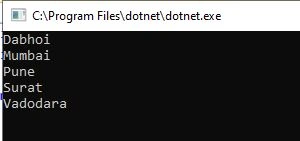
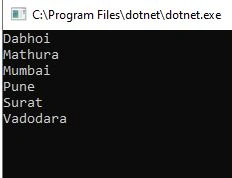
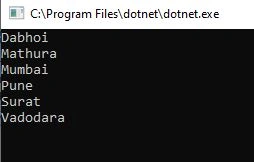
We will use Add method to add elements to the collection. In the below example, we will add cities to the collection and then print on the screen.
using System;
using System.Collections.Generic;

namespace SortedSetDemo
{
    class Program
    {
        static void Main(string[] args)
        {
            SortedSet<string> sortedSetDemo = new SortedSet<string>();
            sortedSetDemo.Add("Mumbai");
            sortedSetDemo.Add("Surat");
            sortedSetDemo.Add("Vadodara");
            sortedSetDemo.Add("Dabhoi");
            sortedSetDemo.Add("Pune");

            foreach (var item in sortedSetDemo)
            {
                Console.WriteLine(item);
            }

            Console.ReadLine();
        }
    }
}
Output
Contain Method in SortedSet Collection
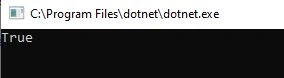
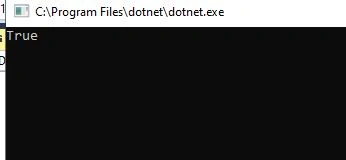
Contain method is used to see element is present in the collection or not. Let’s see the below example.
using System;
using System.Collections.Generic;

namespace SortedSetDemo
{
    class Program
    {
        static void Main(string[] args)
        {
            SortedSet<string> sortedSetDemo = new SortedSet<string>();
            sortedSetDemo.Add("Mumbai");
            sortedSetDemo.Add("Surat");
            sortedSetDemo.Add("Vadodara");
            sortedSetDemo.Add("Dabhoi");
            sortedSetDemo.Add("Pune");

           if(sortedSetDemo.Contains("Vadodara"))
            {
                Console.WriteLine("Vadodara is present in the collection");
            }
           else
            {
                Console.WriteLine("Vadodara is not present in the collection");
            }

            Console.ReadLine();
        }
    }
}
Output

How to Remove element from Collection?
We can use Remove, Clear, and RemoveWhere methods to remove elements from Collection as per requirement.
Remove
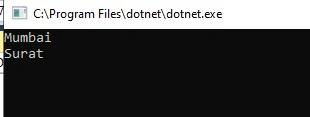
This method is used to remove a specific item from the collection. See the below example,
using System;
using System.Collections.Generic;

namespace SortedSetDemo
{
    class Program
    {
        static void Main(string[] args)
        {
            SortedSet<string> sortedSetDemo = new SortedSet<string>();
            sortedSetDemo.Add("Mumbai");
            sortedSetDemo.Add("Surat");
            sortedSetDemo.Add("Vadodara");
            sortedSetDemo.Add("Dabhoi");
            sortedSetDemo.Add("Pune");

            sortedSetDemo.Remove("Surat");

            foreach (var item in sortedSetDemo)
            {
                Console.WriteLine(item);
            }

            Console.ReadLine();
        }
    }
}
Output
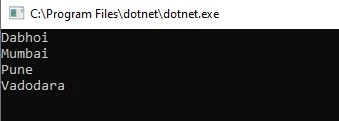
In the above code, “Surat” is removed from the collection.
Clear()
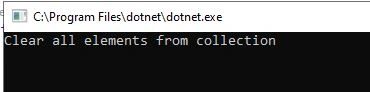
This method is used to remove all items from the collection.
using System;
using System.Collections.Generic;

namespace SortedSetDemo
{
    class Program
    {
        static void Main(string[] args)
        {
            SortedSet<string> sortedSetDemo = new SortedSet<string>();
            sortedSetDemo.Add("Mumbai");
            sortedSetDemo.Add("Surat");
            sortedSetDemo.Add("Vadodara");
            sortedSetDemo.Add("Dabhoi");
            sortedSetDemo.Add("Pune");

            sortedSetDemo.Clear();

            foreach (var item in sortedSetDemo)
            {
                Console.WriteLine(item);
            }
            Console.WriteLine("Clear all elements from collection");
            Console.ReadLine();
        }
    }
}
Output
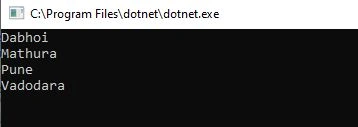
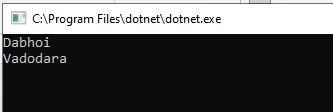
RemoveWhere
This method is used to remove all elements that match the condition defined in method.
using System;
using System.Collections.Generic;

namespace SortedSetDemo
{
    class Program
    {
        static void Main(string[] args)
        {
            SortedSet<string> sortedSetDemo = new SortedSet<string>();
            sortedSetDemo.Add("Mumbai");
            sortedSetDemo.Add("Surat");
            sortedSetDemo.Add("Vadodara");
            sortedSetDemo.Add("Dabhoi");
            sortedSetDemo.Add("Pune");
            sortedSetDemo.Add("Mathura");

            sortedSetDemo.RemoveWhere(myFunc);

            foreach (var item in sortedSetDemo)
            {
                Console.WriteLine(item);
            }
            Console.ReadLine();
        }
        private static bool myFunc(string strcity)
        {
            if(strcity.StartsWith('M'))
            {
                return true;
            }
            return false;

        }
    }
}
Output
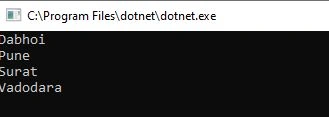
We have removed all cities starting with ‘M’ from the collection using the RemoveWhere method.
Methods Available in SortedSet Collections
Many methods are available in sortedSet collection to perform various operations. We will discuss a few important methods Here.
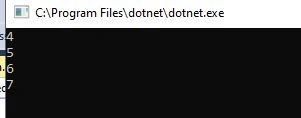
CopyList
In the below example, we have copied the list to sortedset.


Join the conversation! Your thoughts help the community grow.