

In this article I will explain how to open and start a web page (.aspx page ) from a Window application in C#.
Step 1: Initially create new window based project.
Execute Visual Studio then go to "File" -> "New" -> "Project..." then select "Windows" -> "Windows Forms application".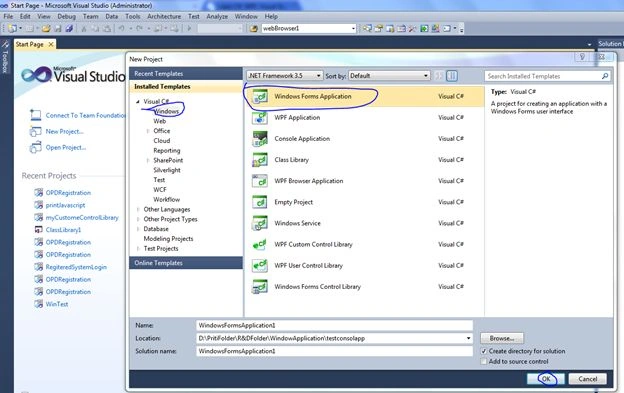
Step 2: Design your form: drag a button onto your form.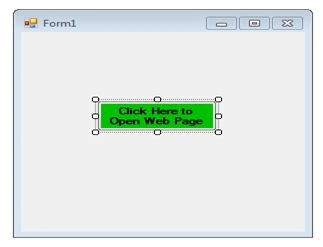
Step 3: Add this namespace to the top your application code.
Step 4: Write this code for the button Click event; here you can provide the web page URL.
Step 5: Then run you application and click on the button and see the output.
Output
This is my web page.
Abdul Amin KhanPosted Mar 16, 2016, 7:41 AM
okkk thanks
Priti KumariPosted Mar 16, 2016, 4:30 AM
follow this http://stackoverflow.com/questions/21202885/how-can-i-change-iis-express-port-for-a-site
Abdul Amin KhanPosted Mar 16, 2016, 3:49 AM
What about Port Number?
Abdul Amin KhanPosted Mar 16, 2016, 3:33 AM
Is there any way to run it on localhost? I need this.
Abdul Amin KhanPosted Mar 16, 2016, 3:09 AM
is this page will run to other machine if we create setup of this project and install there?
chandrakanth chandrakanthPosted Dec 16, 2015, 4:29 AM
Yes,Web allow windows Application.
Manjeet SinghPosted Jun 25, 2015, 6:41 AM
hi Priti, Can we call windows Application in web Application..
Priti KumariPosted May 28, 2014, 6:58 AM
Most welcome
vaishali tamrakarPosted May 28, 2014, 6:44 AM
thanks a lot , it worked..
Priti KumariPosted May 28, 2014, 6:36 AM
Please Put your web page URL in Process.Start("Your web page url").Keep in mind your Application should be in running mode.
vaishali tamrakarPosted May 28, 2014, 6:26 AM
i used this code to call the web page which i created using asp.net, but it could not connect to it..