

Introduction
In this article, we are going to understand starting and stopping an animation using HTML 5 Canvas. In this section, to start an HTML5 Canvas animation, we can call a function that repeatedly requests a new animation frame, and to stop an HTML5 Canvas animation we can simply not request a new animation frame.
Here we will use some JavaScript and some styles along with HTML code. Just go through the steps to see how to create this application.
Let's see how the CanvasStartStopAnimation application can be created. To do so use the following steps.
Step 1 : Open a HTML editor or Visual Studio.
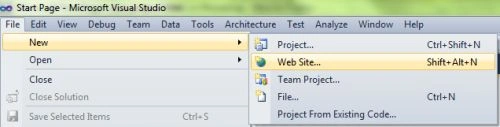
Open File menu ->select new ->Choose Website
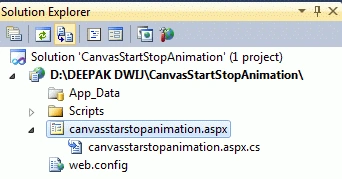
- Go to Solution Explorer
- Right-click on the Application name
- Select Add-->add new item
- Now in the window that opens, select an HTML page or new Webform
- Rename it to canvasstarstopanimation.aspx
CSS Script
- <style>
- body
- {
- margin: 0px;
- padding: 0px;
- }
- Canvas
- {
- border: 2px solid #9C9898;
- margin-top: 50px;
- margin-left: 50px;
- background-color: #F4D19F;
- box-shadow: 5px 5px 8px #222;
- }
- .title
- {
- text-align: center;
- font-family: Segoe UI Light, Arial, Helvetica;
- font-size: 2.2em;
- margin: 1em;
- }
- .info
- {
- text-align: center;
- font-family: Segoe UI Light, Arial, Helvetica;
- font-size: 1.2em;
- margin: 0.25em;
- }
- </style>
Step 3 : In this part we need to work on some JavaScript. To fully understand how JavaScript works, download the attached .rar file and run the CanvasStartStopAnimation application.
The whole JavaScript looks as in the following:
- <script>
- window.requestAnimFrame = (function (callback)
- {
- return window.requestAnimationFrame ||
- window.webkitRequestAnimationFrame ||
- window.mozRequestAnimationFrame ||
- window.oRequestAnimationFrame ||
- window.msRequestAnimationFrame ||
- function (callback)
- {
- window.setTimeout(callback, 1000 / 60);
- };
- })();
- function drawRect(myRectangle)
- {
- var canvas = document.getElementById("myCanvas");
- var context = canvas.getContext("2d");
- context.beginPath();
- context.rect(myRectangle.x, myRectangle.y, myRectangle.width, myRectangle.height);
- context.fillStyle = "#8ED6FF";
- context.fill();
- context.lineWidth = myRectangle.borderWidth;
- context.strokeStyle = "black";
- context.stroke();
- }
- function animate(lastTime, myRectangle, animProp)
- {
- if (animProp.animate) {
- var canvas = document.getElementById("myCanvas");
- var context = canvas.getContext("2d");
- // update
- var date = new Date();
- var time = date.getTime();
- var timeDiff = time - lastTime;
- var linearSpeed = 100;
- // pixels / second
- var linearDistEachFrame = linearSpeed * timeDiff / 1000;
- var currentX = myRectangle.x;
- if (currentX < canvas.width - myRectangle.width - myRectangle.borderWidth / 2)
- {
- var newX = currentX + linearDistEachFrame;
- myRectangle.x = newX;
- }
- lastTime = time;
- // clear
- context.clearRect(0, 0, canvas.width, canvas.height);
- // draw
- drawRect(myRectangle);
- // request new frame
- requestAnimFrame(function ()
- {
- animate(lastTime, myRectangle, animProp);
- });
- }
- }
- window.onload = function ()
- {
- var myRectangle = {
- x: 0,
- y: 50,
- width: 100,
- height: 50,
- borderWidth: 5
- };
- var animProp = {
- animate: false
- };
- // add click listener to canvas
- document.getElementById("myCanvas").addEventListener("click", function ()
- {
- if (animProp.animate)
- {
- animProp.animate = false;
- }
- else
- {
- animProp.animate = true;
- var date = new Date();
- var time = date.getTime();
- animate(time, myRectangle, animProp);
- }
- });
- drawRect(myRectangle);
- };
- </script>
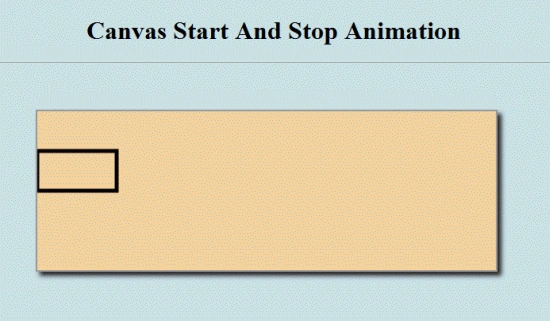
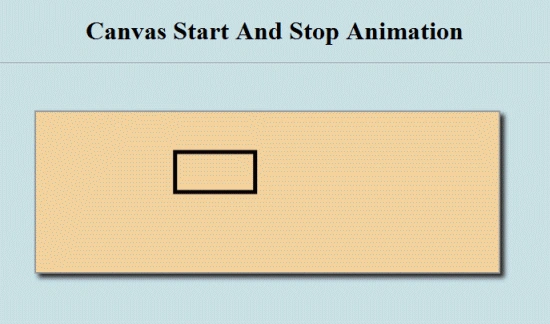
Join the conversation! Your thoughts help the community grow.