

The below code will allow you to capture your desktop and save the image into a word document.
//Include following namespaces
using
System.Collections;using System.ComponentModel;
using System.Windows.Forms;
using System.Data;
using System;
using System.Drawing;
using System.Drawing.Imaging;
using System.Runtime.InteropServices;
using System.IO;
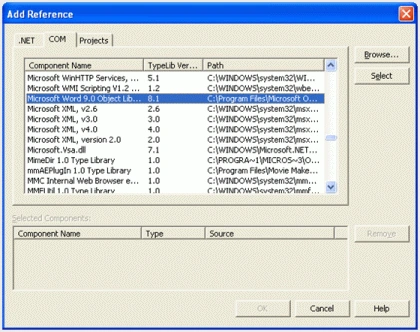
//Import Microsoft Word 9.0 or 11.0 (recommended)
namespace ScreenCapture
{
/// <summary>
/// Summary description for Form1.
/// </summary>
public class Form1 : System.Windows.Forms.Form
{
private System.Windows.Forms.Button button1;
/// <summary>
/// Required designer variable.
/// </summary>
private System.ComponentModel.Container components = null;
public Form1()
{
//
// Required for Windows Form Designer support
//
InitializeComponent();
//
// TODO: Add any constructor code after InitializeComponent call
//
}
/// <summary>
/// Clean up any resources being used.
/// </summary>
protected override void Dispose( bool disposing )
{
if( disposing )
{
if (components != null)
{
components.Dispose();
}
}
base.Dispose( disposing );
}
#region Windows Form Designer generated code
/// <summary>
/// Required method for Designer support - do not modify
/// the contents of this method with the code editor.
/// </summary>
private void InitializeComponent()
{
this.button1 = new System.Windows.Forms.Button();
this.SuspendLayout();
//
// button1
//
this.button1.BackColor = System.Drawing.Color.CornflowerBlue;
this.button1.Font = new System.Drawing.Font("Microsoft Sans Serif", 10F,
System.Drawing.FontStyle.Bold, System.Drawing.GraphicsUnit.Point, ((System.Byte)(0)));
this.button1.ForeColor = System.Drawing.Color.Cornsilk;
this.button1.Location = new System.Drawing.Point(0, 0);
this.button1.Name = "button1";
this.button1.Size = new System.Drawing.Size(120, 23);
this.button1.TabIndex = 1;
this.button1.Text = "Capture";
this.button1.Click += new System.EventHandler(this.button1_Click);
//
// Form1
//
this.AutoScaleBaseSize = new System.Drawing.Size(5, 13);
this.ClientSize = new System.Drawing.Size(115, 22);
this.ControlBox = false;
this.Controls.Add(this.button1);
this.Name = "Form1";
this.Load += new System.EventHandler(this.Form1_Load);
this.ResumeLayout(false);
}
#endregion
/// <summary>
/// The main entry point for the application.
/// </summary>
[STAThread]
static void Main()
{
Application.Run(new Form1());
}
private void Form1_Load(object sender, System.EventArgs e)
{
}
private void CaptureDesk()
{
MethodsForCapture objMethods = new MethodsForCapture();
//First we will capture the image of desktop
objMethods.CaptureScreen(@"c:\TestCapture.jpg",ImageFormat.Jpeg);
MessageBox.Show("Captured");
FileStream f = new FileStream(@"c:\TestCapture.jpg",FileMode.Open);
//For copying the captured image we have to create a object of //BMP class and copy
that object to clipboard
Bitmap b = new Bitmap(f,true);
Clipboard.SetDataObject(b,true);
BenPosted Aug 30, 2006, 9:58 AM
I have code similar to yours implemented into my project. I was wondering though if there was a way of doing the same thing in 2005 without using API calls, just pure C#.NET 2005 code? thanks, Ben
Basant Kuamr YadavPosted Jul 11, 2006, 10:19 AM
I have tried this code , but faced these problems. 1) It is not saving the image file in word though i made reference microsoft object library 11.0 .Some error is coming which i fail to understand. I have tried this code removing the word section related code, then its working and saving the image file only . 2) When i run a movie file in any player then this code is not capturing the movie image but a totally black screen image.
Basant Kuamr YadavPosted Jul 11, 2006, 10:19 AM
I have tried this code , but faced these problems. 1) It is not saving the image file in word though i made reference microsoft object library 11.0 .Some error is coming which i fail to understand. I have tried this code removing the word section related code, then its working and saving the image file only . 2) When i run a movie file in any player then this code is not capturing the movie image but a totally black screen image.
Bhasker DasPosted Jun 15, 2006, 1:17 AM
hi this is my first comment