Introduction
In this article we will learn how to implement Cascading Drop-Down List in SharePoint 2010 List using jQuery and Sp services.
For Implementing Cascading Drop-Down List in SharePoint 2010 List using jQuery and Sp services follow below steps:-
Object
- Create Country custom list
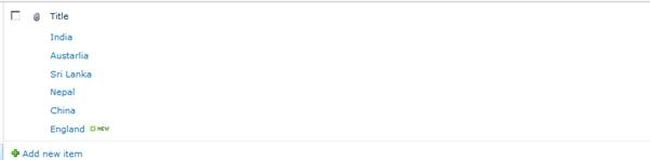
- Create State Custom list: with Country lookup column
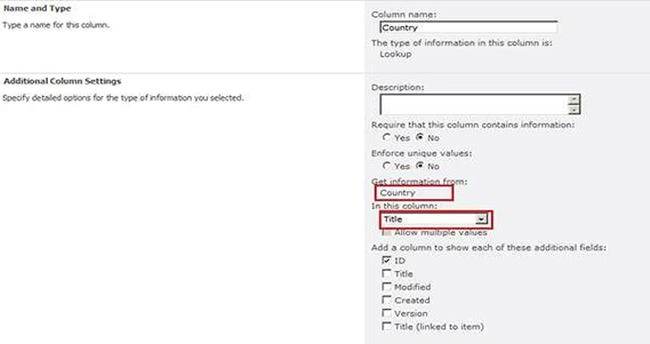
Look up Column Setting
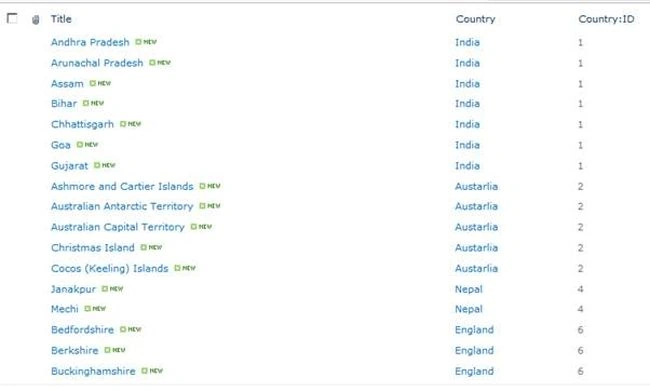
- Create CascadeDropDownList with Country, State lookup columns
- Select Default New Form under List tab of newly created List CascadeDropDownList
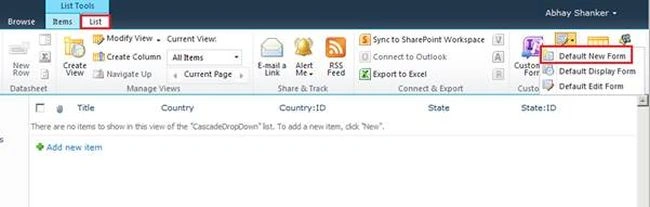
- Add content Editor Web part and Select Edit HTML Source under Format Text Tab
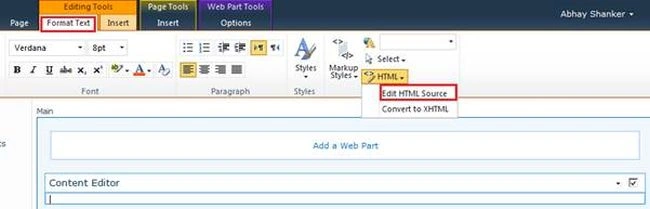
- Copy and Paste the below Code in HTML Editor
- <script language="javascript" src="/JSLibrary/jquery-1.4.2.min.js" type="text/javascript"></script><script language="javascript" src="/JSLibrary/jquery.SPServices-0.5.7.min.js" type="text/javascript"></script><script type="text/javascript">
-
- $(document).ready(function() {
-
- $().SPServices.SPCascadeDropdowns({
-
- relationshipList: "State",
-
- relationshipListParentColumn: "Country",
-
- relationshipListChildColumn: "Title",
-
- relationshipListSortColumn: "ID",
-
- parentColumn: "Country",
-
- childColumn: "State",
-
- promptText: "Choose State...",
-
- debug: true
-
- });
-
-
- });
- </script>

Summary: - In some scenario we need to implement cascading type of concept in OOB forms as for example by selecting Countries respective states or cities. It's not easier in SharePoint.


Join the conversation! Your thoughts help the community grow.