

Here I will demonstrate Cascading dropdown list (populating a child dropdown based on selection of a parent dropdown) .
We will be using ajax method in Jquery by using JSON.
Over the course of this article - We will also see how to update Models using the Update Model Wizard in Entity Framework 4.0
I would be referring to database, Models, Views and Controllers used in my previous article @ (http://www.c-sharpcorner.com/UploadFile/2124ae/5628/)
and even the code discussed below would be an addition to the existing sample of the previous article.
1. Update ViewModel
Open IndexViewModel.cs and add code for second dropdown- Cities Drop down list which would serve as child dropdown for the State dropdown (parent dropdown).
//2nd DropDownList ID
public string ddlCityId
{
get;
set;
}
//2nd DropDownList Values
public List<SelectListItem> CityValue
{
get;
set;
}
2. Database part
- Here we will be creating a new table for cities.
- Create a new table -> tblCity (CityId(int - primary key, CityName - varchar(30),StateName-varchar(30)) in the existing database - SampleDB.mdf
- Insert sample cities for each corresponding state values(from tblState) in tblCity.
3. Models
Update Model
- We can use Update Model wizard to update the SampleDBModel.edmx file.
Update Model Wizard serves for the following purpose:
- ADD -> if an object has not been included in the existing model or if an object has been newly added to database - We can add the object to the Model.
- REFRESH -> if any of objects definition has been changes in the database -> We can update the object definition in the Model.
- DELETE -> in case any object (table, stored procedure, Views) has been deleted from database, it removes the object from the Model
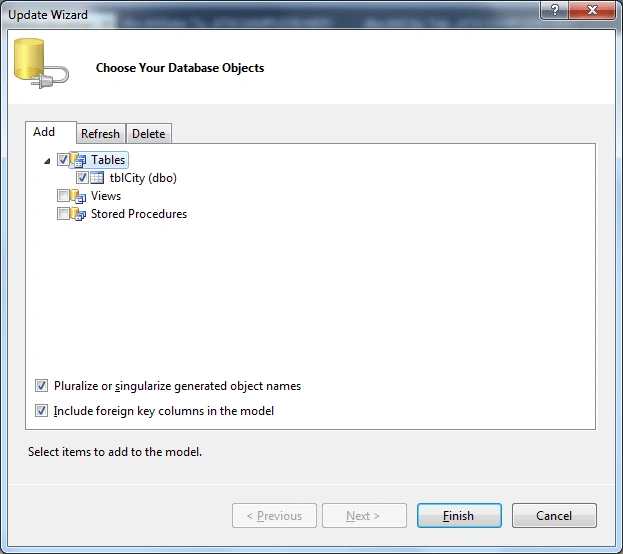
- Here we will use the Update Model wizard to Add -> to basically include tblCity in our Model.
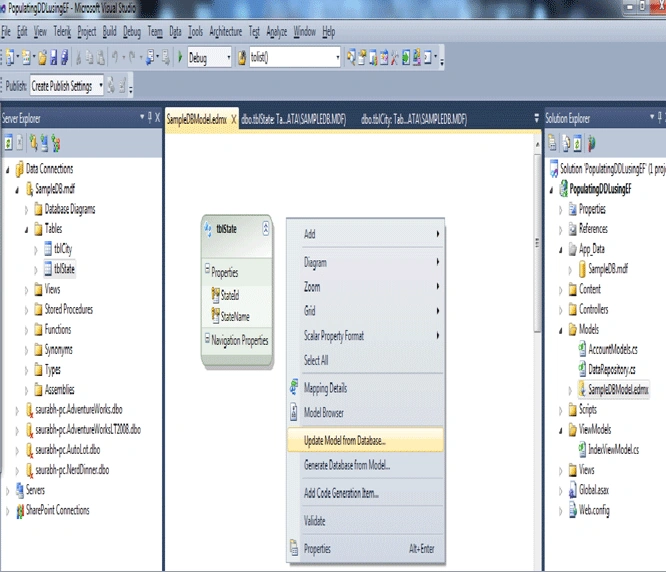
- Open SampleDBModel.edmx file.
- Right Click the Model browser window and select Update Model from database.
- Add tblCity and click Finish -> With this our model is updated with the new table.
Update Repository Class
- Open DataRepository.cs from Models folder
- Include Code for fetching Cities based on Selected State Name
//Get the values for City DropDownlist based on Selected State Names
public List<SelectListItem> GetCityNames(string state_Selected)
{
var vCityName = (from tblCity in entities.tblCities
where tblCity.StateName==state_Selected
select new SelectListItem
{
Text=tblCity.CityName,
Value=tblCity.CityName
}
);
return vCityName.ToList();
}
4. Controllers
- Open HomeController.cs file from Controllers folder
- Inside ActionResult Index() get the first item in the state dropdown
//Get the first item of the First drop down list(State ddl)
string ddlStateId_First_Item = objIndexViewModel.StateValue[0].Value;
- Inside ActionResult Index() - for populating the Cities ddl - on the page load - based on first item in the state ddl
//Get the City names based on the first Item in the State ddl
objIndexViewModel.CityValue = objRepository.GetCityNames(ddlStateId_First_Item);
- Write a Controller action that returns a JSONRESULT - to return a list of cities based on selected Sate.
public JsonResult Cities_SelectedState(string Sel_StateName)
{
JsonResult result = new JsonResult();
var vCities = objRepository.GetCityNames(Sel_StateName);
result.Data = vCities.ToList();
result.JsonRequestBehavior = JsonRequestBehavior.AllowGet;
return result;
}
5. Views
- Open Index.aspx from Views -> Home -> Views folder.
- update it with the new Cities label and Cities dropdown
<%:Html.Label("Cities:") %>
<%:Html.DropDownListFor(m=>m.ddlCityId,Model.CityValue)%>
- Include JQuery to populate Cities ddl based on State ddl change.
<script type="text/javascript">
$(document).ready(function () {
$("#ddlStateId").change(function () {var url = '<%= Url.Content("~/") %>' + "Home/Cities_SelectedState";
var ddlsource = "#ddlStateId";
var ddltarget = "#ddlCityId";
$.getJSON(url, { Sel_StateName: $(ddlsource).val() }, function (data) {
$(ddltarget).empty();
$.each(data, function (index, optionData) {
$(ddltarget).append("<option value='" + optionData.Text + "'>" + optionData.Value + "</option>");
});
});
});
});
</script>
- Open Site.Master (master page) from Views ->Shared folder and include jQuery script files inside Head Section.
<head runat="server">
<script type="text/javascript" src="../../Scripts/jquery-1.4.1.js"></script>
</head>
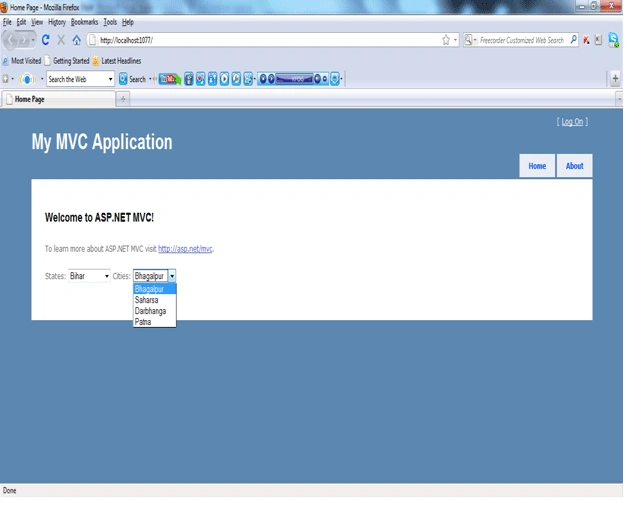
6. Compile And Run the Project (F5) - We can see on Page Load City Dropdown got populated based on first item in the State dropdown.
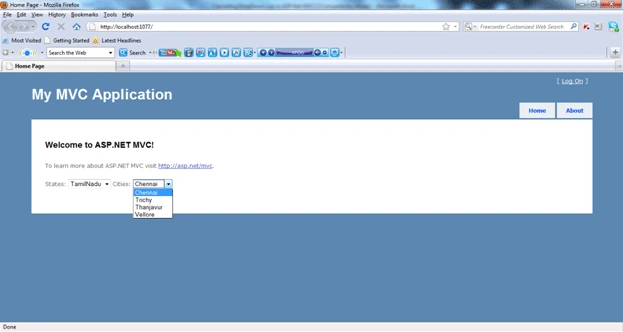
If we Change the value in the State dropdown -> Cities dropdown gets correspondingly populated.
So in this article we have seen how can we implement Cascading DropDownList in ASP.Net MVC using AJAX methos in Jquery by using JSON.
I have attached the code for this sample application.
Happy Learning!!
den kkkddPosted Dec 13, 2012, 12:32 PM
Thank you very much!!!
Arun PonnusamyPosted Oct 25, 2012, 11:53 AM
HI Can you give an example for 3 level cascading when i try for an another level it is giving error in creating the instance Ex I am trying to cascade Degree, Year, Semester I could do the Degree and Year but I am struck with the semester Thanks
mahalakshmi sethuPosted Oct 11, 2012, 7:14 AM
Thank you so much!
chrisPosted Jun 4, 2011, 12:08 PM
Kumar; Nice work, and easy to understand and implement. Could you extend it to 4 cascading dropdown lists with MVC2(or MVC3 preferrably) using JQuery. That is: State City Street Name House Number. It will be a wonderful program. I look forward to your reaction to this. ChrisWan [email protected]
chrisPosted Jun 4, 2011, 12:04 PM
Kumar; Nice work, and easy to understand and implement. Could you extend it to 4 cascading dropdown lists with MVC2(or MVC3 preferrably) using JQuery. That is: State City Street Name House Number. It will be a wonderful program. I look forward to your reaction to this. Chris Wan
VickyPosted May 24, 2011, 4:25 PM
Hi Kumar, Thank you in advance for your great work. I am trying ti implement the cascading ddl on my project but I´m facing a problem. Lets say i want to store the StateID(GUID) instead of the State name(which is a string). When i try to select the SelectListItems select new SelectListItem { Text = State .Name, Value = State .Id.ToString(), } I get the error " not supported exception was unhandled by user code - LINQ to Entities does not recognize the method 'System.String ToString()' method, and this method cannot be translated into a store expression." Is there a solution to figure this problem?
Nicolas MijochPosted May 3, 2011, 6:48 PM
$.getJSON(url, { Sel_StateName: $(ddlsource).val() }, function (data) { $(ddltarget).empty(); $.each(data, function (index, optionData) { $(ddltarget).append("<option value='" + optionData.Text + "'>" + optionData.Value + "</option>"); }); In this part in the jquery function you have conceptually error, you put <option value='" + optionData.Text + "'> instead <option value='" + optionData.Value + "'> and the next part is the same. In your program works, because both data are the same. Despite this little error your post help me a lot. Thanks for share it with the world!.
sebastian herreraPosted Apr 22, 2011, 1:59 AM
Hi Kumar, thanks in advance for your work. it helps me a lot. I´m facing a doubt, what do I have to do in order to submit only the last value result to the database. Let me explain further: 1 - Product Table has a field CategoryId 2- Category Table has ParentCategoryId field that defines if a new dropdown appears with values. 3- When submit I send to the database the CategoryId of the last dropdown. Some categories display only one dropdownlist field based on the fact they dont have nested categories, consequently the id value goes directly to the database. Other categories have one dropdownlist for main category, another one for nested categories, if I send only the information of the first dropdown will not reflect the correct category detail. Any help will be appreciated. brgds. sa
vikas guptaPosted Apr 8, 2011, 10:05 AM
Hi Saurabh.. it is based on dropdown selected text..how can i do that on selected value(id of int) based.. please reply...
Paulo Crespo PereiraPosted Mar 8, 2011, 9:50 AM
You were very happy in your article. Congratulations! Simple, efficient and easy to learn. You are the man !
Nhung LuuPosted Mar 3, 2011, 9:32 PM
Hi ^^, Here, i don't known get the dropdownlist selected value when action sumit to Form Can you help me? Thanks you
SapnaPosted Feb 21, 2011, 10:59 PM
Very nice and easy to understand!