

This article explains how to populate a child dropdown list depending on each new value as values are seelcted in the parent's dropdown list.
I use two tables to populate dropdown lists. One is a GAMES table and another is SUBGAMES table. The GAMES table is a parent table and the SUBGAMES table is a child table. These tables have primary key and foreign key relationship using the Game_Id column.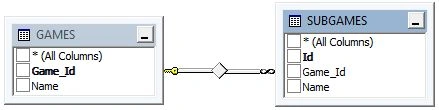
First populate the parent dropdown list using the GAMES table then populate the child dropdown list using the SUBGAMES table by the selected Game_id from the parent dropdown list.
1. UI Design
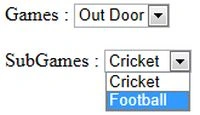
Create two dropdown lists, one for game (ddlGame) and another for subgames (ddlSubGame). The ddlGame dropdown list has an onchnage event that populates the ddlSubGame dropdown list depending on the value selected in the dlGame dropdown list.
<body>
<form id="form1" runat="server">
<div>
Games : <asp:DropDownList ID="ddlGame" runat="server" onchange="FillSubGames(this.value)" ></asp:DropDownList>
<br /><br />
SubGames : <asp:DropDownList ID="ddlSubGame" runat="server"></asp:DropDownList>
</div>
</form>
</body>
2. jQuery Scripts
I add a script reference for calling jQuery AJAX and the Google API.
<script type="text/javascript" src="http://ajax.googleapis.com/ajax/libs/jquery/1.4.1/jquery.min.js"></script>
3. Populate Games Dropdown List
I populate the ddlGame dropdown list on page load. The following code shows how to populate the ddlGame dropdown list.
private void FillGames()
{
string employee = string.Empty;
string connString = @"Data Source = sandeepss-PC; database = Development;
user = sa;password = knowdev";
SqlConnection con = new SqlConnection(connString);
SqlCommand cmd = new SqlCommand();
cmd.CommandText = "SELECT Game_Id, Name FROM GAMES";
cmd.Connection = con;
con.Open();
IDataReader Idr = cmd.ExecuteReader();
ddlGame.DataSource = Idr;
ddlGame.DataTextField = "Name";
ddlGame.DataValueField = "Game_Id";
ddlGame.DataBind();
con.Close();
Idr.Close();
}
To fill a dropdown list on page load I call the page_Load event like:
protected void Page_Load(object sender, EventArgs e)
{
FillGames();
}
4. Fetch Sub Games Data
I create a webMethod to fetch subGames data as per Games_Id. So I create a another web from ClientServerInterface.aspx and defined a web method "GetSubGames(string id)"
in ClientServerInterface.aspx.cs. This method returns a string that has all SubGames. These sub games are separated by a tilde sign("~") and each sub games Id and Name are separated by a vertical bar ("|" ).
[System.Web.Services.WebMethod]
public static string GetSubGames(string id)
Join the conversation! Your thoughts help the community grow.