

Introduction
In this article, we explain how to change the Windows 8 Sound Scheme. It's the same as in Windows 7.
Procedure to change the Sound Scheme
Step 1
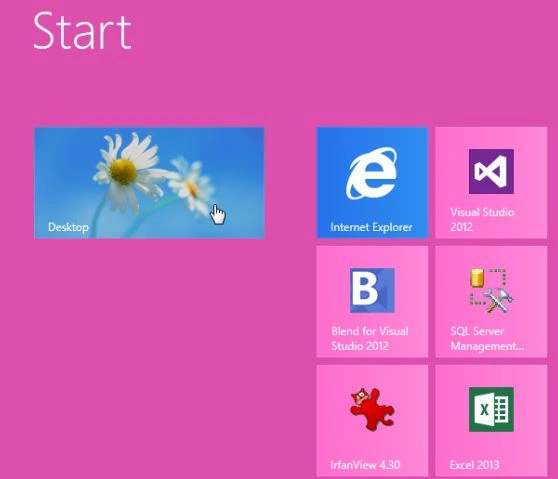
First, we have to move to the Windows 8 Start Screen and then click Desktop.
Step 2
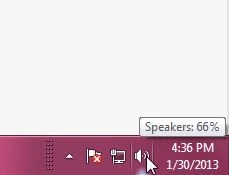
In Windows 8, Desktop right-click on the sound icon in the system tray.
Step 3
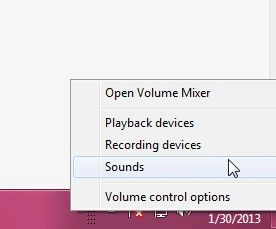
Select sounds.
Step 4
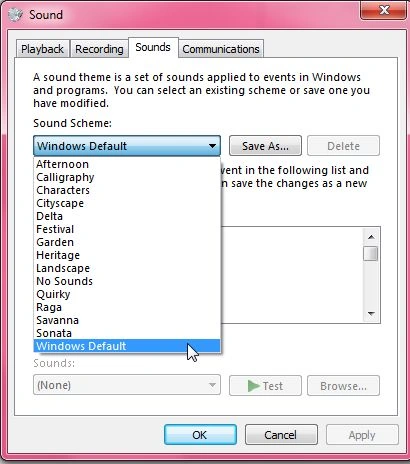
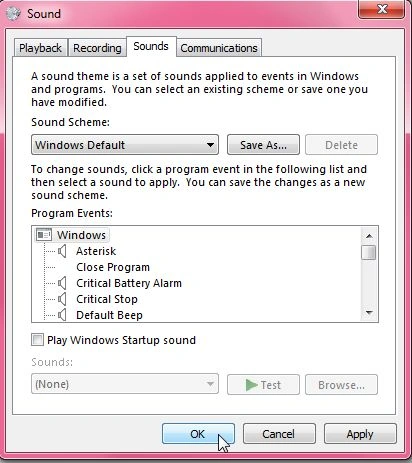
When the sound window opens, click the down arrow under Sound Scheme and select your preferred sound.
Note
If you don't have a favorite Sound Scheme then you can highlight it then click the Test button to hear it.
Step 5
Click OK to save.
That's it! Now you can use whatever Windows Theme you want and still be able to tweak the Sound Scheme of it.
Summary
In this article, we learned about Change the Windows 8 Sound Scheme.
Join the conversation! Your thoughts help the community grow.