

Today, I will explain how to use checkbox in WPF using MVVM pattern. Before starting this article please read Explain INotifyPropertyChanged In WPF - MVVM and ICommand Interface In MVVM - WPF article.
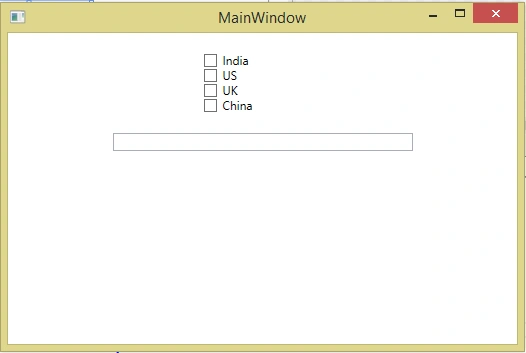
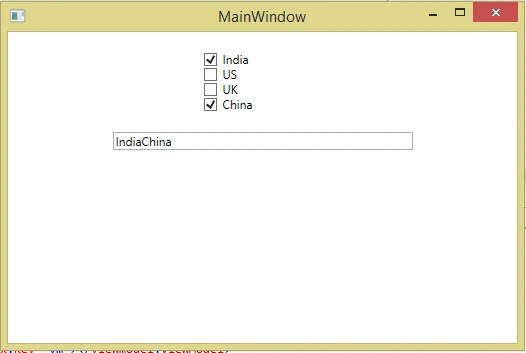
Let’s take an example to create one WPF Application, put four checkboxes and put one text box in it. The user has to select the check box and whatever check box the user selects, you have to display the list of all the checked checkboxes in the text box.
Thus, we create a WPF Window, as shown below.
Code - MainWindow.xaml
<Window x:Class="MVVM_Checkbox.View.Window1"
        xmlns="http://schemas.microsoft.com/winfx/2006/xaml/presentation"
        xmlns:x="http://schemas.microsoft.com/winfx/2006/xaml"
        Title="Window1" Height="350" Width="525">
    <StackPanel Orientation="Vertical" Margin="20" >
        <CheckBox Width="120" Name="cbIndia" Content="India"></CheckBox>
        <CheckBox Width="120" Name="cbUS" Content="US"></CheckBox>
        <CheckBox Width="120" Name="cbUK" Content="UK"></CheckBox>
        <CheckBox Width="120" Name="cbChina" Content="China"></CheckBox>
        <TextBox Width="300" Margin="20"></TextBox>
    </StackPanel>
</Window>
Here, when the user checked the checkbox, we have to display its selected checkbox content in the textbox, so first we have to create a command for the checkbox, which is checked. In simple words, we have to create a checkbox, which is checked on the change of the event in Windows form Application, but in MVVM pattern, we say that we have to create a command for the same. Thus, we create the Relay Command class, which implements the ICommand interface. This is taught in the ICommand Interface In MVVM - WPF article.
Code - RalayCommand.cs
public class RelayCommand:ICommand
{
    Action<object> _executemethod;
    Func<object, bool> _canexecutemethod;

    public RelayCommand(Action<object> executemethod,Func<object,bool> canexecutemethod)
    {
        _executemethod = executemethod;
        _canexecutemethod = canexecutemethod;
    }

    public bool CanExecute(object parameter)
    {
        if (_executemethod != null)
        {
            return _canexecutemethod(parameter);
        }else
        {
            return false;
        }
    }

    public event EventHandler CanExecuteChanged
    {
        add { CommandManager.RequerySuggested += value; }
        remove { CommandManager.RequerySuggested -= value; }
    }

    public void Execute(object parameter)
    {
        _executemethod(parameter);
    }
}
Now we have to make view-model class in which we have to define two properties.
String Name;
ObservableCollection<String> Countries;
Here ‘Name’ property is used to store the selected countries' names, as shown in the single string. When the user selects any country, we concat the checkbox name in this ‘Name’ property and when it is unchecked, we remove this name from the string. Finally, we bind this property ‘Name’ to the text box.
‘Countries’ property contains the one type of collection of the string. Here, we take the string as the country name. Based on checked and un-checked of check box, we add or remove the country name from the collection.
Now, we have to implement the INotifyPropertyChanged interface to update the UI, based on the change in view-model, which was discussed in Explain INotifyPropertyChanged In WPF - MVVM.
public class ViewModel:INotifyPropertyChanged
{
    private ObservableCollection<string> _countries;
    public ObservableCollection<string> Countries
    {
        get { return _countries; ; }
        set
        {
            _countries = value;
            OnPropertyChange("Countries");
        }
    }

    private string _name;
    public string Name
    {
        get { return _name; }
        set
        {
            _name = value;
            OnPropertyChange("Name");
        }
    }
    public event PropertyChangedEventHandler PropertyChanged;

    private void OnPropertyChange(string propertyname)
    {
        if (PropertyChanged !=null)
        {
            PropertyChanged(this, new PropertyChangedEventArgs(propertyname));
        }
    }
}
Now, we define the ICommand for the fire.
public ICommand MyCommand { get; set; }
Also, we create two new methods - canexecute and execute, where canexecute allows to fire execute method or not. On the other hand, execute method contains the actual logic like assigning all the checked check box values to the ‘Name’ property.
Byron ByronPosted Mar 5, 2022, 10:49 PM
My friend link to "Explain Multi Binding In MVVM - WPF" is not working.
Smk MersalPosted Apr 13, 2020, 9:43 AM
How to do visibility collapsed in datagrid header based on radiobutton selection.I want to collapsed 2 columns of datagrid , based on single radio button selection .... by using mutlibinding? i multivalue converter ..?
Ken WeigPosted Sep 22, 2019, 5:39 AM
Big shit - Checkbox with Command and MultiBinding as tutorial for beginners. Dear students don't follow it if you not understood when you need to use it. Search first for "IsChecked"
Sanjay ShekhawatPosted May 17, 2019, 2:11 AM
Thank you :)
Shamim UddinPosted Oct 16, 2016, 5:28 AM
Nice