

When we code to start a voice call, we must be aware of DependencyService in Xamarin.Forms.
DependencyService in Xamarin.Forms provides access to the native functionality and some platform-specific implementations of the iOS, Android and Windows Phone SDKs from your PCL or Shared Project.
To start a voice call there are some platform-specific implementations and permissions.
1. The following is the procedure to implement the voice call in Xamarin.Forms. Let's create a ContentPage with an entry and a button as HomePage.cs.
2. Create an interface IPhoneCall.cs in the shared code that shows the functionality that we intend to implement.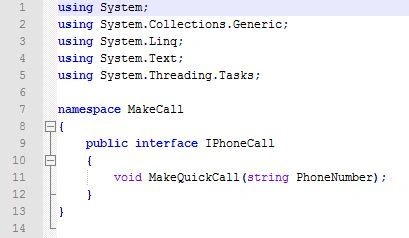
3. The Interface must be implemented in each platform-specific application project.
Android implementation: Before implementing the interface in Android don't forget to set some permissions in AndroidManifest.xml. These permissions are necessary for invoking a voice call in Android.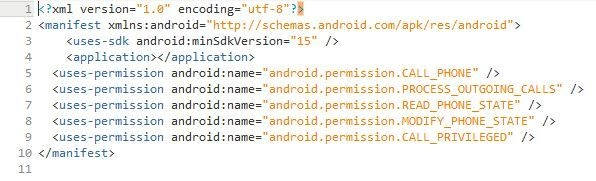
After setting the permissions we must implement the interface using a small class PhoneCall_Droid.cs.
iOS implementation: implementing for iOS create a call named as PhoneCall_iOS.cs.
*iOS implementation
Windows Phone implementation: Windows Phone has a simple API to invoke the dialer, the only caveat is to remember to tick the ID_CAP_PHONEDIALER capability in the WMAppManifest.xml, otherwise access to the dialer APIs are blocked.
The implementation is only two lines of code as in the following: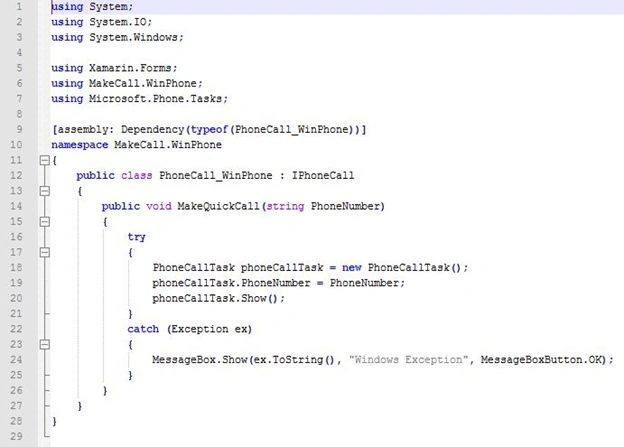
4. We had completed implementing the interface and registering each specific platform. Now we can write DependencyService to get an instance of the interfaces.
Geera SainiPosted Aug 19, 2017, 10:11 PM
I have Unhandled Exception:System.NullReferenceException: <Timeout exceeded getting exception details> occurred on var dialer = DependencyService.Get<IPhoneCall>().Dial(number);
Santhakumar MunuswamyPosted Jun 29, 2015, 2:08 PM
Thanks for nice one
Gopi ChandPosted Jun 29, 2015, 1:33 PM
Good one :)
Chiheb ChebbiPosted Jun 29, 2015, 10:13 AM
nice !