

Introduction
A common table expression, CTE, is used for a specific temporary result set by using a SELECT, INSERT, UPDATE, or DELETE statement so, that the user can perform further operations on it. When the user uses Join queries on some particular table & in sub-queries, he needs the same set of records then the code readability is slightly difficult. So the use of CTE makes the code readability better. Common Table Expressions (CTE) have two types, recursive and non-recursive. For beginners, it is easy to understand.
Syntax
WITH CTE_Name ([Select_Column_List])
AS
(Your_Query_Definition)
- CTE_Name is a common table expression name.
- Select_Column_List is the column name list that the user would like to select.
- Your_Query_Definition: Specifies a SELECT statement whose result set populates the common table expressions.
For more info, click here.
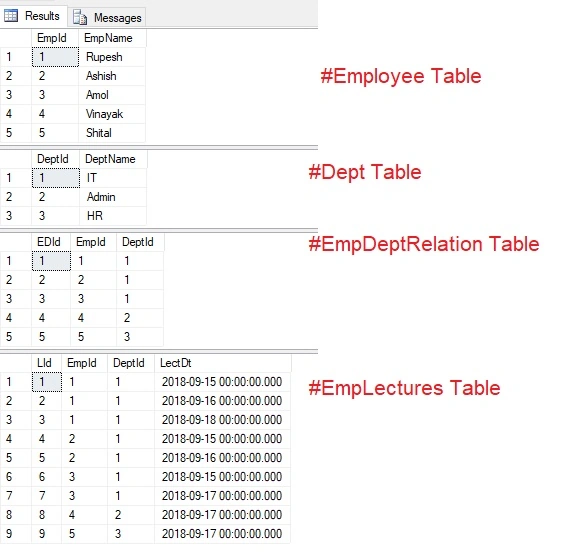
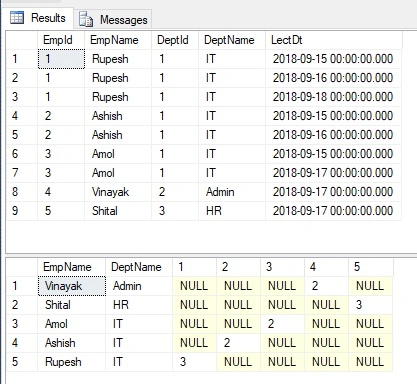
Step 1. I am going to create temp tables as follows Employee, Department, relationship employee & department i.e. EmpDeptRelation, an employee who conducted the number of lectures in the EmpLectures table.
First, we are going to check whether these temp tables are already present or not. If present, then drop those tables. Also, after the creation of tables, we need to insert some dummy data into them.
if OBJECT_ID('tempdb..#Employee') is not null
Begin
    Drop Table #Employee
End
if OBJECT_ID('tempdb..#Dept') is not null
Begin
    Drop Table #Dept
End
if OBJECT_ID('tempdb..#EmpDeptRelation') is not null
Begin
    Drop Table #EmpDeptRelation
End
if OBJECT_ID('tempdb..#EmpLectures') is not null
Begin
    Drop Table #EmpLectures
End
if OBJECT_ID('tempdb..#tempDB') is not null
Begin
    Drop Table #tempDB
End
CREATE TABLE #Employee
(
    EmpId int,
    EmpName varchar(100)
)
Insert Into #Employee values(1,'Rupesh')
Insert Into #Employee values(2,'Ashish')
Insert Into #Employee values(3,'Amol')
Insert Into #Employee values(4,'Vinayak')
Insert Into #Employee values(5,'Shital')
GO
--Select * from #Employee
CREATE TABLE #Dept
(
    DeptId int,
    DeptName varchar(100)
)
Insert Into #Dept values(1,'IT')
Insert Into #Dept values(2,'Admin')
Insert Into #Dept values(3,'HR')
GO
--Select * from #Dept
CREATE TABLE #EmpDeptRelation
(
    EDId int,
    EmpId int,
    DeptId int
)
Insert Into #EmpDeptRelation values(1,1,1)
Insert Into #EmpDeptRelation values(2,2,1)
Insert Into #EmpDeptRelation values(3,3,1)
Insert Into #EmpDeptRelation values(4,4,2)
Insert Into #EmpDeptRelation values(5,5,3)
GO
--Select * from #EmpDeptRelation
CREATE TABLE #EmpLectures
(
    LId int,
    EmpId int,
    DeptId int,
    LectDt datetime
)
Insert Into #EmpLectures values(1,1,1,'09-15-2018')
Insert Into #EmpLectures values(2,1,1,'09-16-2018')
Insert Into #EmpLectures values(3,1,1,'09-18-2018')
Insert Into #EmpLectures values(4,2,1,'09-15-2018')
Insert Into #EmpLectures values(5,2,1,'09-16-2018')
Insert Into #EmpLectures values(6,3,1,'09-15-2018')
Insert Into #EmpLectures values(7,3,1,'09-17-2018')
Insert Into #EmpLectures values(8,4,2,'09-17-2018')
Insert Into #EmpLectures values(9,5,3,'09-17-2018')
GO
--Select * from #EmpLectures
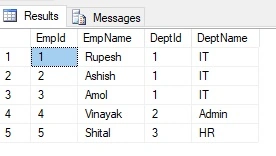
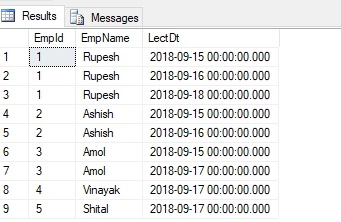
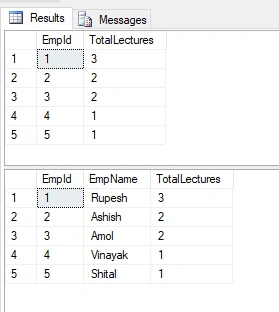
Step 2. As per the above syntax of CTE, we will create some queries & execute those queries.
Firstly will fire only select queries on each table to check the records.
Select * from #Employee
Select * from #Dept
Select * from #EmpDeptRelation
Select * from #EmpLectures
Amit Kumar SinghPosted Oct 6, 2018, 3:23 AM
Nice one.. Thanks for Sharing Rupesh Sir !!
Code AlonePosted Sep 29, 2018, 4:23 PM
Now many questions are out of Boundary. Thank you Sir Rupesh Kahane