

Here I am using Visual Studio 2012 with .NET Framework 4.5.
Create a new project, click ASP.Net MVC 4 application, and select Internet Application.
Now you will get your newly created application and let us start with "Entity Framework Configuration".
Step 1: Go to TOOLS, then Extensions and Updates.
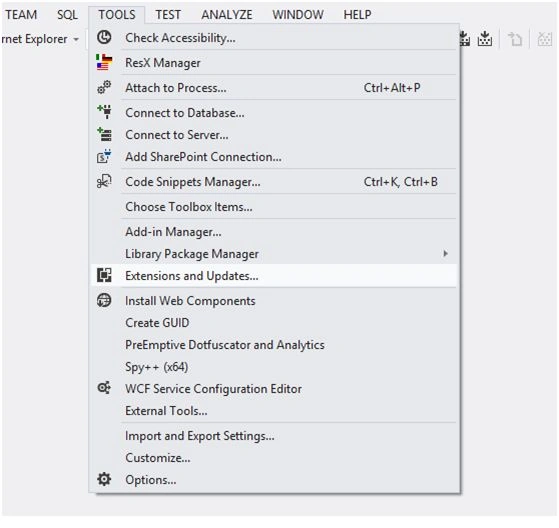 Step 2: Go to the online gallery and search for "nu-get package manager" and install it.
Step 3: After you have installed the Nuget package manager, you have two options for the installation entity framework.
Step 2: Go to the online gallery and search for "nu-get package manager" and install it.
Step 3: After you have installed the Nuget package manager, you have two options for the installation entity framework.
- Through the UI (From Solution Explorer)
- Package Manager Console.
Installing Entity Framework Through the UI (From Solution Explorer)
- Right-click on the project References, then click Manage NuGet Packages,
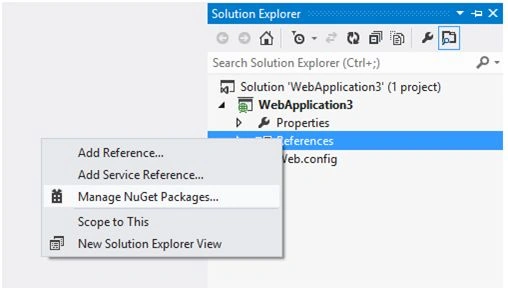
- This will take you to another window where you can find EntityFramework.
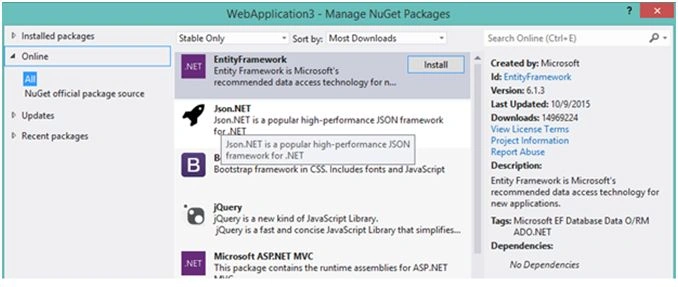
- Install It.
- It will ask for License Acceptance,

- Click on the I Accept button in the License Acceptance window. Now your installation for "Entity Framework" is complete.
Installing Entity Framework through Package Manager Console
- For installing through package manager console,Go to VIEW, then Other Windows, and then Package Manager Console.

- Package Manager Console is open.
- Write "install - package entityframework" and press enter.
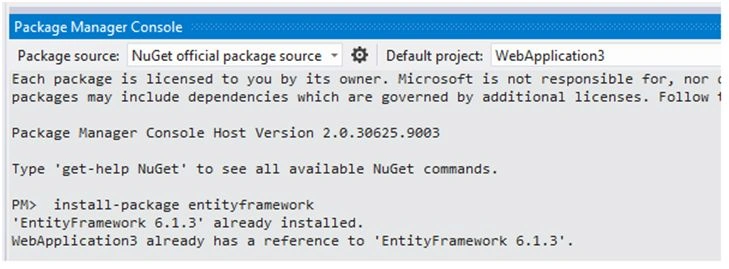
I already installed Entity Framework through Solution Explorer, so now it gave a message 'EntityFramework 6.1.3 already installed'.
Sonu ChaudharyPosted Feb 25, 2016, 6:35 AM
good one!
Ammar ShaukatPosted Jan 18, 2016, 12:23 PM
Really short and helpful for the novice .net programmer .
Praveen KumarPosted Jan 13, 2016, 12:07 PM
Nice one Pranjali
Santhakumar MunuswamyPosted Jan 13, 2016, 10:04 AM
Welcome
Santhakumar MunuswamyPosted Jan 13, 2016, 10:04 AM
Good Start
Gowtham KPosted Jan 13, 2016, 8:27 AM
Good one
Raja TPosted Jan 13, 2016, 6:40 AM
Nice, Thanks for sharing
Humayun Kabir MamunPosted Jan 12, 2016, 11:42 PM
Thanks but I think this Installation/Adding of Entity Framework...
Pankaj Kumar ChoudharyPosted Jan 12, 2016, 7:59 PM
Nice Start mam..............
Ankit SaxenaPosted Jan 12, 2016, 11:43 AM
Nice share. Thanks for posting.