

Many developers, admins and even AI tools get this wrong. SharePoint Online counts the decoded path length, not the encoded path. The real limit is 400 characters.
Some of the most frequent questions I hear in migrations, meetings, governance workshops, and community forums include:
👉 “How exactly is the SharePoint file path length counted?”
👉 “What’s the maximum file path length in SharePoint Online?”
You’ve probably seen conflicting answers. Some say 260 characters, some say 400, and many insist it’s based on the encoded URL (with %20 for spaces). That’s wrong.
Many people (and even some AI assistants) give the wrong answer; often saying it’s based on the encoded URL length. In reality, SharePoint Online measures the decoded path length.
Why People Get Confused
Encoded vs Decoded: Reporting tools often report encoded lengths, making paths look longer than they are. URLs in the browser show %20 for spaces, %2F for slashes, etc. If you count those, you’ll think the limit is exceeded when it’s not.
Tool differences: Migration tools sometimes report encoded lengths, while SharePoint enforces decoded lengths.
AI answers: Many assistants still repeat the “encoded path” myth.
Mixed environments: On‑prem vs cloud limits differ, so admins carry old numbers forward.
What Actually Counts
In SharePoint Online the 400-character limit applies to the decoded path, which includes the site name, document library, folders, subfolders, and file name (without extension) - but not the domain (e.g., https://mytenant.sharepoint.com/).
Spaces and special characters count as one character each
Quarterly Report 2025.xlsx = 21 characters
Quarterly%20Report%202025.xlsx = 25 characters (but this is not what SharePoint counts)
📐 Example: SharePoint File Path Calculation
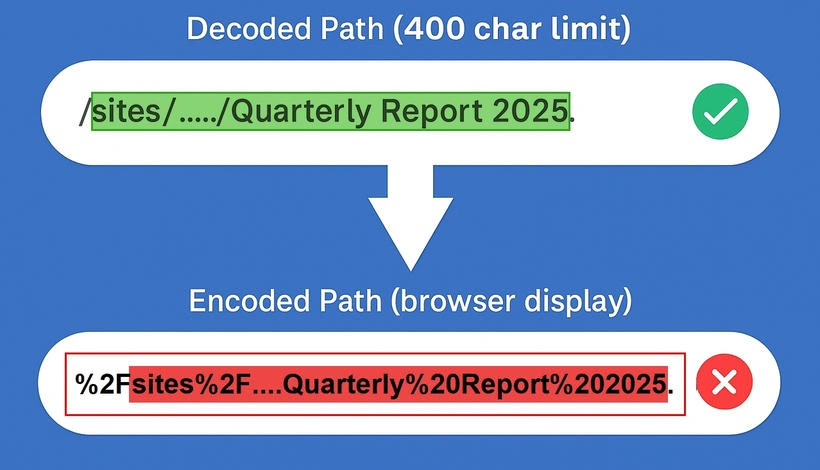
✅ SharePoint counts the decoded URL: (Spaces / Special Char = 1 character each, total length is reasonable).
https://mytenant.sharepoint.com/sites/YourSiteName/Shared Documents/Project Folder/Sub Folder/Quarterly Report 2025.xlsx
So, the site name, library, folder path, and file name (without extension) all contribute to the total length (83 Char); i.e. - sites/YourSiteName/Shared Documents/Project Folder/Sub Folder/Quarterly Report 2025
❌ Don’t be misled by the encoded URL: (Spaces = %20, "3 characters each", looks much longer.)
https%3A%2F%2Fmytenant.sharepoint.com%2Fsites%2FYourSiteName%2FShared%20Documents%2FProject%20Folder%2FSub%20Folder%2FQuarterly%20Report%202025.xlsx (103 Char)
Best Practices
Keep folder structures shallow - don’t bury files 10-15 levels deep.
Use clear, short names where possible, but don’t panic if a file name runs long.
Run pre‑migration reports with tools like PnP PowerShell or ShareGate to flag decoded paths >400 characters.
Educate users: Spaces and special characters are fine, just keep the overall path length in check.
Real‑World Observation
SharePoint Online counts the decoded path, capped at 400 characters. The real enforcement happens at the total decoded path length (400 characters), not strictly at the segment level.
Here’s where it gets interesting: while the official guidance says “255 characters” for Name metadata or each segment. In practice, file names themselves can go much longer than 255 characters. I’ve tested with a file name of 298 characters - no error, no warning. So yes, long file names can work, as long as the total decoded path stays under 400 characters. That said, I haven’t tested sync behavior. It’s possible OneDrive may still choke on extreme cases, especially during sync or migration.
For safety and consistency, I recommend keeping individual file or folder names under 255 characters, even if SharePoint technically allows more. It’s a practical ceiling that avoids surprises across tools and environments.
📌 Final Takeaway
Forget the encoded path myth 😊
SharePoint Online enforces a 400‑character limit on the decoded path.
Counts: site name, document library, folders/subfolders, and file name.
Does not count: domain (https://tenant.sharepoint.com/) or file extension (.docx, .xlsx, etc.)
Spaces and special characters = 1 character each (not %20 or %2F).
Long file names (even 255+ characters) can work, but the total decoded path must stay under 400.
For safety and consistency across tools (especially OneDrive sync), keep file and folder names under 255 characters.
Anna lopezPosted Jan 17, 2026, 11:02 AM
Use LongPathTool