

In this article, I am going to explain the concept of containers and demonstrate how to run your dotnet core web application in a container.
What Are Containers and Why Use Them
It is a common scenario in which code is working fine on a developer’s machine, however it doesn’t work when deployed on a different machine. To solve such issues related to environmental dependencies, containers come into the picture.
You can visualize containers using the following example to understand them in a better way.
In earlier days, it was very difficult to transport different goods from one place to another using the same methods. Transportation and packaging was totally dependent on the things which you were going to transport. For example, some goods could not be transported through the sea route or via roads. To solve this problem, the invention of containers was a breakthrough. Containers can be packaged with any type of material and product . The respective environment for these product can be provided or created in the container itself.
So It became very easy to transport any type of product through any media.
In the same way, Containers encapsulate code and all its dependencies so the application runs quickly and reliably from one environment to another without the hassle of environment-related dependencies.
There are multiple vendors available which provide containers and among those Docker is the most popular. In this example we are going to use Docker.
Steps for creating and running the dotnet core app in container:
Create a web application named “containerapp” using the below command
“dotnet new webapp -o containerapp”
Create a file in the project root directory “Dockerfile”. If you are using Visual Studio you can right click on the project -> Add new item and add Docker support. It will automatically create a docker file and docker ignores the file for you.
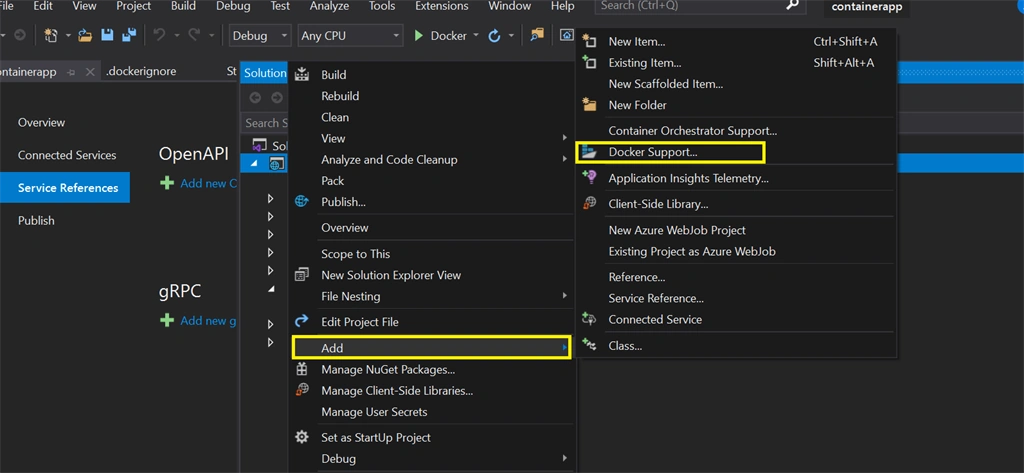
Dockerfile contains all the dependencies and information to run the application. Below is the content of docker file .
Join the conversation! Your thoughts help the community grow.