

Welcome, learners! As we transition from building simple LLM chains to building complex, multi-step AI agents using LangGraph, we run into a very real physical limitation: the Context Window. Today, we will explore how to manage memory in LangGraph when an agent goes through multiple reasoning steps, using a real-world Solar Panel Manufacturing scenario.
1. The Core Problem: The "Cluttered Workbench" Analogy
Imagine you are a senior technician on a factory floor. Your "context window" is your physical workbench.
Every time you pick up a new tool, read a manual, or inspect a part, you place it on the workbench.
If you are fixing a complex machine over several hours, your workbench gets completely covered in old manuals, broken parts, and coffee cups.
Eventually, you have no space to look at the current part you are fixing. You become slow, confused, and might even make a mistake because you can't see the immediate problem through the clutter.
In LangGraph, when an agent goes through multiple reasoning steps (calling tools, evaluating results, thinking again), every single interaction is appended to the messages list. If the agent takes 30 steps to diagnose a factory issue, the messages list will eventually exceed the LLM’s context window limit (e.g., 8k, 32k, or 128k tokens). When this happens, the API throws an error, or the LLM suffers from the "lost in the middle" phenomenon, forgetting crucial instructions.
2. The Real-Time Scenario: Solar Panel Manufacturing Unit
Let’s apply this to a Solar Panel Manufacturing Unit.
We are building a Production Line AI Agent. Its job is to monitor the manufacturing process, which involves:
Silicon Ingot Casting: Monitoring furnace temperatures.
Wafer Slicing: Checking wire tension and blade wear.
Cell Assembly & Stringing: Inspecting for micro-cracks using computer vision.
Module Lamination: Ensuring the EVA (Ethylene Vinyl Acetate) film is sealed without bubbles.
The Multi-Step Reasoning Challenge:
Suppose the AI agent detects a sudden drop in the efficiency of the solar cells.
Step 1: It queries the temperature logs of the diffusion furnace (Returns 500 data points).
Step 2: It checks the gas flow rates (Returns 200 logs).
Step 3: It calls the computer vision tool to check recent micro-crack defect images (Returns detailed JSON metadata for 50 images).
Step 4: It checks the maintenance schedule for the stringer machine.
By Step 4, the agent has generated thousands of tokens of raw data. If it needs to take a 5th step to order replacement parts, the context window is full. We need a strategy to manage this.
3. Strategies to Manage Memory in LangGraph
To keep our "workbench" clean, we use three primary strategies in LangGraph:
A. Message Trimming (The "Shift Rotation" Approach)
Just as a factory only keeps the current shift's active tasks on the floor and archives the rest, we can trim the message history. We keep only the most recent NN messages (e.g., the last 10 interactions) so the LLM only sees the immediate context.
B. Conversation Summarization (The "Shift Handover" Approach)
When a shift ends, the outgoing supervisor writes a summary for the incoming supervisor. In LangGraph, we can pass older messages to a smaller, cheaper LLM to generate a summary. We then replace the hundreds of old messages with a single "Summary Message" and keep the recent messages intact.
C. State Channel Management (Separating Concerns)
Instead of dumping everything into the messages list, we can use LangGraph’s state channels to store raw data (like sensor readings) in separate variables (e.g., sensor_data, defect_logs), and only pass a synthesized, concise version of that data into the LLM's messages.
4. End-to-End Implementation: Python Code
Let’s build a LangGraph agent for our Solar Panel unit that implements Message Trimming and State Management to prevent context overflow.
Prerequisites
pip install langgraph langchain-openai langchain-coreStep 1: Define the State and Tools
We will define custom state variables to separate raw factory data from the chat history.
import os
from typing import Annotated, TypedDict, Any
from langchain_core.messages import BaseMessage, SystemMessage, HumanMessage, ToolMessage, trim_messages
from langchain_core.tools import tool
from langchain_openai import ChatOpenAI
from langgraph.graph import StateGraph, START, END
from langgraph.graph.message import add_messages
from langgraph.prebuilt import ToolNode

# Set your OpenAI API key
# os.environ["OPENAI_API_KEY"] = "your-api-key"

# --- 1. Define Factory Tools ---
@tool
def check_furnace_temperature(zone_id: str) -> str:
    """Checks the temperature logs for a specific diffusion furnace zone."""
    # Simulating a massive return of data
    return f"Zone {zone_id} temperature logs: [850C, 852C, 849C, 855C, 860C, 858C...] (500 data points retrieved)."

@tool
def get_micro_crack_defect_rate(batch_id: str) -> str:
    """Queries the computer vision system for micro-crack defects in a solar cell batch."""
    return f"Batch {batch_id} defect report: 12 micro-cracks found in 500 cells. Primary location: busbars. (Detailed JSON metadata returned)."

@tool
def order_replacement_parts(part_name: str, quantity: int) -> str:
    """Places an order for manufacturing replacement parts."""
    return f"Successfully ordered {quantity} units of {part_name}. Delivery expected in 48 hours."

tools = [check_furnace_temperature, get_micro_crack_defect_rate, order_replacement_parts]

# --- 2. Define the Agent State ---
class SolarFactoryState(TypedDict):
    # The messages list handles the chat history.
    # We use Annotated with add_messages to automatically append new messages.
    messages: Annotated[list[BaseMessage], add_messages]

    # Custom state to hold raw factory data separately from the LLM context
    raw_sensor_data: str
    production_alerts: list[str]
Step 2: Create the Memory Management Node
This is the most critical part. Before the LLM thinks, we pass the messages through a "Memory Manager" node that trims the history.
# Initialize the LLM
llm = ChatOpenAI(model="gpt-4o", temperature=0)
llm_with_tools = llm.bind_tools(tools)

def manage_memory_node(state: SolarFactoryState) -> dict:
    """
    Trims the message history to prevent context window overflow.
    Analogy: Clearing off the workbench, keeping only the most recent tools.
    """
    messages = state["messages"]

    # We want to keep the System Message, plus the last 10 messages (Human/AI/Tool interactions)
    # trim_messages is a built-in LangChain utility
    trimmed_messages = trim_messages(
        messages,
        max_tokens=4000,          # Limit by tokens
        strategy="last",          # Keep the most recent messages
        token_counter=llm,        # Use the LLM to count tokens accurately
        include_system=True,      # Always keep the system prompt!
        allow_partial=False,      # Don't cut a message in half
    )

    print(f"--- Memory Manager: Trimmed {len(messages)} messages down to {len(trimmed_messages)} ---")

    return {"messages": trimmed_messages}

def agent_node(state: SolarFactoryState) -> dict:
    """The main reasoning node."""
    system_prompt = SystemMessage(
        content="You are the AI Production Manager for a Solar Panel Manufacturing Unit. "
                "Your goal is to diagnose production issues and ensure high cell efficiency. "
                "Use the available tools to investigate."
    )

    # Prepend system message to the trimmed messages
    messages_to_llm = [system_prompt] + state["messages"]

    response = llm_with_tools.invoke(messages_to_llm)
    return {"messages": [response]}

def should_continue(state: SolarFactoryState) -> str:
    """Determines if the agent should call a tool or finish."""
    last_message = state["messages"][-1]
    if hasattr(last_message, "tool_calls") and last_message.tool_calls:
        return "tools"
    return END
Step 3: Build and Compile the LangGraph
Now we wire it all together. Notice how the manage_memory_node sits right before the agent_node.
# Initialize the graph
workflow = StateGraph(SolarFactoryState)

# Add nodes
workflow.add_node("manage_memory", manage_memory_node)
workflow.add_node("agent", agent_node)
workflow.add_node("tools", ToolNode(tools))

# Define the edges (the flow)
workflow.add_edge(START, "manage_memory") # Always clean memory first!
workflow.add_edge("manage_memory", "agent")
workflow.add_conditional_edges("agent", should_continue, {"tools": "tools", END: END})
workflow.add_edge("tools", "manage_memory") # After tool execution, clean memory again before next step

# Compile the graph
app = workflow.compile()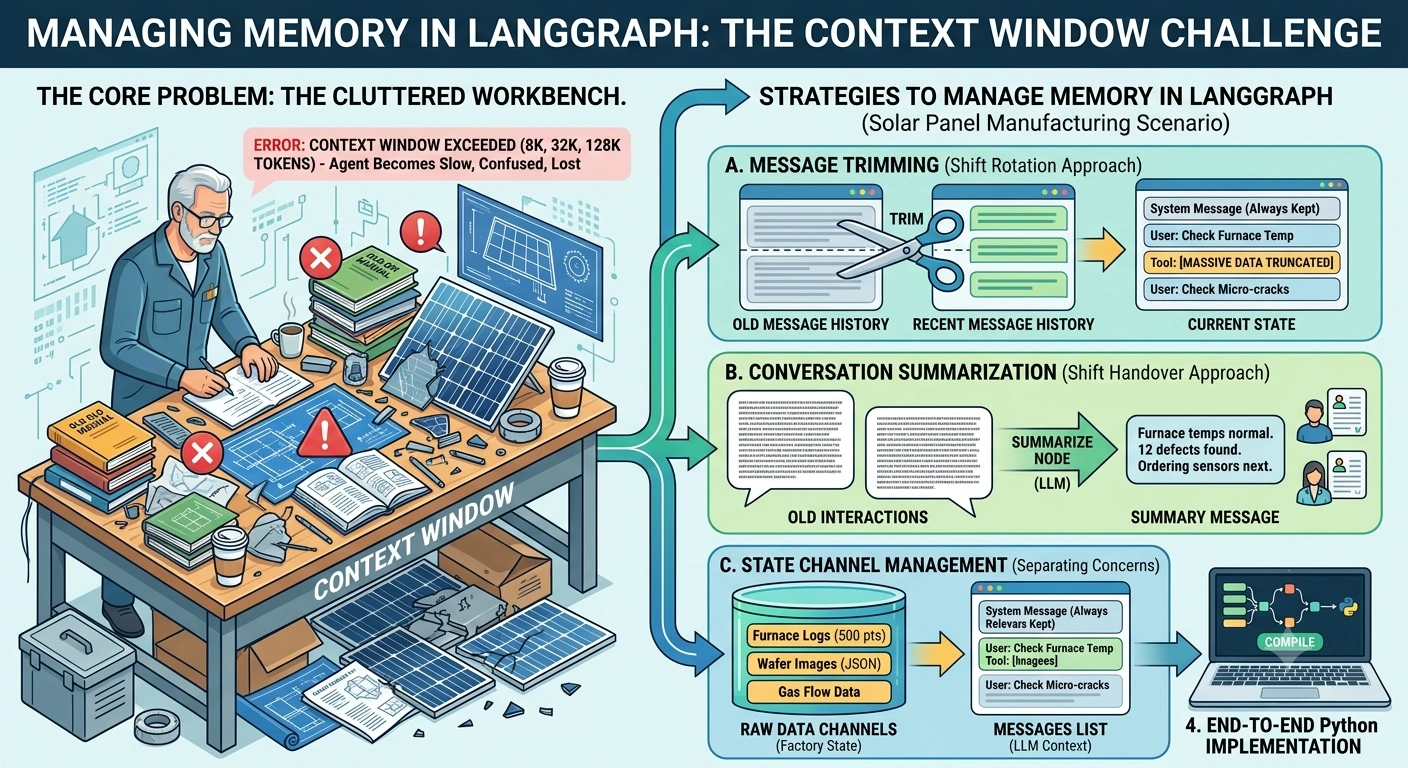
Step 4: Run the Multi-Step Reasoning Scenario
Let's simulate a complex issue that requires multiple steps.
def run_factory_diagnosis():
    initial_state = {
        "messages": [
            HumanMessage(content="We are seeing a 15% drop in efficiency in Batch #SP-992. "
                                 "Check the diffusion furnace temperatures and the micro-crack defect rates. "
                                 "If the furnace is too hot, order 5 new thermocouple sensors.")
        ],
        "raw_sensor_data": "",
        "production_alerts": []
    }

    print("Starting Solar Panel Production Diagnosis...\n")

    # Stream the execution to see the steps
    for step in app.stream(initial_state, stream_mode="updates"):
        for node, output in step.items():
            print(f"\n--- Node: {node.upper()} ---")
            if "messages" in output:
                for msg in output["messages"]:
                    print(f"[{msg.type.upper()}]: {msg.content[:100]}...") # Truncated for display

if __name__ == "__main__":
    run_factory_diagnosis()
5. How This Solves the Context Window Problem
Let's break down what just happened in our Solar Panel scenario:
Initial Request: The human asks the agent to check temperatures, check defects, and potentially order parts.
Step 1 (Agent -> Tool): The agent calls
check_furnace_temperature. The tool returns a massive string of 500 data points.Memory Management Triggers: Before the agent processes the temperature data, the flow routes back through
manage_memory. If the tool output was huge,trim_messagesensures we don't carry unnecessary historical baggage.Step 2 (Agent -> Tool): The agent processes the temperature, realizes it's normal, and calls
get_micro_crack_defect_rate.Step 3 (Agent -> Tool): The agent sees the defects, realizes the furnace wasn't the issue, but the stringer machine might be misaligned. It decides to order parts anyway as a precaution and calls
order_replacement_parts.Context Preservation: At no point did the
messageslist grow unbounded. Themanage_memorynode acted as a gatekeeper, ensuring the LLM only ever looked at the System Prompt + the most recent, relevant interactions.
Pro-Tip for Advanced Implementations: Summarization
If your agent runs for days (e.g., a continuous monitoring agent), trimming isn't enough because you lose the beginning of the conversation. In that case, replace trim_messages with a Summarization Node:
Take the oldest 20 messages.
Pass them to a cheap model (like
gpt-4o-mini) with the prompt: "Summarize these factory interactions into a brief handover report."Replace those 20 messages with a single
SystemMessagecontaining the summary.Keep the most recent 5 messages as-is.
6. Key Takeaways for Senior AI Engineers
Never trust the default message list: In production LangGraph apps, always implement a memory management node. The default
add_messagesreducer will eventually crash your app.Separate Data from Context: Use LangGraph's
Stateto store raw data (like JSON payloads from factory sensors) in separate keys. Only inject synthesized text into themessageslist.Always protect the System Prompt: When using
trim_messages, always setinclude_system=True. If the LLM forgets its persona as the "Solar Panel Factory Manager," it will start giving generic advice.Monitor Token Counts: Use the
token_counterparameter in trimming/summarization to accurately track limits, as different models have different tokenization schemes.
By implementing these memory management strategies, your LangGraph agents can run complex, multi-step reasoning tasks in enterprise environments—like manufacturing, logistics, or finance—without ever hitting the context wall.
Join the conversation! Your thoughts help the community grow.