

Introduction
This articles helps you to create Custom Routes in your ASP.NET MVC application. You are familiar with the Overview of Controller from my previous article, here I will describe how to create the custom route and present your controller's action at the start of the MVC application.
In this article, we'll follow up the following sections:
- Define Custom Route
- Define New Action in Controller
- Run the Controller
Define Custom Route
In this section, you'll create the Custom Route in the ASP.NET MVC application. Use the procedure below:
Step 1: Open the RouteConfig.cs file
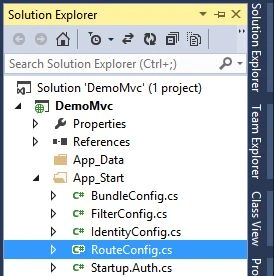
Step 2: Update the file with the following code:
- using System.Web.Mvc;
- using System.Web.Routing;
- namespace DemoMvc
- {
- public class RouteConfig
- {
- public static void RegisterRoutes(RouteCollection routes)
- {
- routes.IgnoreRoute("{resource}.axd/{*pathInfo}");
- routes.MapRoute(
- name: "Sample",
- url: "{controller}/{action}",
- defaults: new { controller = "Sample", action = "GetStudent" }
- );
- }
- }
- }
In the code above, you can see that the new MapRoute is defined for the default route. It is the custom route information and I deleted the previous route information. In this route the controller name is Sample and the action name is GetStudent. The controller is defined but this action is not defined yet. So, in the next section we'll define this action.
Define New Action in Controller
Now in this section, we'll create the new action in the SampleController, so just proceed ahead with the following procedure.
Step 1: Suppose we have an Entity Data Model in the application named StudentModel. You can also create this ADO.NET Entity Data Model.
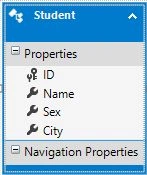
Step 2: Now in the SampleController create a new action method with the following code:
- public ActionResult GetStudent()
- {
- MyDatabaseEntities db = new MyDatabaseEntities();
- return View(db.Students.ToList());
- }
Now our entire controller will look like this:
- using DemoMvc.Models;
- using System.Linq;
- using System.Web.Mvc;
- namespace DemoMvc.Controllers
- {
- public class SampleController : Controller
- {
- // GET: Sample
- public ActionResult Index()
- {
- return View();
- }
- public ActionResult Welcome()
- {
- return Content("Hello and Welcome to MVC");
- }
- public ActionResult GetStudent()
- {
- MyDatabaseEntities db = new MyDatabaseEntities();
- return View(db.Students.ToList());
- }
- }
- }
That's it. We've created the new ActionResult action named GetStudent for showing the list of Students. Now proceed to the next section.
Step 3: Right-click on GetStudent() and select the Add View option as in the following:
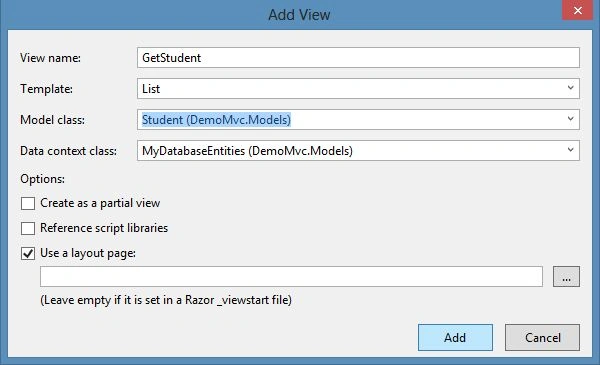
Run the Application
Now our Controller and view are created. Just run the application.
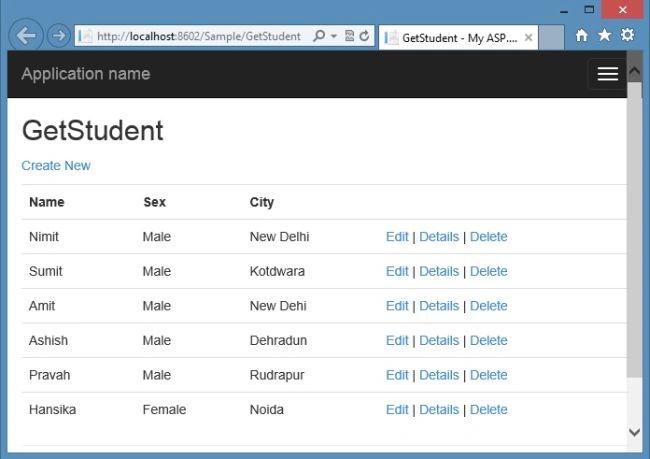
You can see that the new GetStudent() action displays the result as you run the application because you have set this custom route of your application. Now it works as a home page of your MVC application.
Summary
This article described how to define the custom route in the MVC 5 application. You can also learn how to create the controller and view in this application. Thanks for reading.
Hong TrieuPosted May 6, 2014, 12:27 AM
Cool.