

Introduction
When working with embedded resources in a WPF application, it is important to follow specific steps to guarantee that your resources are properly included in the assembly and can be accessed during runtime. The following instructions outline the process of extracting content from an embedded .txt file and converting it into an XML file.
Add the Text File to Your Project
- Add the .txt file to be embedded in the resource.
- In the Solution Explorer, right-click on your project.
- From the dropdown menu, choose Add > Existing Item.
Set the File as an Embedded Resource
- To set the file as an embedded resource.
- Right-click on the recently added .txt file in the Solution Explorer and choose Properties.
- Set the Build Action to Embedded Resource.
The enclosed document will be displayed in the following manner
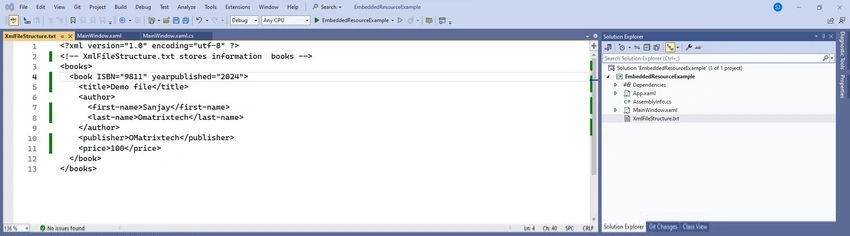
Read the Embedded Resource
To read the embedded resource, you need to use the Assembly.GetManifestResourceStream method. This allows you to access the embedded file as a stream.
using System.IO;
using System.Reflection;
using System.Windows;

namespace EmbeddedResourceExample
{
    /// <summary>
    /// Interaction logic for MainWindow.xaml
    /// </summary>
    public partial class MainWindow : Window
    {
        public MainWindow()
        {
            InitializeComponent();
        }

        private void Button_Click(object sender, RoutedEventArgs e)
        {
            try
            {
                var assembly = Assembly.GetExecutingAssembly();
                string resourceName = "EmbeddedResourceExample.XmlFileStructure.txt"; // Added embedded resource
                string filePathToWrite = TxtFilePath.Text; // Update the file path to the location where the files should be stored.
                string streamString = null;

                using (Stream stream = assembly.GetManifestResourceStream(resourceName))
                using (StreamReader reader = new StreamReader(stream))
                {
                    streamString = reader.ReadToEnd();
                }

                if (!Directory.Exists(filePathToWrite))
                {
                    Directory.CreateDirectory(filePathToWrite);
                }

                File.WriteAllText(Path.Combine(filePathToWrite, "MyTestFile.xml"), streamString); // Save file at the specified location
            }
            catch (Exception ex)
            {
                MessageBox.Show(ex.Message);
            }
        }
    }
}
Xaml View
<Window x:Class="EmbeddedResourceExample.MainWindow"
        xmlns="http://schemas.microsoft.com/winfx/2006/xaml/presentation"
        xmlns:x="http://schemas.microsoft.com/winfx/2006/xaml"
        xmlns:d="http://schemas.microsoft.com/expression/blend/2008"
        xmlns:mc="http://schemas.openxmlformats.org/markup-compatibility/2006"
        xmlns:local="clr-namespace:EmbeddedResourceExample"
        mc:Ignorable="d"
        Title="MainWindow" Height="450" Width="800">

    <Grid>
        <StackPanel Orientation="Vertical">
            <StackPanel Orientation="Horizontal" Margin="10,30,0,0">
                <TextBlock Text="File Path" Width="Auto" Height="26"/>
                <TextBox x:Name="TxtFilePath" TextWrapping="Wrap" Text="" VerticalAlignment="Top" Width="693" Height="41" Margin="40,0,0,0"/>
            </StackPanel>
            <Button Content="Convert txt file to xml" Height="46" Width="725" Click="Button_Click" Margin="10,50,0,0"/>
        </StackPanel>
    </Grid>
</Window>
Join the conversation! Your thoughts help the community grow.