

Introduction
This article explains how to export an aspx page to a PDF file.
Requirement
The only requirement is to add the DLL of "ITextSharp" to the application.
Code
In the code behind add the following namespaces:
- using iTextSharp.text;
- using iTextSharp.text.pdf;
- using iTextSharp.text.html;
- using iTextSharp.text.html.simpleparser;
- using System.Drawing;
Design a page.
Place the following code on the button click event to convert the aspx page into PDF:
- protected void Button1_Click(object sender, EventArgs e)
- {
- string attachment = "attachment; filename=" + "abc" + ".pdf";
- Response.ClearContent();
- Response.AddHeader("content-disposition", attachment);
- Response.ContentType = "application/pdf";
- StringWriter s_tw = new StringWriter();
- HtmlTextWriter h_textw = new HtmlTextWriter(s_tw);
- h_textw.AddStyleAttribute("font-size", "7pt");
- h_textw.AddStyleAttribute("color", "Black");
- Panel1.RenderControl(h_textw);//Name of the Panel
- Document doc = new Document();
- doc = new Document(PageSize.A4, 5, 5, 15, 5);
- FontFactory.GetFont("Verdana", 80, iTextSharp.text.Color.RED);
- PdfWriter.GetInstance(doc, Response.OutputStream);
- doc.Open();
- StringReader s_tr = new StringReader(s_tw.ToString());
- HTMLWorker html_worker = new HTMLWorker(doc);
- html_worker.Parse(s_tr);
- doc.Close();
- Response.Write(doc);
- }
- public override void VerifyRenderingInServerForm(Control control)
- {
- }
Save all and run; an error will occur as in the following image:
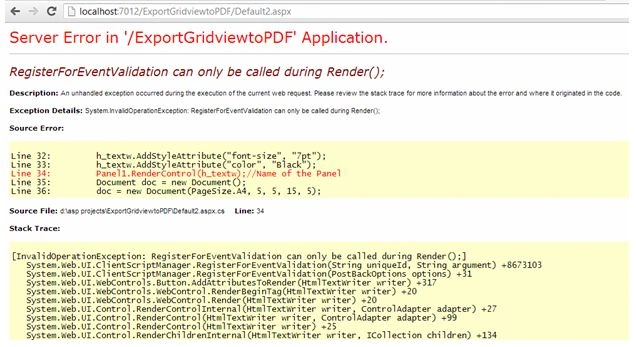
This error occurs when we render a control into a response. Use the following point to resolve this error:
Add EnableEventValidation="false" in the page directive on the source of your page at the top.
Now save all and view the page in the browser; when you click on the button to convert the apx page into a PDF it will work.
Gowri sankarPosted Jul 31, 2020, 11:17 PM
I tried this code but its shows the error from the line html_worker.Parse(s_tr); and the error is Color 'inherit' not found. how to solve these problem ?
Kuldeep ThakurPosted Feb 5, 2020, 12:42 AM
Why i'm getting the error " Unable to cast object of type 'iTextSharp.text.html.simpleparser.CellWrapper' to type 'iTextSharp.text.Paragraph'.? Please help me I'm saving whole page as a pdf.
ramya tPosted Apr 24, 2018, 1:18 AM
I get The remote server returned an error: (401) Unauthorized.
Priyank VarshneyPosted Dec 14, 2016, 7:29 AM
Hello Mam, I am getting an error while generating the pdf and the error is "Object reference not set to an instance of an object.", can you please help me to resolve this error. I am not getting this how to resolve it. So please mam
Ram JPosted Feb 27, 2015, 9:40 AM
While executing the code, I am getting error 'The network path was not found'. Where exactly the pdf file is stroing?
Dinesh RainaPosted Feb 3, 2015, 6:45 AM
ha neha but iam getting the error with an load image could not found .how to solve the proplem pls help me.
K P Singh ChundawatPosted Jan 28, 2015, 12:59 PM
Hi Neha Sharma Ma'm ..Is iTextSharp opensource ?
Ashwin KumarPosted Jan 28, 2015, 12:39 AM
cann you please help me change the font Neha. I tried using other fonts in the code but it takes Arial and default font even if I change the name of the font. Please help me.
K P Singh ChundawatPosted Dec 30, 2014, 3:57 AM
Great work Neha Sharma ma'm...Thanks to share ...
Subhash PMPosted Dec 5, 2014, 2:13 AM
Good Article. Works Fine. . Thank You.. ;)
Vishal MahajanPosted Jun 26, 2014, 1:39 PM
i have find Error " Illegal characters in path."
kranthiPosted Jun 17, 2014, 11:26 AM
hi, in application i'm having div and span element, to the span element im applying color based on some percentage getting from db. Except that span everything is coming fine. can u help to resolve the issue..
Deepika APosted Jan 15, 2014, 5:27 AM
Hi Neha, i was able to resolve above issue but now getting a new one at html_worker.Parse(s_tr); it is giving Input string was not in a correct format.
Deepika APosted Jan 15, 2014, 2:28 AM
Hi Neha, in the code you kept panel, i tried to have a panel for my whole aspx page but it is giving exception somthing like this Control 'ctl02' of type 'Button' must be placed inside a form tag with runat=server
Anita SrivastavPosted Dec 28, 2013, 6:34 AM
sorry it was my fault your Code is superb thank it help me lot
Anita SrivastavPosted Dec 28, 2013, 5:18 AM
hii neha in your print button code how i can manage the page size acctually i am printing a page but the page cut from the right
nguyen van ThanhPosted Aug 29, 2013, 12:39 AM
this code can export pdf file with unicode font(UTF-8)? Pls help me or suggest me to fix it.
Neha SharmaPosted May 20, 2013, 5:05 AM
you can send me screenshots in message or create any link for that.
Rashid KhanPosted May 20, 2013, 2:49 AM
ooppsss after resizing still image is big. Sorryyyyy:)
Neha SharmaPosted May 20, 2013, 2:08 AM
Hi rashid,i think i need to see the screen shots only what going on there??as per my knowledge for the invoice generation applications in asp.net you can go with the crystal report that ll be better.but i can understand if you have not worked yet on crystal report how can you start it at this point.for that i would like to help you at my best .send me the screen shots please.
Rashid KhanPosted May 19, 2013, 6:21 AM
HI Neha, How are you doing i wish your fine there, Thanks for the reply. I have a aspx page. which i designed as a invoice format. such as company logo and details and customer details. invoice#, date, items details total etc. i placed all my page control in panel. so now i am facing problem in 2 areas. 1st doc.close(); "The document has no pages" and if skip is step. pdf will give save and open option but error message occur. file is damages cannot be repaired. do you have any idea about it or you need to see my code?
Neha SharmaPosted May 17, 2013, 2:11 AM
Hi rashid may be you are missing something let me see what you have done in step by step so that i can help you .
Rashid KhanPosted May 15, 2013, 7:38 AM
HI Neha After useing EnableEventValidation="false" still same error occur, i have invoice.aspx page. having gridview. labels textboxes. i need to generate pdf file as in invoice format. do you have any idea about it. if yes please share. Thank you
Neha SharmaPosted Apr 18, 2013, 2:56 AM
Hi Sravan,may be you are giving some paths here i am not sure about what code you have placed there but as i can see here this is the path error,please follow above code and instructions.
sravan deditedPosted Apr 18, 2013, 12:36 AMEdited Apr 18, 2013, 12:37 AM
Am getting these error... Exception Details: System.IO.DirectoryNotFoundException: Could not find a part of the path 'C:\Program Files (x86)\Microsoft Visual Studio 9.0\App_Themes\BlueGlass\Images\space.gif'.